
Livraison le jour même ou le lendemain

Qualité garantie

Débloquez vos offres de bienvenue: Livraison GRATUITE | Jusqu'à -80 % | 30 jours d'essai gratuits à JoyPlus
Téléchargez l'application
Securing your home is a priority. On paper, the wireless outdoor security camera kit has everything going for it: easy installation, no cables to run along your walls, and full control from your smartphone. But be warned—the market is full of promises that often lead to disappointment. Between unrealistic battery life and premium features locked behind a subscription, it's easy to make the wrong choice.
Our editorial team has analysed the market to help you cut through the noise. Let's break down the pitfalls to avoid and the criteria that truly matter to find THE video surveillance system that will meet your expectations, without any unpleasant surprises.
The marketing is slick, but major drawbacks are often hidden behind the punchy claims. Here are the key things to watch out for.
To make the right choice, ignore the marketing jargon and focus on the features that define the real performance of a wireless video surveillance system.
A picture is worth a thousand words, but only if it's clear. Resolution is the number one criterion for quality.
The field of view (in degrees) is just as crucial. A wide angle (130° to 160°) covers more ground with a single camera, but watch out for the "fisheye" distortion effect at the edges, which is often pronounced on entry-level models.
The term "wireless" refers to data transmission (via a Wi-Fi IP camera). The power source, however, remains a critical point.
Where will your videos be stored? The answer is a matter of cost, but also of privacy.
Here are a few kits that stand out from the crowd, each meeting a specific need while avoiding the pitfalls we've mentioned.

Who is it for? Ideal for a first-time setup or for monitoring key access points (entrance, garage door). This kit offers an excellent balance of performance and price, with 2K resolution and incredibly simple installation.
It checks the box for image quality with a sharp 2K resolution and colour night vision (via its spotlight). And while the Arlo Secure subscription is needed for advanced features, the kit remains perfectly usable for motion alerts and live streaming at no extra cost.
The 100% wire-free installation and the simplicity of the Arlo ecosystem. The 2K image quality is a real standout in this price segment.
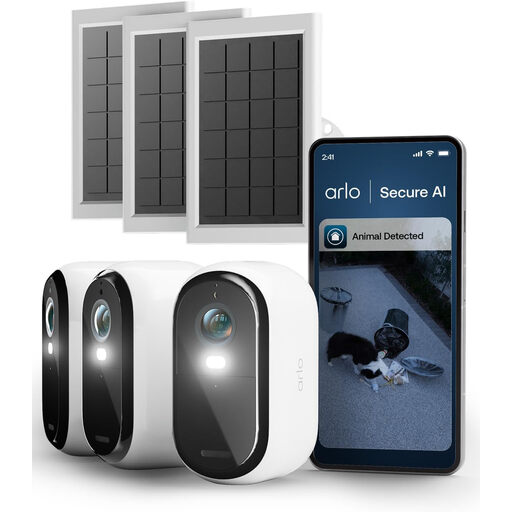
Who is it for? For those looking for a "set it and forget it" solution. Perfect for a second home or for covering large areas (garden, driveway) without ever worrying about manually recharging the batteries.
This bundle tackles the battery life problem head-on. Each outdoor camera with its solar panel benefits from continuous charging, which shatters the number one constraint of battery-powered systems and ensures reliable, long-term surveillance.
The near-limitless autonomy thanks to solar power. A solution that is both practical and more eco-friendly for total peace of mind.
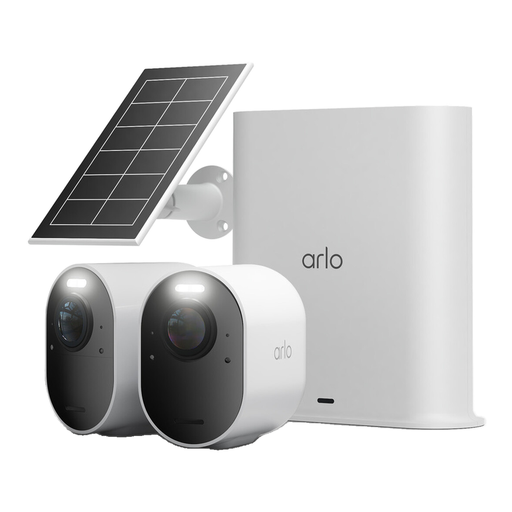
Who is it for? For the most demanding users who want performance without compromise. The quality of a 4K security camera and the XXL field of view are perfect for monitoring large properties with surgical precision.
This kit hits a home run by addressing all three major pitfalls. The 4K HDR resolution ensures stunning image clarity, day or night. The included solar panel eliminates the battery constraint. Finally, the Smarthub allows for local storage (on an SD card, not included), offering a welcome alternative to the cloud subscription.
The winning trio: 4K resolution, a 180° panoramic field of view, and automatic subject tracking. It's simply one of the most powerful systems on the market.
Our editorial team has selected a full range of products that meet our selection criteria and current standards.
Real-world battery life depends heavily on usage. The factors that drain it the most are: the frequency of detections, the length of recordings, the activation of the spotlight at night, and freezing temperatures. For a camera placed in a high-traffic area (like an entrance), expect to recharge it every 4 to 8 weeks, unless you opt for a solar panel.
No, a subscription is not required for basic functions. Without a subscription, an Arlo security camera will send you motion notifications and allow you to view the live stream. However, to store videos in the cloud and benefit from smart AI detection (people, vehicles, etc.), the Arlo Secure subscription becomes essential. Eufy systems, on the other hand, often stand out thanks to their HomeBase, which handles local storage with no monthly fees, making a subscription completely optional.
The performance of your Wi-Fi IP camera depends directly on your signal quality. Before mounting it to the wall, here's a tip: use the camera's app to test the signal strength at the exact spot where you plan to install it. If the signal is weak, consider installing a Wi-Fi extender or a mesh system to extend your network's coverage outdoors. Also, remember to check the camera's compatibility with your network's frequency band (2.4 GHz offers better range, while 5 GHz provides better speed).