
Livraison le jour même ou le lendemain

Qualité garantie

Débloquez vos offres de bienvenue: Livraison GRATUITE | Jusqu'à -80 % | 30 jours d'essai gratuits à JoyPlus
Téléchargez l'application
The wireless RS68 RGB mechanical keyboard appeals to both PC gamers and remote workers with its aluminium chassis, RGB lighting and multiple connection modes. However, a feature-packed specification sheet does not necessarily guarantee the right choice. Certain details can genuinely affect the everyday experience, particularly switch compatibility, battery life and key layout.
This Joybuy selection compares two versions of the RS68, along with a rechargeable battery designed for Kodak Pixpro devices. The goal: to distinguish genuine practical needs from marketing claims that can sometimes be difficult to verify.
A keyboard marketed as wireless may be limited to Bluetooth or require a proprietary USB receiver. For versatile use, check for the following three modes: wired USB, Bluetooth and wireless receiver connectivity, when the latter is advertised.
A tri-mode Bluetooth keyboard makes it easy to switch between a desktop computer, laptop and tablet. However, latency, range and battery life can vary depending on the mode used. If you want to game without worrying about recharging, a wired mechanical keyboard remains the simplest solution.
A hot-swappable mechanical keyboard generally allows you to replace switches without using a soldering iron. Compatibility nevertheless depends on the PCB, switch format and number of pins. The hot-swap designation therefore does not mean that every switch available on the market will work.
The gradient blue version of the RS68 features a hot-swappable PCB and custom-lubricated Redragon mechanical switches. For the gradient grey version, the listing confirms the hot-swappable PCB but does not specify the model of the installed switches. If you plan to customise the keyboard extensively, it is best to verify this point before placing your order.
An aluminium RGB keyboard can make an excellent visual impression, but lighting says nothing about key stability or typing quality. To assess the product properly, focus instead on the chassis material, wrist rest, connection type and whether the switches can be replaced.
The detachable wrist rest is convenient when alternating between gaming and extended typing sessions. Nevertheless, check its dimensions and attachment system: comfort also depends on the keyboard’s height and your position at the desk.
On a desktop setup, a USB connection eliminates interruptions caused by a low battery. For a workspace shared between several devices, Bluetooth offers greater flexibility. The right choice therefore depends largely on your environment:
The gradient grey RS68 listing specifies tri-mode connectivity. The gradient blue version is presented as wired, wireless and Bluetooth. Check the included accessories and the type of receiver specified on the product page.
The aluminium alloy body of the gradient grey RS68 may provide a more rigid structure than an entirely plastic chassis. However, this feature alone does not reveal the keyboard’s exact weight, stability or noise level.
Both versions feature RGB lighting and gradient keycaps. The blue model specifies custom-lubricated mechanical switches. To achieve a quieter or more tactile typing experience, check that these switches can be replaced and that your preferred models are compatible.
For Kodak Pixpro cameras, the battery part number is crucial. The model featured here is a 3.7 V, 1,100 mAh lithium-ion battery, with advertised compatibility matching the LB-060 part number. The listing specifically names the AZ361, AZ362, AZ421, AZ422, AZ501, AZ521, AZ522, AZ525 and AZ526 cameras, along with other models that use this part number.
The product title mentions the AZ421, AZ422, AZ425, AZ527 and AZ528 models. If the model shown on your camera does not exactly match the displayed list, compare the LB-060 part number with the manufacturer’s recommendations before purchasing. An incompatible battery may prevent the camera from starting or charging correctly.
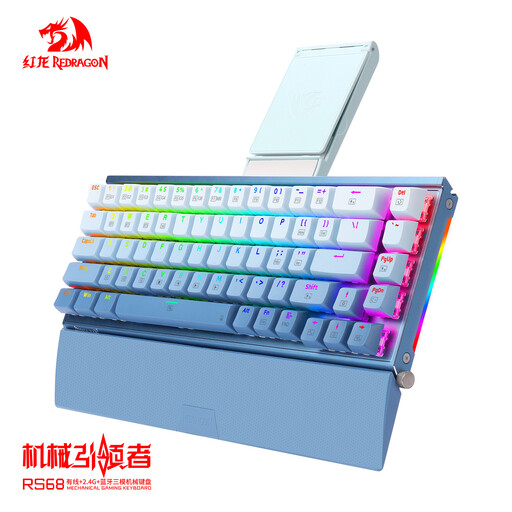
Why this model may suit you: an appealing configuration for anyone looking to purchase their first mechanical keyboard for both gaming and office work, with several advertised connection modes.
The hot-swappable PCB allows you to upgrade the switches without replacing the entire keyboard. The wired connection can also eliminate the need to recharge the battery.
Gradient blue keycaps, RGB backlighting, custom-lubricated switches and a detachable wrist rest.
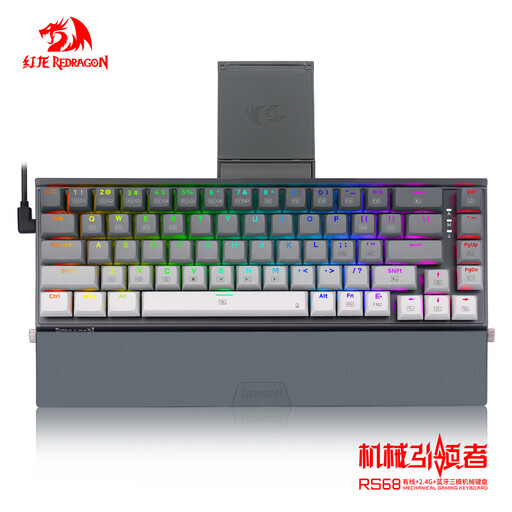
Why this model may suit you: its aluminium alloy body and tri-mode connectivity make it well suited to a workspace shared between multiple devices.
The listing clearly distinguishes tri-mode connectivity from a simple wired connection. The hot-swappable PCB also leaves room for future customisation.
Aluminium alloy chassis, gradient grey keycaps, RGB lighting and a detachable wrist rest.
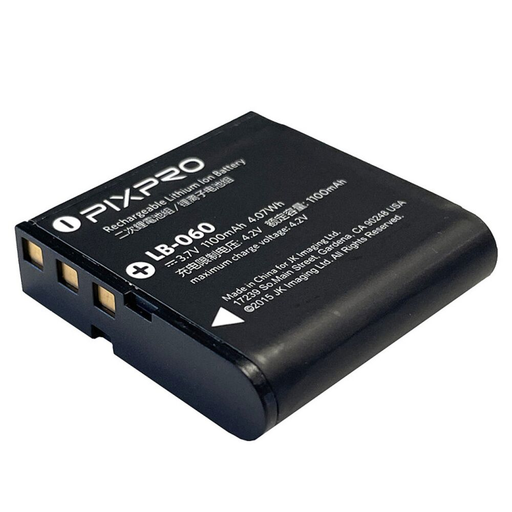
Why this model may suit you: a compact spare battery for owners of LB-060-compatible cameras, whether travelling, attending events or enjoying extended photography sessions.
The LB-060 part number, 3.7 V voltage and 1,100 mAh capacity are specified. Compatibility should nevertheless be checked against your camera.
Lithium-ion technology, a stated capacity of 1,100 mAh, a weight of 27 g and an advertised recharge time of 2 to 3 hours, depending on the charger.
For the RS68, start with the wired connection to check the key layout and backlighting. If you use Bluetooth, follow the pairing procedure supplied with the product and disable unused connections to help limit power consumption.
For the Kodak battery, switch off the camera before inserting or removing it. Use a charger suitable for lithium-ion batteries, do not short-circuit the contacts and do not expose the battery to temperatures above 60 °C. A damaged, swollen or leaking battery must not be used. Dispose of the old battery at a dedicated battery collection point in accordance with local regulations.
We have brought together an updated selection of products suited to a range of needs and selection criteria.
Yes. The listings for the featured versions specify a wired connection. This can be useful for PC gaming, initial setup or continuing to use the keyboard when its battery is low. Check the cable and included accessories on the page for your chosen version.
Hot-swap refers to a PCB designed to let you remove and replace certain switches without soldering. Compatibility is not universal: check the supported format before purchasing. This feature does not necessarily mean that all stabilisers or keycaps can be replaced.
No. It is advertised as compatible with cameras that use the LB-060 part number. The models named include the AZ421, AZ422, AZ425, AZ527 and AZ528 in the product title, while the detailed description mentions other Pixpro cameras. Compare the part number printed on your current battery or listed in the camera manual before ordering.