
Livraison le jour même ou le lendemain

Qualité garantie

Débloquez vos offres de bienvenue: Livraison GRATUITE | Jusqu'à -80 % | 30 jours d'essai gratuits à JoyPlus
Téléchargez l'application
A wireless portable CarPlay screen with a 4K dashcam can modernise an older car without replacing the original stereo. GPS navigation, hands-free calls, music, front camera and reversing camera are all brought together in one device. However, product listings can sometimes mix theoretical resolution, partial compatibility and optional accessories.
Before placing your order, there are three pitfalls to avoid:
A portable Android Auto screen must be compatible with the operating-system version installed on your phone. The ESSGOO model featured here supports iOS 10 or later and Android 11 or later. The wireless connection generally uses Bluetooth for pairing, followed by Wi-Fi to transmit data.
Also check how sound will be played in the cabin:
The MirrorLink, AirPlay and Miracast functions do not automatically replace CarPlay or Android Auto. They are mainly used to mirror the screen of a compatible smartphone. Available apps, broadcasting rights and supported controls may vary from one phone to another.
For comfortable viewing of maps and menus, a 10.26-inch car touchscreen provides a generous display area. The ESSGOO model’s 1600 × 600 definition corresponds to a panoramic format, so it cannot be compared directly with that of a smartphone screen.
For the dashcam, assess the following separately:
The ESSGOO model’s front camera is advertised as 4K with a 140° angle, while the rear camera is specified as 1080P, 140° and IP67. This setup covers the front and rear of the vehicle, but does not guarantee perfect visibility in all weather or lighting conditions.
Loop recording gradually replaces the oldest files when the memory card is full. Any important footage must therefore be locked manually or automatically, depending on the available functions.
The ESSGOO model comes with a 64 GB TF card and, according to its technical specifications, supports capacities of up to 128 GB. Before buying a replacement card, check the manual to confirm the supported format and capacity.
Power via a 12–24 V cigarette-lighter socket is suitable for many vehicles. Even so, take the time to measure the available space on the dashboard and check that the mount does not obstruct visibility or access to the controls. In France, the screen and its cables must not reduce the driver’s field of vision.
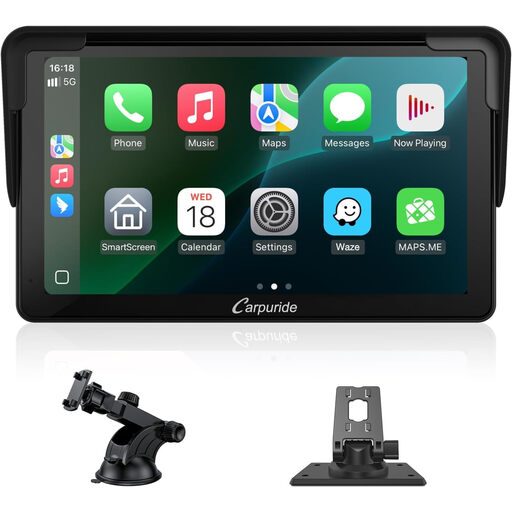
Why this choice suits this profile : its compact format is ideal for drivers who want to add CarPlay and Android Auto to an older car without installing a bulky screen.
The listing mentions a 1080P screen, as well as wireless CarPlay, Android Auto and MirrorLink. Nevertheless, check which audio solutions are compatible with your vehicle before ordering.
7-inch format, Bluetooth 5.0 and support for wireless CarPlay and Android Auto, according to the description provided.
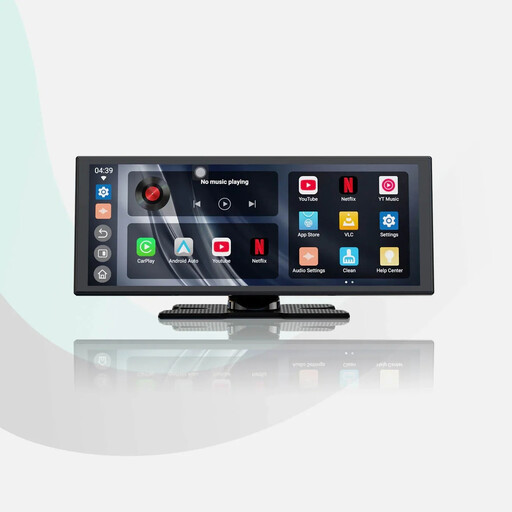
Why this choice suits this profile : its large screen and integrated functions are designed for drivers who expect more from a device than simple navigation display.
The listing clearly distinguishes the 1920 × 720 screen from the 1080P rear camera. This is useful for understanding what is actually displayed and recorded.
11.4-inch screen, 1080P rear camera, built-in apps and wireless connection to CarPlay and Android Auto, according to the description.
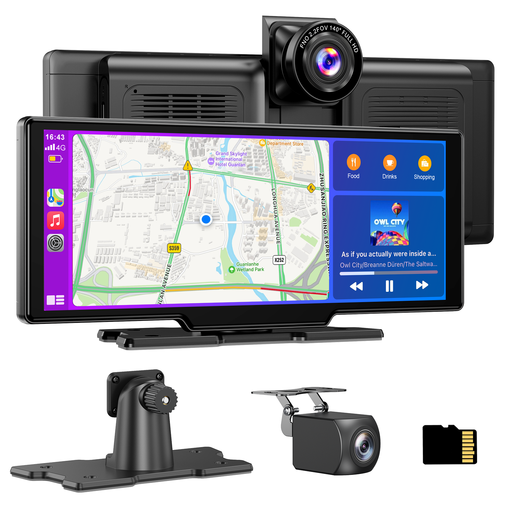
Why this choice suits this profile : this 2-in-1 solution is ideal for drivers who regularly take to the road and want to combine navigation, front video recording and a reversing camera in a single device.
The listing details the 4K front camera, 1080P rear camera, loop recording and the supplied 64 GB TF card separately.
4K front camera, AHD 1080P IP67 rear camera, 10.26-inch screen, four audio outputs and 12–24 V power supply.
Install the screen on a stable area of the dashboard, without obstructing the road, mirrors or controls. Plug it into the cigarette-lighter socket, then complete the initial pairing with your phone while stationary. Automatic reconnection depends on smartphone compatibility and the Bluetooth and Wi-Fi settings.
When installing the rear camera, route the cable without crushing or pinching it in the trim. If the model uses the reversing-light signal, proceed carefully. If in doubt, it is best to have the connection carried out by a car-fitter.
Do not use video-projection functions while driving. AirPlay, Miracast and entertainment apps are intended for breaks and passengers only, in accordance with road-safety regulations.
We have selected a comprehensive, real-time updated list of products that meet these strict criteria and European safety requirements.
No. The screen works as an independent unit and simply sits on the dashboard. Sound can be played via Bluetooth, AUX, FM or the built-in speaker. However, check which audio outputs are available in your car.
No, not when it records locally to a TF card. Mobile data is mainly used by navigation apps, internet tethering or the phone’s online services.
It all depends on the card’s capacity, the selected resolution and the length of the clips. With loop recording, the oldest files are gradually replaced. Quickly back up any useful footage and regularly check that the card is working properly.