
Livraison le jour même ou le lendemain

Qualité garantie

Débloquez vos offres de bienvenue: Livraison GRATUITE | Jusqu'à -80 % | 30 jours d'essai gratuits à JoyPlus
Téléchargez l'application
A wireless mouse can declutter your desk, accompany a laptop on the go, or make a long gaming session more comfortable. But with battery life, DPI resolution, ergonomics and connectivity to consider, product specs often throw numbers at you without really helping you make the right choice.
Before you reach for your card, it's worth focusing on the criteria that will actually make a difference day to day.
A Bluetooth mouse connects directly to a computer, tablet or some compatible TVs without taking up a USB port. However, pairing can take a few steps and compatibility depends on the system you're using.
A wireless USB mouse works with a nano-receiver or a 2.4 GHz receiver. It's generally plug-and-play, but it does occupy a USB-A port. So check the available connectors on your laptop, especially if it only has USB-C ports.
DPI refers to the sensitivity of the sensor – in other words, how far the cursor moves on screen when you move the mouse. A high number alone doesn't guarantee a better experience.
For office work, browsing and studying, a resolution between 800 and 1,600 DPI is enough for most people. Higher values make more sense for gaming, graphic design or very high-resolution screens, provided you can adjust them easily.
A battery-powered mouse can last several months or even longer, but you'll need to remember to replace and recycle the used batteries. A rechargeable mouse avoids those recurring purchases, as long as you keep an eye on its charge level and have the right cable to hand.
Shape also plays a vital role. A compact model slips easily into a bag, while a wider mouse is often more comfortable for extended use. An ambidextrous mouse lets you switch hands or share it between people, but its symmetrical shape won't suit everyone.
For a workstation shared between a work PC and a personal Mac, a mouse compatible with both systems can save you from having multiple peripherals. Just make sure the number of supported devices and the switching method are clearly stated in the product listing.
Take the quoted figures with a pinch of salt: the stated battery life varies depending on how often you use it, the lighting and the type of connection. Battery-powered models can claim up to 12 or 18 months of life, depending on their design. A rechargeable mouse will instead give a time per charge, which is usually more variable depending on usage.
Also check whether the cable is included, how long charging takes and whether the mouse can still be used while it's charging.
To assess a mouse's ergonomics, look at its height, width, weight and the hand orientation it's designed for. A left-handed vertical mouse meets a very specific need, while an ambidextrous model appeals to a wider audience.
Side buttons can speed up navigation or give you handy shortcuts, but they quickly become annoying if you press them by accident. For gaming, also look at the polling rate, button customisation and connection type. A wireless gaming mouse should primarily offer latency suited to your play style, rather than a mountain of DPI.
Finally, a silent mouse has its place in a shared office, library or home workspace. The noise reduction claimed by the manufacturer doesn't always perfectly reflect the feel of the click or the sound of the scroll wheel.
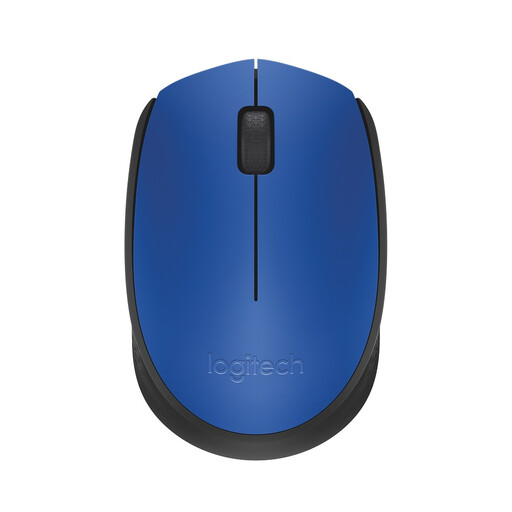
Why this choice suits this profile: Its 2.4 GHz USB receiver and ambidextrous design work well for studying, remote work or travel.
The plug-and-play connection avoids complicated setup, while the symmetrical shape rules out the risk of choosing a model that's too specialised.
Claimed range up to 10 metres, optical tracking and compatibility with Windows, macOS, ChromeOS and Linux.

Why this choice suits this profile: Those looking for multiple connection modes and extensive customisation get a model that's equally at home in gaming and productivity.
The listing details Bluetooth, 2.4 GHz and USB-C modes, rather than just a vague mention of wireless connection.
Claimed sensor up to 24,000 DPI, six buttons, magnetic charging and Windows and Mac compatibility according to the listing.
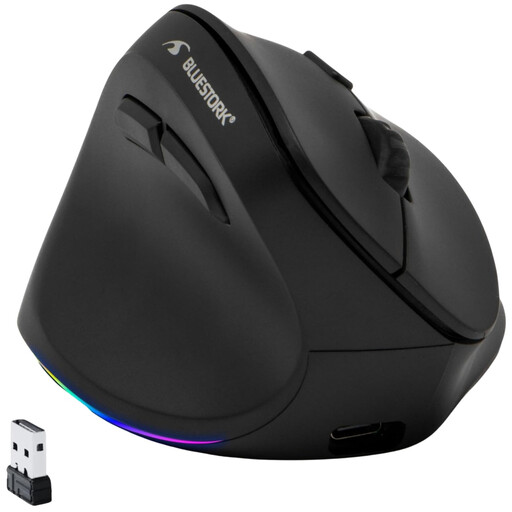
Why this choice suits this profile: Its left-handed vertical design meets a specific grip need, while USB-C charging suits a heavily used workstation.
The left-handed orientation is clearly stated – impossible to mistake it for a merely symmetrical ambidextrous mouse.
Built-in lithium battery, USB-C charging, adjustable resolution up to 4,800 DPI and RGB lighting.
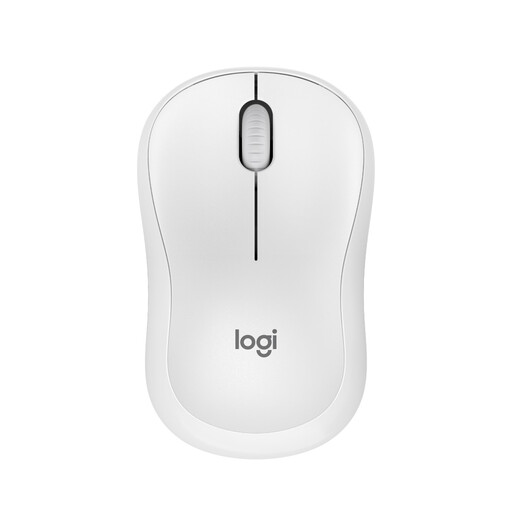
Why this choice suits this profile: This compact Bluetooth mouse does without a USB receiver and is aimed at office use, at home or on the move.
The listing mentions a claimed 90% reduction in click noise from the manufacturer, without presenting this figure as a universal measurement.
Bluetooth without a dongle, three buttons, 1,000 DPI and claimed battery life up to 18 months on one AA battery.
We've put together a full selection, updated in real time, of products that meet these strict criteria as well as European safety requirements.
No. The computer needs to have a working Bluetooth connection and its system must be compatible with the chosen model. If not, a mouse with a USB receiver is an alternative, provided you have the right port available.
It depends on the quality of the components, how often you use it, the number of clicks and how well you look after it. To make it last longer, protect it from moisture and knocks, and avoid abrasive cleaning products. If you're not using it for a long period, remove the battery to reduce the risk of any potential leakage.
It can reduce spending on batteries, but you need to consider its purchase price and the lifespan of its built-in battery. Before ordering, also check the cable supplied, whether you can use it while charging and the warranty terms.