
Livraison le jour même ou le lendemain

Qualité garantie

Débloquez vos offres de bienvenue: Livraison GRATUITE | Jusqu'à -80 % | 30 jours d'essai gratuits à JoyPlus
Téléchargez l'application
A wireless mouse frees up your desk, makes working from home easier and slips neatly into a bag. However, some models quickly show their limitations: an unstable connection, overly noisy clicks, battery life quoted without specifying test conditions, or an uncomfortable shape.
Before comparing specifications, it is therefore worth looking beyond the design and DPI count. Here are the criteria that really matter when choosing a wireless mouse for a PC, Mac, laptop or games console.
A high DPI count does not guarantee a better experience in every situation. For office work, web browsing and studying, sensitivity between 800 and 1600 DPI is generally sufficient. Higher settings are mainly useful for certain games, high-resolution screens or creative software.
A mouse with adjustable DPI lets you set the cursor speed to suit your needs. However, check how many levels are available and whether there is a dedicated button for switching quickly between them.
A 2.4 GHz mouse generally works with a USB receiver. The connection is simple and responsive, but the dongle takes up a port and may require an adapter on some newer ultraportable laptops.
A Bluetooth mouse connects directly to compatible devices, with no additional receiver required. It is particularly convenient with a laptop, tablet or desk where you want to minimise cables and accessories. Models combining Bluetooth and 2.4 GHz offer greater flexibility, especially when switching from a PC to a Mac or juggling several devices.
You need to distinguish between a battery-powered mouse and a rechargeable mouse. A battery may last for several months, but it will eventually need replacing and recycling. An integrated battery eliminates disposable batteries, at the cost of regular recharging and keeping a cable close at hand.
The quoted figures often vary depending on usage, RGB lighting, the distance from the receiver and how standby mode operates. For a wireless gaming mouse, battery life with the lighting switched on may be significantly shorter than without RGB.
The phrase ‘compatible with PC and Mac’ does not necessarily mean that every function, such as button programming, will be available on each system.
An ergonomic mouse should suit the size of your hand and the way you hold it. Compact models are easy to carry, but may become tiring for a larger hand after several hours of use. An ambidextrous shape works equally well for right- and left-handed users, while a left-handed vertical mouse is designed for a much more specific need.
Weight also affects comfort. Between 60 and 80 grams, a mouse will generally prioritise freedom of movement. A heavier model may, by contrast, feel more stable on a desk or during gaming.
For office work, three buttons and a scroll wheel may be more than enough. Side buttons can nevertheless speed up web browsing, particularly when going back to the previous page or quickly switching between tabs. For gaming, focus instead on the number of programmable buttons, profile management and sensitivity settings.
A silent mouse reduces noise in a shared space, library or during a video call. However, bear in mind that noise reduction does not mean the mouse is completely silent.
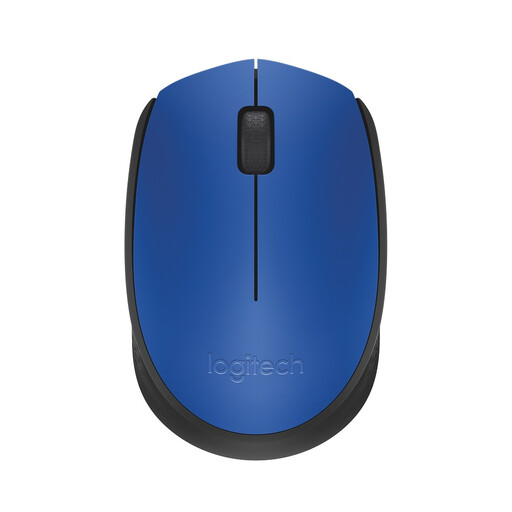
Why this choice suits this profile : This compact model is ideal for studying, everyday office work and travelling. Its 2.4 GHz connection and USB receiver let you use it straight away, without complicated setup.
The specifications state that it has an ambidextrous shape, a range of up to 10 metres and battery life of up to 12 months with one AA battery.
Ambidextrous design, optical sensor and compatibility with Windows, macOS, ChromeOS and Linux.
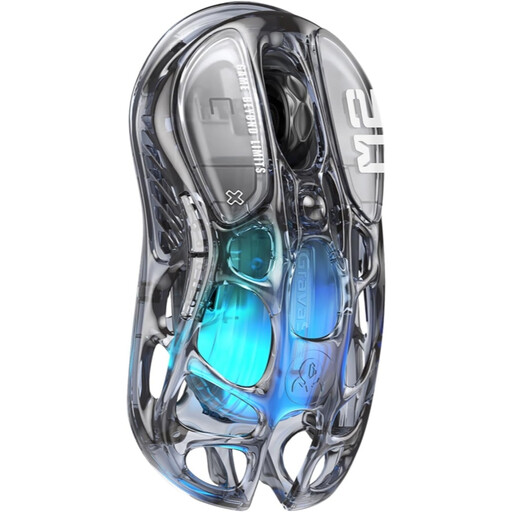
Why this choice suits this profile : Its lightweight design and tri-mode connectivity will appeal to users who enjoy customising their setup and switching between gaming and work.
The choice between Bluetooth, 2.4 GHz and a cable means you are not dependent on a single connection method.
Sensor rated at 26 000 DPI, polling rate of up to 1000 Hz, weight of 79 g and five customisable buttons.
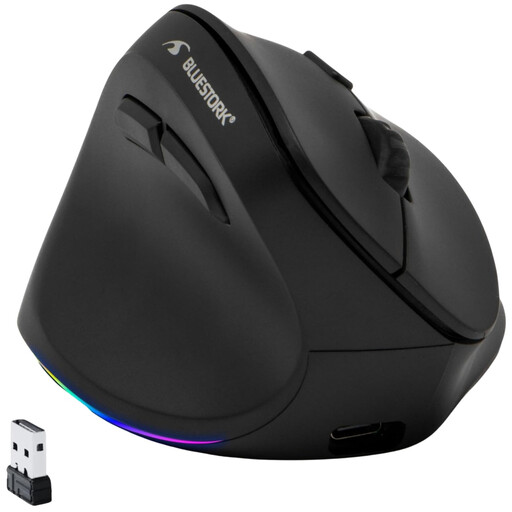
Why this choice suits this profile : Its left-handed vertical design meets a need rarely catered for by standard models, both in the office and when working from home.
Its left-handed shape means you do not have to settle by default for a symmetrical mouse when hand orientation is the priority.
Integrated lithium battery rechargeable via USB-C, adjustment up to 4800 DPI and RGB lighting.
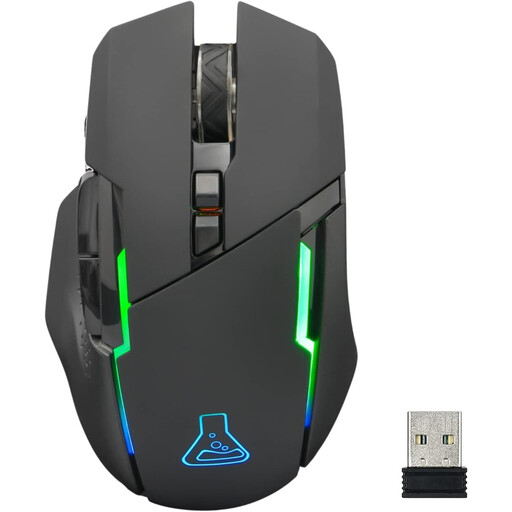
Why this choice suits this profile : Its DPI settings, profiles and six buttons are aimed at gamers who want to adapt their peripheral to different games.
Battery life is specified both with and without RGB: up to 10 hours with the lighting on and up to 32 hours without it.
Settings from 400 to 7200 DPI, five profiles, stated two-hour charging time and compatibility with PC, Mac, PS4 and Xbox One.
We have selected a complete, real-time updated list of products that meet these demanding criteria, as well as European safety requirements.
No. The computer must have Bluetooth and compatible drivers. Otherwise, a 2.4 GHz model with a USB receiver will often be easier to set up. You should also check how many ports are available and whether a USB-C adapter may be required.
A battery-powered mouse can work for several months, depending on its design and standby mode. A rechargeable mouse needs to be plugged in when its battery starts to run low. For a gaming model, always check the quoted battery life with and without RGB lighting.
This mainly depends on its power source. A battery-powered mouse requires regular replacements, whereas a rechargeable model uses electricity and may need its battery replaced after several years. In both cases, batteries and devices should be taken to the appropriate collection points in France.