
Livraison le jour même ou le lendemain

Qualité garantie

Débloquez vos offres de bienvenue: Livraison GRATUITE | Jusqu'à -80 % | 30 jours d'essai gratuits à JoyPlus
Téléchargez l'application
Buying a wireless mouse? It seems simple enough. But between the technical jargon, marketing promises, and a saturated market, it's easy to make a mistake. Dizzying DPI, supposedly "ergonomic" shapes, different connection types... it's enough to get lost and end up with buyer's remorse. As a Product Specialist at Joybuy, my mission is to cut through the noise for you. The goal? To help you find THE mouse that meets your needs, without breaking the bank.
Before we even start comparing models, let's review the common mistakes that almost certainly lead to disappointment (and unnecessary spending).
To make the right choice, focus on these three criteria that will make all the difference in your daily use.
The type of wireless connection should be dictated by your use case, and nothing else.
DPI (Dots Per Inch) measures the sensor's sensitivity. Simply put: the higher the DPI, the farther the cursor will travel on-screen for the same hand movement.
Battery life is a critical factor for a wireless mouse.
Let's get practical. Here is a selection of models that cater to distinct user profiles, applying the criteria we've just discussed.
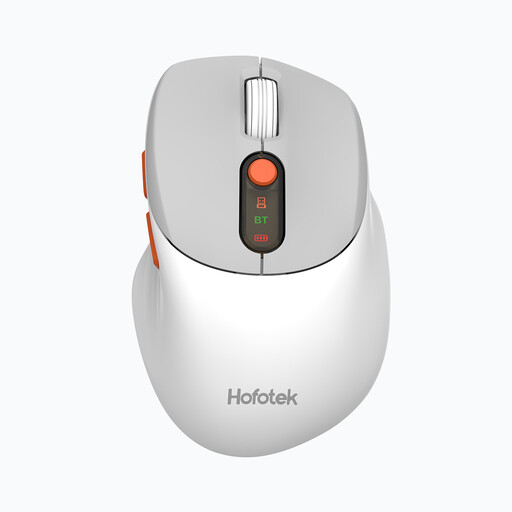
Why it stands out: Perfect for juggling a PC, tablet, and laptop. Its dual connectivity and easy switching between 3 devices make it a true productivity workhorse.
It ends the 2.4 GHz vs. Bluetooth dilemma by offering both. Its silent clicks are a blessing in open-plan offices—a far more practical feature than the pointless DPI race.
Multi-device connectivity (up to 3) and silent clicks for a peaceful work environment. Its feather-light weight (62 g) makes it an excellent travel companion.
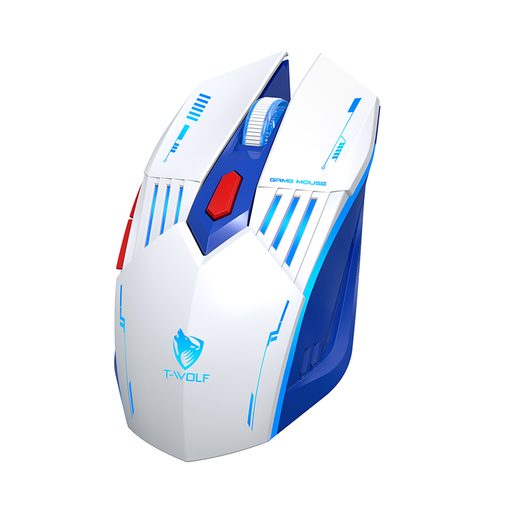
Why it stands out: For gamers seeking performance without emptying their wallets. It combines an ultra-responsive 2.4 GHz connection for gaming, Bluetooth for daily use, and a wired mode so you never run out of power mid-game.
It doesn't fall for the DPI hype. Its range up to 3600 DPI is ideal for gaming, from casual to competitive players, without superfluous marketing numbers. Its tri-mode versatility is its real strength.
Tri-mode connectivity (2.4 GHz, Bluetooth, wired) and a rechargeable battery via USB-C. The RGB lighting is the finishing touch for an impressive gaming setup.
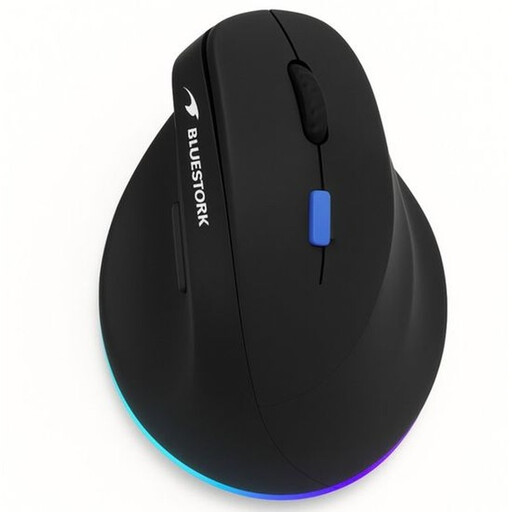
Why it stands out: Specifically designed to relieve wrist and forearm strain. Its vertical shape promotes a more natural "handshake" position, preventing pain after long hours of work.
It goes beyond the simple "ergonomic" marketing claim. Its vertical mouse design provides a concrete solution to a real biomechanical problem, unlike vaguely curved shapes with no proven benefit.
Vertical design for maximum wrist comfort, dual connectivity (2.4 GHz + Bluetooth), and a rechargeable battery via USB-C. Its sensor, reaching up to 4800 DPI, ensures excellent precision.
Explore our full selection of models that meet our selection criteria and European safety standards.
For casual gaming, a Bluetooth mouse can work. However, for competitive games (FPS, esports), its slight latency (input lag) can be a deal-breaker. In that case, a 2.4?GHz wireless connection is non-negotiable: its responsiveness is nearly identical to that of a wired mouse.
The lifespan of a rechargeable mouse depends on two components: the battery and the switches. A modern lithium-ion battery can handle several hundred charge cycles, which translates to several years of use. As for the click switches, they are rated for millions of actuations, guaranteeing excellent mechanical durability.
You need a "multi-device" model, which offers dual-mode (Bluetooth + 2.4?GHz) connectivity. A simple button, often located under the mouse, allows you to switch on the fly between the different connected devices (for example, your laptop via Bluetooth and your desktop PC with the 2.4?GHz dongle). It's a valuable time-saver in your daily workflow.