
Livraison le jour même ou le lendemain

Qualité garantie

Débloquez vos offres de bienvenue: Livraison GRATUITE | Jusqu'à -80 % | 30 jours d'essai gratuits à JoyPlus
Téléchargez l'application
A wireless mouse promises a clutter-free desk and complete freedom of movement. However, the market is flooded with models featuring often misleading specifications. Between the lure of "universal" ergonomics and obscure technical jargon, it's easy to end up with an accessory that's uncomfortable or ill-suited to your needs.
As a Product Expert at Joybuy, my role is to help you see things more clearly. Let's break down the pitfalls to avoid and the criteria that truly matter, so your next office mouse is a sound investment, not a source of regret.
Before you even start looking at models, you need to know how to see past the marketing claims that often lead to a poor choice.
For a successful purchase, focus on these three points that will make all the difference in your daily use.
This is the first technical detail to confirm.
Comfort is not an option. After several hours, a poorly-suited mouse can cause strain or even pain.
Here is our selection, designed for different user profiles and based on the criteria we've just discussed.
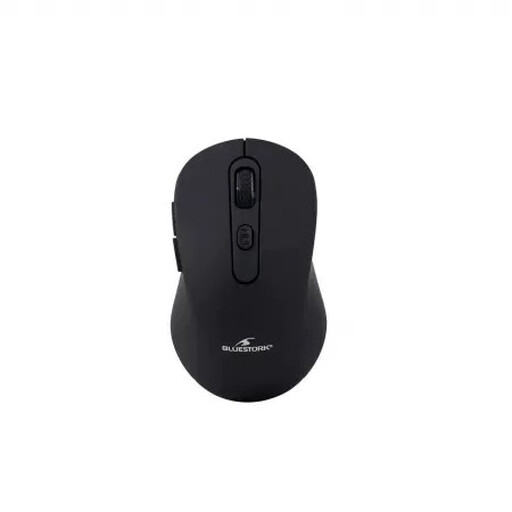
Why we love it: Perfect for those who juggle multiple devices: the desktop PC at the office (connected via the 2.4 GHz dongle) and the laptop or tablet on the go (via Bluetooth).
No more dilemmas! Its dual connectivity gives you the choice between 2.4 GHz and Bluetooth. The built-in battery frees you from the hassle and cost of batteries.
Versatility: 2.4 GHz + Bluetooth connection. Cost-effective: Rechargeable battery. Precision: Adjustable 4800 DPI sensor.
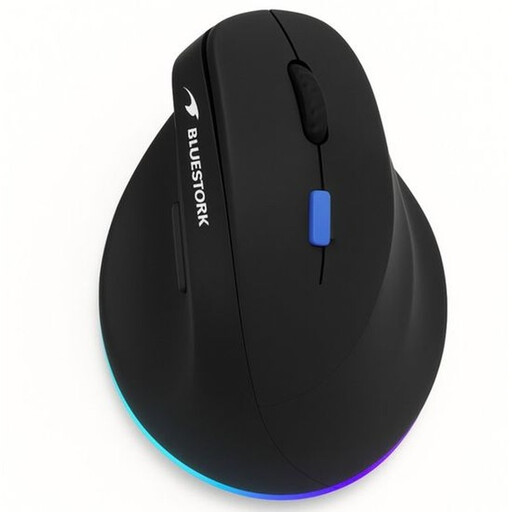
Why we recommend it: Designed for those who spend entire days in front of their screen. Its unique vertical design relieves wrist strain by promoting a natural forearm posture.
It doesn't promise "universal" ergonomics; it offers a targeted and effective solution for a specific problem: comfort for right-handers who work long hours.
Vertical Design: Reduces wrist strain. Dual Connectivity: 2.4 GHz and Bluetooth. Rechargeable: Built-in battery with USB-C port.
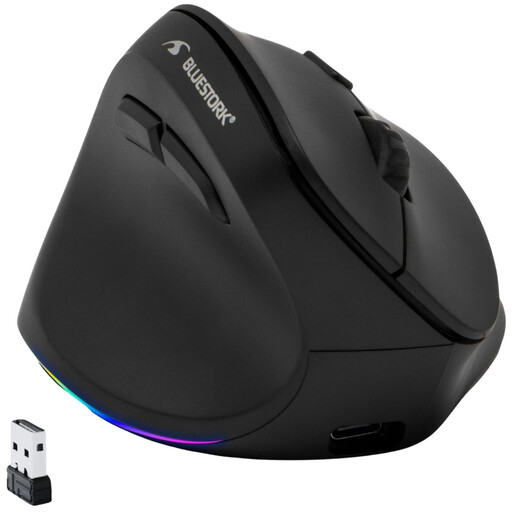
Why it's a no-brainer: Finally, a model that makes no compromises for left-handers! Its vertical shape and buttons are specifically placed for the left hand, offering a level of comfort that a simple ambidextrous mouse can never match.
It shatters the "one-size-fits-all" ergonomics myth by catering to a demographic too often overlooked by manufacturers.
True Left-Handed Design: Adapted shape and buttons. Vertical Ergonomics: Natural wrist posture. Rechargeable: No more batteries.
Explore our full selection of mice, all tested and approved by our experts according to the criteria in this guide.
It all depends on the build quality and your usage. The switches (the "clicks") are rated for millions of actuations. As for the battery, a rechargeable model will handle several hundred charge cycles. For typical office use, a well-made wireless mouse will easily last you 3 to 5 years.
It's very simple. Enable Bluetooth on your computer, tablet, or smartphone. Turn on your mouse, then put it into "pairing" mode (usually by pressing and holding a dedicated button, often located on the bottom of the mouse). It will appear in the list of detected Bluetooth devices. All you have to do is select it to complete the connection.
Absolutely! In an open-plan office, a library, or just at home in the evening so you don't disturb anyone, a silent mouse is a game-changer. Its muffled clicks preserve the peace and quiet for those around you. It's also an excellent way to stay focused by eliminating a source of auditory distraction.