
Livraison le jour même ou le lendemain

Qualité garantie

Débloquez vos offres de bienvenue: Livraison GRATUITE | Jusqu'à -80 % | 30 jours d'essai gratuits à JoyPlus
Téléchargez l'application
A wireless microphone can make vlogging, interviews and online lessons much easier. But not every model meets the same needs. Product listings are often keen to highlight long range or noise reduction, without always explaining the conditions required to achieve those results. To avoid disappointment, focus mainly on compatibility, battery life and how recordings are saved.
Having a USB-C connector does not guarantee that the microphone will work with every device featuring the same port. Some smartphones impose restrictions on audio recording, while cameras still very often use a 3.5 mm jack input. A wireless microphone for iPhone may also require a specific adapter depending on the phone model.
Before placing your order, check:
A range of 100 metres generally means in an open, unobstructed space. In a flat, classroom or busy street, walls, people and radio interference can significantly reduce the distance you can actually use. For a camera microphone or outdoor filming, connection stability matters just as much as the theoretical range.
A battery advertised to last several hours may prove insufficient if you are filming all day with several transmitters. You need to distinguish between the battery life of each transmitter, that of the receiver and the additional capacity provided by the charging case. Internal recording can also act as a safety net if the wireless connection is temporarily interrupted.
For individual use, a set with 1 transmitter and 1 receiver is generally sufficient. For a two-person podcast, interview or panel discussion, it is better to choose 2 transmitters, or even an expandable system. Some devices support several transmitters and receivers, which can be useful for productions involving multiple speakers.
With a USB-C microphone for Android, direct connection to the phone is particularly convenient. For a camera, make sure the receiver has an output suitable for its audio input. If you are looking for a microphone for a computer, a wired USB model may sometimes be simpler to set up and means you will not need to monitor the battery.
The sampling rate and resolution provide useful information, but they are not enough to predict how the microphone will sound in every room. Microphone position, distance from your mouth and the acoustics of the location remain decisive. A system with adaptive gain, voice modes or manual level adjustment can reduce the difference between a quiet voice and a louder one.
For streaming or podcasting, also check whether the model offers:
A microphone with noise reduction can lessen certain ambient sounds, but it can never replace good positioning. In a street, park or highly reverberant room, overly aggressive processing may distort the character of your voice. Choose a model offering several levels of noise reduction or allowing you to disable the function completely.
Internal storage, whether on built-in memory or a card, provides welcome protection. However, check whether the card is included, which format the audio is recorded in and how the files can be retrieved.
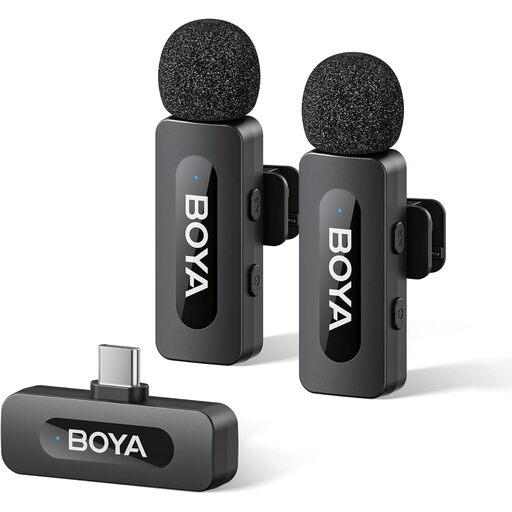
Why this choice suits this profile : With 2 transmitters, a USB-C receiver and noise-reduction control, this set is well suited to videos filmed with a compatible smartphone or tablet.
The listing claims up to 9 hours of battery life and recommends checking USB-C compatibility before buying. That helps minimise unpleasant surprises when connecting the device.
Two transmitters, USB-C connection and noise reduction that can be activated when required.

Why this choice suits this profile : This DJI wireless microphone is aimed at creators who switch between an iPhone, camera or Android device with a USB-C adapter, particularly for vlogs and mobile interviews.
Its voice modes, two levels of noise reduction and internal floating-point recording provide several safety nets if the sound level changes or the radio connection drops out.
Advertised use of up to 28 hours, adaptive gain control and support for several transmitters per receiver.

Why this choice suits this profile : Its lavalier design is suitable for online lessons, interviews, videos filmed on the move and long recordings requiring storage on a TF card.
The three DSP processing levels let you tailor the audio capture. Local recording to a TF card also provides an independent copy.
Advertised range of up to 100 metres in an open space, advertised total battery life of up to 20 hours and a remote shutter button.
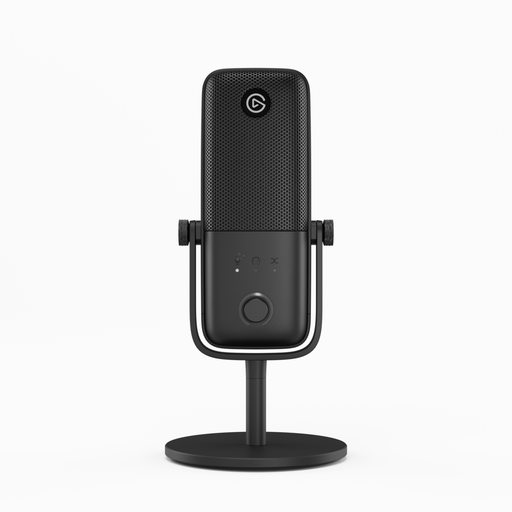
Why this choice suits this profile : This wired USB microphone is designed for users recording from a computer, without having to manage a battery or radio connection.
USB connection and automatic recognition reduce the number of set-up steps. However, you will need to accept that it does not offer wireless connectivity.
Clipguard 2.0 and Auto Gain technologies, with volume, gain and mute controls.
We have put together a complete, real-time updated list of products that meet these demanding selection criteria and European safety standards.
To get started with a wireless lavalier microphone, charge the transmitters and receiver before using them for the first time. Then connect the receiver to your phone or camera and make a short test recording. Avoid letting the microphone rub against your clothing and keep a consistent distance from your mouth.
Keep the devices in a dry place, away from moisture, and store the accessories in their case. Rechargeable batteries gradually lose capacity over repeated cycles; charging them regularly and using the supplied cable can help prevent problems. If you record people in France, inform them and obtain their consent whenever the circumstances require it.
Use the receiver that matches your phone’s port, then check that the app has selected the external microphone correctly. With a USB-C device, the connection may be direct. On an iPhone or camera, a specific adapter or receiver may be required. Always test the set-up before an interview or live broadcast.
It depends on the model, the number of transmitters being used and the power available in the charging case. Advertised figures are only indicative: the noise-reduction level, internal recording and temperature can affect actual battery life. For a full day of filming, plan a way to recharge the equipment.
Yes, provided the transmission is stable and the microphone is compatible with the computer or software you are using. For a fixed workstation, a USB microphone can help you avoid battery-related limitations. For creators on the move, a wireless system offers greater freedom, provided you monitor the audio level and arrange a backup when the content is important.