
Livraison le jour même ou le lendemain

Qualité garantie

Débloquez vos offres de bienvenue: Livraison GRATUITE | Jusqu'à -80 % | 30 jours d'essai gratuits à JoyPlus
Téléchargez l'application
A wireless microphone for smartphone can significantly improve the clarity of a video, livestream or interview. However, product listings sometimes pile on promises — ‘noise reduction’, ‘long range’ or ‘universal compatibility’ — without explaining the conditions in which they apply.
To avoid a disappointing purchase, focus on what really matters: the connector, actual battery life, number of transmitters and whether you can control the sound while recording.
A USB-C microphone will not necessarily work with every device fitted with a USB-C port. Some smartphones limit support for audio accessories, while iPhones with a Lightning connector require a dedicated version or a compatible adapter.
Before ordering, check:
A model described as ‘for iPhone and Android’ therefore deserves careful consideration, especially if you regularly switch between devices.
A noise-reduction function can reduce certain steady sounds, such as a fan hum or moderate background noise. It will not make traffic, a nearby conversation or strong gusts of wind disappear.
With a microphone with noise reduction, look at the processing options available: activation button, adjustable levels or automatic digital processing. Noise reduction that is too aggressive can also distort the voice. For an outdoor vlog, a windscreen and careful positioning of the capsule in relation to your mouth are still essential.
The advertised battery life may refer to a single transmitter, the entire kit or use with the charging case. A rechargeable microphone should be chosen according to the length of your filming sessions, as well as the time needed to recharge the equipment.
For livestreams that run on, check whether the microphone can be recharged while in use. Advertised battery life of 3 to 6 hours may be enough for a quick interview, but become a drawback during a full day of filming.
A single transmitter is enough for filming tutorials, vlogs or solo presentations. For an interview or two-person conversation, a dual-transmitter microphone lets you record each participant with their own microphone.
Do not confuse ‘dual microphone’ with two recording modes available on a single transmitter. The product listing should clearly state how many microphones or transmitters are included.
A USB-C microphone is convenient with many Android smartphones, tablets and newer computers. iPhone users should check whether the receiver is Lightning or USB-C, depending on their device’s connector.
For use with a PC or Mac, a desktop USB microphone may be more suitable than a lavalier model. The Razer desktop USB microphone, for example, is powered by cable and designed for a fixed setup: it is not a wireless microphone for smartphone.
A lavalier microphone clips near the collar and stays discreet in front-facing videos. A unidirectional model primarily picks up sounds from the front, but its positioning remains crucial.
For a streaming microphone, keep a consistent distance and make sure the cable or clip does not rub against your clothing. For an interview microphone, position the transmitter to minimise contact with your hands, jewellery or fabric.

Why this choice suits this profile: Its compact design is ideal for first livestreams, video calls and recordings made with a device featuring a USB-C interface.
The listing states 3 to 6 hours of battery life and a USB-C interface, making it easier to compare the kit with your phone before buying.
A compact lavalier microphone, Bluetooth 5.0 as stated in the listing, and a design intended for video conferences, livestreams and interviews.
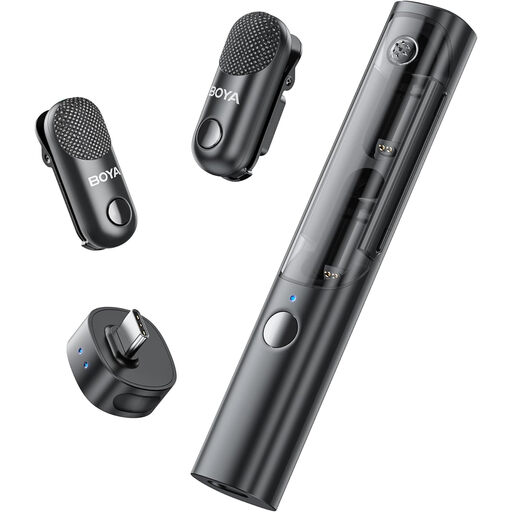
Why this choice suits this profile: With 2 transmitters, its receiver and charging case, this kit is designed for creators who switch from vlogging to interviews, including two-person shoots.
The number of components is clearly stated. The listing also notes that noise reduction can alter the tone in a very quiet environment, so it is better to be able to switch it off depending on the scene.
2 TX + 1 RX configuration, USB-C connectivity and charging case. The stated compatibility covers iPhones and compatible Android devices.

Why this choice suits this profile: This model is aimed at frequent filming, outdoor interviews, online teaching and recording situations where a backup option is welcome.
The three DSP levels let you adapt the processing to your surroundings. Recording a backup to a TF card can prevent you from losing a take, but the card is not included.
Up to 20 hours of total advertised battery life with the case, an advertised range of 100 m in open space, and compatibility with smartphones, cameras and computers.
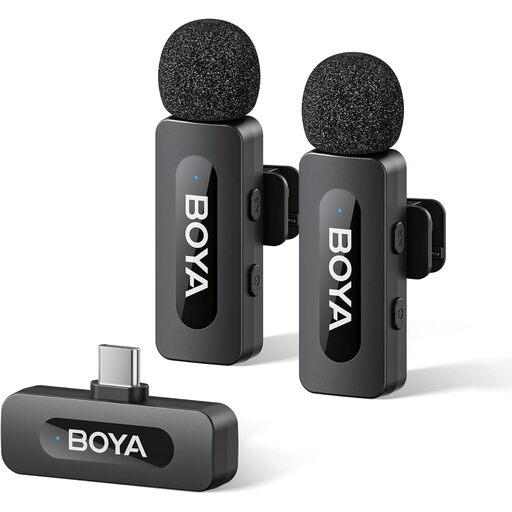
Why this choice suits this profile: Videographers who regularly use an Android smartphone or a USB-C iPhone can choose a kit with two transmitters and an easily accessible noise-reduction control.
The listing states that noise reduction can be activated with one click and advertises 9 hours of battery life. It is still essential to confirm exact compatibility with your phone.
Advertised 2 TX + 1 RX configuration, rechargeable battery and USB-C connection for compatible devices.
We have brought together a complete, real-time updated selection of products that meet these demanding criteria as well as European safety standards.
To achieve consistent sound, clip the lavalier microphone a few centimetres from your mouth without pressing it against the fabric. Before a livestream, make a short test recording to check the sound level, connector and synchronisation.
A few simple habits can help extend the life of your equipment:
For a fixed computer setup, the Razer Seiren V3 Chroma Quartz belongs to a completely different category. This desktop USB microphone works with Windows and Mac, offers a hypercardioid pickup pattern, volume adjustment and latency-free monitoring depending on the configuration. It is suitable for the office, gaming or stationary streaming, but its wired power supply does not meet the mobility needs of a wireless microphone for smartphone.
Plug the receiver into the phone’s compatible port, switch on the transmitter, then check that the app is using the external audio accessory correctly. Depending on the model, you may need to allow microphone access or select the audio source in the settings.
The running cost is generally limited to the electricity needed to recharge the battery. However, remember to factor in any accessories that may need replacing: cable, windscreen, adapter or TF card for models with local recording.
Yes, provided you choose a kit with two transmitters if you want to record two people separately. For an outdoor interview, also check the mounting, wind protection, battery life and connection stability in the conditions in which you plan to use it.