
Livraison le jour même ou le lendemain

Qualité garantie

Débloquez vos offres de bienvenue: Livraison GRATUITE | Jusqu'à -80 % | 30 jours d'essai gratuits à JoyPlus
Téléchargez l'application
A wireless microphone can make recording much more convenient, but not every model is suited to the same uses. From clip-on microphones for smartphones and kits with two transmitters to models designed for a speaker or mixing desk, misreading a product listing can quickly lead to an impractical purchase.
Before placing your order, watch out for three common pitfalls:
For a wireless microphone for a smartphone, start by checking which port is available on your phone. Models equipped with a USB-C microphone are suitable for devices with this connector, subject to software and hardware compatibility. If your iPhone uses a different interface, choose a version explicitly designed for iOS or use the appropriate accessory.
A model designed for a speaker, amplifier or mixing desk may have a 3.5 mm or 6.35 mm jack output. This format is more suitable for speeches, karaoke, events and musical performances than for direct recording on a smartphone.
A rechargeable microphone needs to last for your entire session, with enough capacity to avoid cutting out during a live broadcast or halfway through an interview. Compare the stated battery life, charging time and whether a charging case is included.
Figures can vary depending on the volume level, the distance between the transmitter and receiver, and the use of features such as noise reduction. For regular use, look for a clear battery indicator, straightforward charging and a case that properly protects the equipment.
A dual wireless microphone is particularly useful for interviews, duets or filmed conversations. However, check that both transmitters are included, that they can operate simultaneously and that the appropriate receiver is supplied.
2.4 GHz radio transmission and Bluetooth do not always work in the same way. Check the pairing procedure and confirm compatibility with your camera, computer or smartphone. For streaming, video calls and short videos, ease of connection is often just as important as the stated range.

Why this choice suits this profile : Its miniature design and stated iOS interface are well suited to creators who film short videos, interviews or social media content using a compatible Apple device.
The listing mentions the iOS interface and a stated battery life of 3 to 6 hours. Even so, check your exact device model before buying.
Compact microphone, Bluetooth 5.0 stated in the listing and a format well suited to speaking on the move.
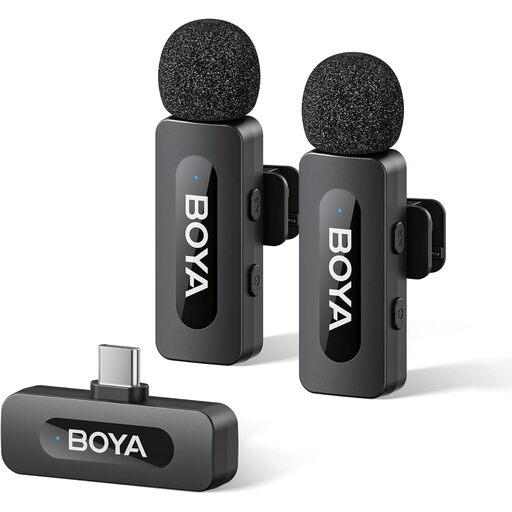
Why this choice suits this profile : This USB-C kit, comprising two transmitters and one receiver, is designed for users who conduct interviews, livestreams or videos featuring several speakers.
USB-C compatibility and noise reduction activation should be checked in the manual and with the device being used, rather than inferred from the product name alone.
Stated configuration of 2 TX + 1 RX and battery life of up to 9 hours.
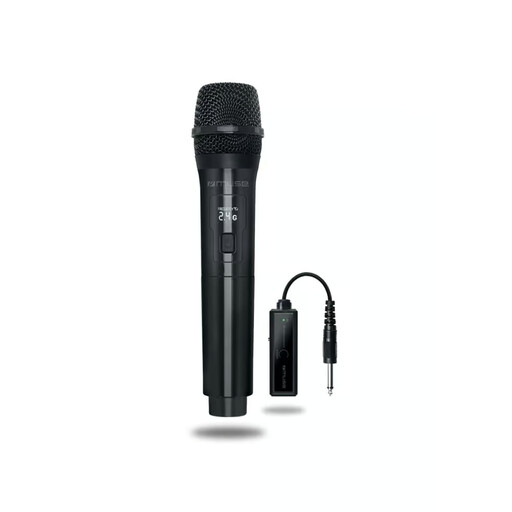
Why this choice suits this profile : This microphone is suitable for speeches, events, performances and audio setups with a speaker, amplifier or mixing desk.
The 6.35 mm and 3.5 mm connectors are clearly specified. However, the stated range is measured in an open space and should be viewed in context for your venue.
2.4 GHz transmission, a stated range of up to 30 metres and battery life of up to 8 hours.

Why this choice suits this profile : Its two clip-on microphones and magnetic charging case are ideal for interviews, two-person conversations and filming sessions where you want to pack away your equipment quickly.
The number of microphones and charging method are specified. However, the stated battery life of 3 to 6 hours should still be compared with the length of your filming sessions.
Two transmitters, a magnetic charging case and an interface stated to be compatible with Android and Apple.
We have put together a complete, real-time updated list of products that fully meet these strict selection criteria and European safety regulations.
For a microphone for TikTok and videos, attach the capsule close to your mouth without pressing it against a creased garment. Make a short recording before each session to check the sound level, interference and that the correct audio input has been selected.
Avoid moisture, excessive heat and knocks. Use the supplied cable for charging when instructed in the manual, and stop using the device if the battery becomes very hot, swells or gives off an unusual smell. Storing it in a dry place at a moderate temperature helps reduce stress on the built-in battery.
Start by identifying your phone’s port, then plug in or pair the receiver according to the technology used. Allow microphone access in the video app and carry out an audio test. With a USB-C model, check that your phone supports an external audio input.
For a short session, 3 to 6 hours may be enough. For a microphone for streaming or extended recordings, look for a higher stated battery life, a charge indicator or a case capable of recharging the transmitters between takes.
No. This feature can reduce certain noises depending on the environment and the selected setting, but it will not necessarily eliminate conversations, wind or nearby sounds. A windscreen, careful positioning and a less reverberant room remain valuable allies.