
Livraison le jour même ou le lendemain

Qualité garantie

Débloquez vos offres de bienvenue: Livraison GRATUITE | Jusqu'à -80 % | 30 jours d'essai gratuits à JoyPlus
Téléchargez l'application
A wireless microphone for smartphone can significantly improve voice quality in a vlog, interview or live stream. However, you should not be swayed by product-page claims alone. A stated range does not guarantee a stable connection between four walls, and “noise reduction” will never make up for a poorly positioned microphone.
Here are the criteria to consider before buying, followed by a selection suited to different uses in France.
A microphone described as compatible with iPhone and Android will not necessarily work with every model. The first thing to check is your phone’s port:
A kit fitted with a USB-C receiver will work with a phone featuring this port, but will require a different adapter for a Lightning iPhone. Check the accessories included in the box carefully.
Actual battery life depends on the volume, the distance between the transmitter and receiver, the features enabled and the temperature. A wireless microphone advertised to last for several hours may still need recharging before the end of a long day of filming. For regular use, check the battery capacity, the type of charging case and whether a backup recording function is available.
A noise reduction function can reduce certain ambient sounds, but it will not make traffic, wind or nearby conversations disappear. A windscreen, a reliable clip and a reasonable distance between the transmitter and your mouth are still essential. For an interview, position the wireless lavalier microphone a few centimetres from the collar, making sure it does not rub against the fabric.
For a USB-C wireless microphone, make sure the receiver is recognised by your phone, tablet or computer. With a camera, look instead for an output compatible with its audio input, usually a 3.5 mm jack. Some kits are designed exclusively for smartphones, while a microphone for camera requires a dedicated cable or receiver.
If you regularly switch between your phone and camera, a kit supplied with several adapters may prove more convenient. This avoids having to buy a second set when moving from a mobile vlog to an interview filmed with a camera.
A single transmitter is enough for a solo vlog, a training session or a live stream with one person. For an interview or a two-person podcast, choose a kit with two transmitters. The number of supported channels is also worth considering for group recordings.
2.4 GHz transmission is very common on compact models. The stated range is generally measured in an open area: walls, wireless networks and obstacles can reduce connection stability.
Internal recording provides welcome peace of mind when the connection to your phone becomes unstable. However, remember to transfer the files and check the audio synchronisation before starting the edit.

Why it suits this profile : Its compact design and iOS interface make it an appealing first microphone for short videos, filmed calls or occasional interviews.
The product details mention a windscreen and a noise reduction function. However, it is still essential to check the connector version before ordering.
Transmitter listed at 78 g, iOS interface and stated battery life of 3 to 6 hours.

Why it suits this profile : This kit is aimed at creators who want to switch between smartphone and camera while benefiting from more advanced audio control features.
The product details specify the compatible devices and include a USB-C adapter for phones. However, Lightning compatibility must be checked separately.
Up to 28 hours of stated use, automatic gain control, two levels of noise reduction and internal 32-bit floating-point dual-file recording.
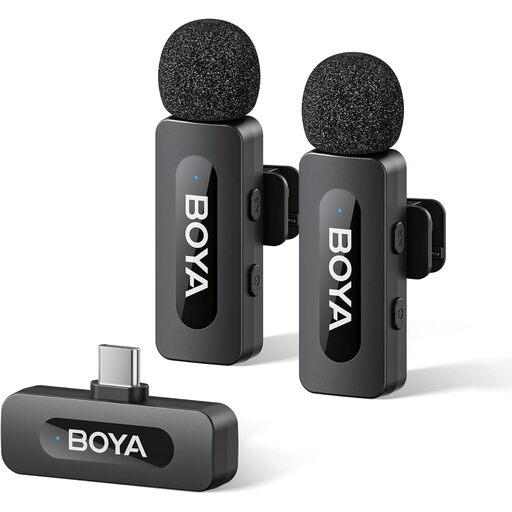
Why it suits this profile : With its two transmitters and receiver, this model is suitable for interviews, two-person conversations and streaming on a USB-C device.
The product details mention one-click noise reduction, but also remind you to check USB-C compatibility before buying.
Two transmitters, up to 9 hours of stated battery life and a design intended for a USB-C device.

Why it suits this profile : Its dual wireless lavalier microphones and interface described as universal make it suitable for interviews, filmed lessons and two-person live streams.
The magnetic charging case reduces the risk of leaving something behind between takes. Nevertheless, actual compatibility should be confirmed with your phone and app.
Two microphones, magnetic charging case and stated battery life of 3 to 6 hours.
We have put together a complete, real-time updated list of products that fully meet these strict selection criteria and European safety regulations.
To avoid any unpleasant surprises with a microphone for vlogging, streaming or interviews, follow these steps:
If you use the microphone for extended periods, avoid leaving a lithium battery completely discharged for several weeks. If it becomes hot, swells or gives off an unusual smell, stop using it immediately and follow the recycling instructions applicable to electrical equipment.
Yes, some models are designed to work in both environments, but the connector remains decisive. A USB-C receiver is suitable for a device with this port. With a Lightning iPhone, a specific adapter may be required. Also check that the app you are using accepts an external audio input.
For short recording sessions, 3 to 6 hours of stated battery life may be sufficient. Creators who film repeatedly, run live streams or deliver training sessions should consider a model offering longer battery life, a charging case or internal recording. Always allow some headroom, as battery life varies depending on the conditions of use.
Yes, provided that the receiver and camera have compatible connectors. Some kits come with an output suitable for cameras, while others are designed exclusively for smartphones. Before buying, check the type of audio input, the cable supplied and whether an adapter is required.