
Livraison le jour même ou le lendemain

Qualité garantie

Débloquez vos offres de bienvenue: Livraison GRATUITE | Jusqu'à -80 % | 30 jours d'essai gratuits à JoyPlus
Téléchargez l'application
A wireless mechanical QWERTY US keyboard can be just as suitable for PC gamers as it is for remote workers and users who switch between multiple devices. But with compact formats, RGB backlighting, different connection modes and built-in screens, it quickly becomes difficult to compare the spec sheets.
Before you place an order, three common pitfalls keep cropping up:
The 100% format keeps the numeric keypad. It's particularly handy for spreadsheets, accounting and multimedia shortcuts. An 80% keyboard, typically with 87 keys, removes the numeric keypad while keeping the function keys and arrow keys.
With around 84 keys, the 75% format reduces the footprint even further without sacrificing the function row. It fits easily on a narrow desk or in a compact gaming setup. The 65% and 68-key formats free up even more space, but some commands then require the Fn key.
A keyboard with a touchpad, like the Logitech K400 Plus, serves a different purpose: it's mainly aimed at controlling a computer from the sofa or navigating a multimedia interface.
A tri-mode keyboard typically combines:
The cable means you don't have to rely on the battery. Bluetooth makes it easy to switch from one device to another, while 2.4 GHz is often preferred for a desktop PC or gaming, thanks to its dedicated receiver.
Don't just look at the stated battery capacity: also check the conditions under which the battery life was measured. It varies depending on the brightness of the backlighting, how often you use it and the connection mode. On models with a TFT screen or RGB lighting, manufacturers sometimes quote a battery of 4,000 to 8,000 mAh, but that doesn't guarantee the same usage time in every scenario.
A hot-swappable keyboard lets you replace the switches without soldering. That's handy for tailoring the typing feel to your preferences: linear, tactile or clicky. However, do check compatibility with 3-pin or 5-pin switches.
The type of mounting, such as gasket mount or leaf spring mount, the sound-dampening foam and the PBT keycaps all affect the feel and the sound you hear. These are genuine comfort features, but they're not a universal guarantee: the experience also depends on the switches and your own preferences.
For a purchase in France, also take the time to check the safety information: presence of a lithium battery, recommended charger, precautions in damp conditions and disposal instructions. The CE and RoHS markings should appear on the product page or in the supplied documentation.
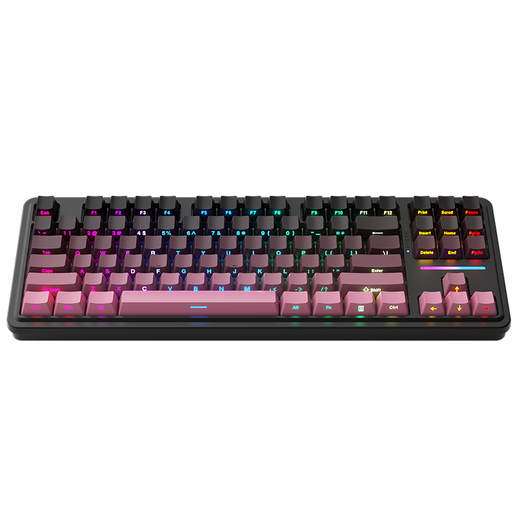
Why this choice suits this profile: its 80% format frees up desk space while keeping the essential keys. It offers a wired connection, Bluetooth and 2.4 GHz, plus replaceable switches.
The three modes mean you're not reliant on a single connection, while the replaceable switches mean you don't have to change the whole keyboard if your preferences evolve.
80% format, gasket mount, RGB lighting and switching between USB, Bluetooth and 2.4 GHz modes.
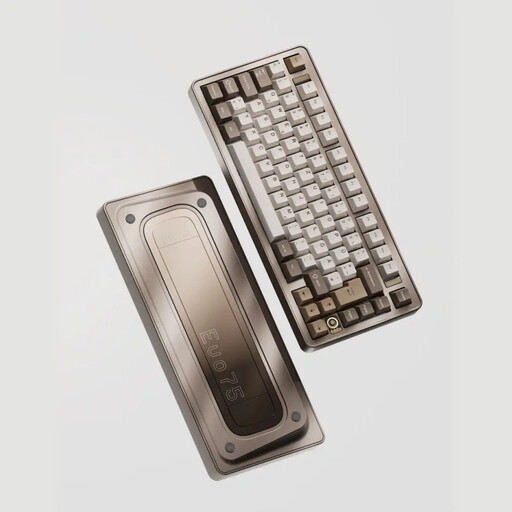
Why this choice suits this profile: this customisable mechanical keyboard combines an aluminium chassis, a 75% format, VIA compatibility and a stated 8,000 mAh battery.
The customisation options are genuine: hot-swappable switches, VIA software and quick disassembly. It's a far cry from a mere RGB gimmick.
Aluminium chassis, leaf spring mount, VIA compatibility, 8,000 mAh battery and RGB backlighting.
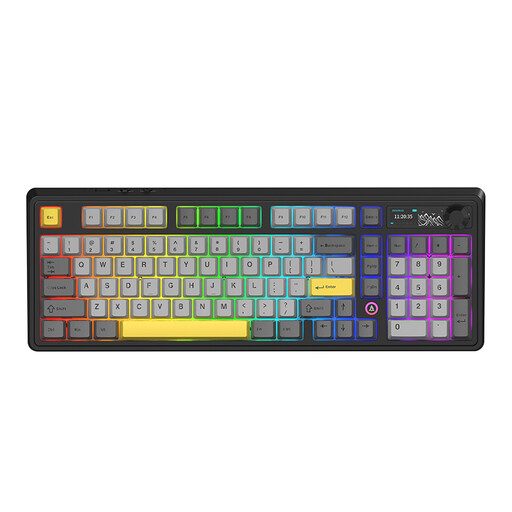
Why this choice suits this profile: its 97 keys, metal knob, TFT screen and three connection modes suit those who switch between gaming, work and advanced settings.
The 98% format keeps a compact numeric keypad, while the screen and knob offer real controls, going beyond mere decorative lighting.
TFT screen, control knob, hot-swappable circuit, RGB lighting and a stated 8,000 mAh battery despite the screen.
We've selected a comprehensive, real-time updated list of products that meet these strict criteria, while also taking European safety regulations into account.
Yes. It can work with Windows, macOS, Android or iOS, provided the compatibility stated by the manufacturer is met. You just need to select the correct layout in your system settings. However, please note: the characters printed on the keys remain those of the QWERTY US layout.
Bluetooth connects directly to many laptops, tablets and smartphones. 2.4 GHz uses a USB receiver, which can be more convenient with a desktop PC or for gaming. The wired mode is still useful when the battery is flat or to avoid any interruption.
It all depends on the model, the battery capacity, the RGB backlighting, the screen and how often you use it. The figures quoted by manufacturers should be taken as estimates obtained under specific conditions. To reduce power consumption, turn off the lighting when you don't need it and switch off the keyboard after use.