
Livraison le jour même ou le lendemain

Qualité garantie

Débloquez vos offres de bienvenue: Livraison GRATUITE | Jusqu'à -80 % | 30 jours d'essai gratuits à JoyPlus
Téléchargez l'application
A great wireless mechanical keyboard can transform your gaming or work experience. It promises a clutter-free desk, the surgical precision of a mechanical keystroke, and a style that reflects you. The only problem: the market is flooded with models whose marketing claims are often misleading. Deciphering technical jargon and sales pitches can feel like an uphill battle. This guide is here to cut through the noise and help you make an informed decision that's perfectly suited to your real needs.
Before you even start eyeing the latest models, let's review the three classic mistakes that turn a promising purchase into a costly regret.
hot-swappable mechanical keyboard (with interchangeable switches) label is a dream for customisation enthusiasts. The catch? Some models only accept 3-pin switches, locking you out of a vast majority of custom switches, which use a 5-pin format.To avoid these disappointments, here are the criteria on which you must be uncompromising. They are what separate a good wireless gamer keyboard from a mere gadget.
The responsiveness of your wireless keyboard depends entirely on its connection technology.
pro gaming keyboard. It ensures near-zero latency (often 1 ms, with a 1000 Hz polling rate), making it indistinguishable from a wired connection for almost all gamers.Bluetooth gaming keyboard remains a rarity.The size of the keyboard, or form factor, has a direct impact on your ergonomics and the space available on your desk.
wireless TKL keyboard is a true bestseller.A crucial point to watch out for: verify the keyboard has the correct regional layout for you (e.g., QWERTY for the US/UK, AZERTY for France). This is the guarantee you won't be tearing your hair out over punctuation, accents, and special characters.
This is the soul of your keyboard. The type of mechanical switch defines the sound, feel, and the entire personality of your typing.
Rather than an endless catalogue, here is a targeted selection of models that tick all the right boxes and cater to specific user profiles.
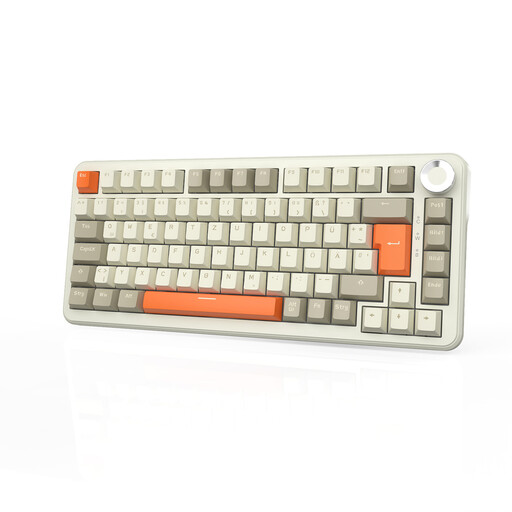
Why it's the right choice: Perfect for those who switch between gaming, content creation, and office work. Its 75% layout is an excellent compromise: it keeps the essential function keys while remaining compact. The volume knob is a real bonus for video editing or managing audio mid-stream.
Its tri-mode connectivity has you covered: an ultra-responsive 2.4 GHz connection for gaming, and Bluetooth for versatility. Its pre-lubed linear switches (Flying Fish) ensure a smooth and quiet typing experience, far from the racket of *clicky* switches.
Monster battery life (8000 mAh), full hot-swap compatibility (3 and 5-pin) for limitless customisation, and a metal control knob that's as practical as it is elegant.
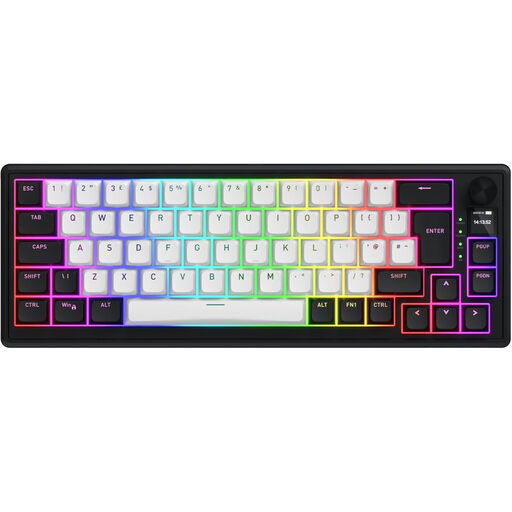
Why it's the right choice: Built for raw performance. Its responsiveness is calibrated for e-sports and FPS games where every millisecond makes a difference. Its 65% form factor frees up maximum space for wide mouse sweeps.
This keyboard shatters the myth of wireless latency. With its 8000 Hz *polling rate* and magnetic switches featuring *Rapid Trigger*, the activation delay is simply non-existent, even without a cable.
Magnetic switch technology: an actuation point that's adjustable down to the millimeter (from 0.2 to 4.0 mm) and instant reset (*Rapid Trigger*) for absolute responsiveness.
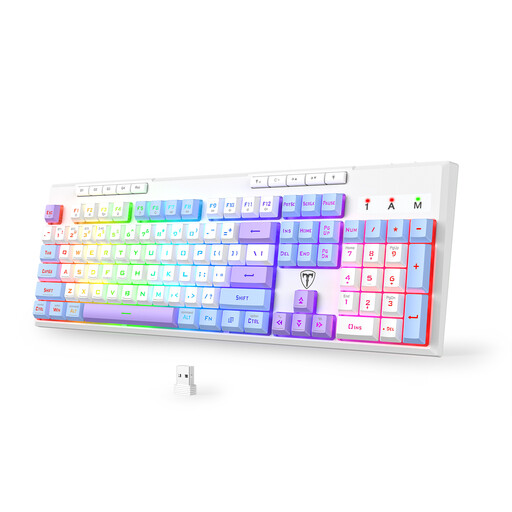
Why it's the right choice: The ideal entry point into the world of wireless mechanical keyboards. It ticks all the essential boxes (tri-mode, RGB, anti-ghosting) in a full-size format, without breaking the bank.
Unlike many entry-level models that compromise on performance, this one includes true tri-mode connectivity, with a reliable and responsive 2.4 GHz connection for gaming.
An aggressive price-to-performance ratio: complete connectivity, a comfortable 4000 mAh battery, and even programmable macro keys.
Discover our full collection of keyboards that meet our demanding selection criteria and quality standards.
Battery life can vary wildly depending on the model and your usage. The main culprit? The RGB mechanical keyboard lighting. With backlighting on, you can generally expect between 30 and 60 hours. By turning it off, the battery life can skyrocket to several hundred hours. The battery capacity, in milliampere-hours (mAh), is an excellent indicator: a model with 4000 mAh or more already ensures very comfortable endurance.
Yes, without a shadow of a doubt, as long as you use the 2.4 GHz connection. This technology is designed for minimal latency (typically 1 ms), equivalent to that of a standard wired keyboard. For 99% of gamers, even in competitive play, the difference is completely imperceptible. Bluetooth, on the other hand, is still not recommended for games that demand perfect responsiveness.
Absolutely, and it's one of the great joys of mechanical keyboards. Most models use switches with a cross-shaped stem (Cherry MX standard), making them compatible with the vast majority of keycap sets on the market. The only point to watch for is the physical layout: keyboards come in different standards like ANSI (common in the US) and ISO (common in Europe). An ISO layout has specific key shapes (like the large "Enter" key and a shorter left "Shift" key). So, make sure the keycap set you're eyeing is compatible with your keyboard's specific layout (e.g., ISO or ANSI) before you buy.