Joybuy Insights

Wireless Mechanical Keyboard Guide: How to Choose the Right One

A wireless desk setup promises a clean workspace and newfound freedom of movement. However, choosing the right wireless mechanical keyboard can quickly become a headache. Between the marketing jargon and technical subtleties, it's easy to end up with a disappointing model that's ill-suited for your needs, whether for gaming, coding, or office work.

To avoid falling into the common traps, let's review the three most frequent pitfalls:

  1. The Myth of "Universal" Wireless Connectivity: Not all wireless technologies are created equal—far from it. While Bluetooth is convenient for juggling multiple devices, its latency can be a deal-breaker for a gaming keyboard. Conversely, a 2.4 GHz connection offers near-wired responsiveness but requires the use of a dedicated USB dongle.
  2. The Half-Kept "Hot-Swappable" Promise: The ability to change switches on the fly without soldering is a major selling point for customisation and longevity. The catch? Some models only accept 3-pin switches, drastically limiting your options, whereas the market standard for quality models is 5-pin.
  3. The Quest for the Perfect "Thocky" Sound: That famous deep, muted typing sound, so sought-after by enthusiasts, doesn't just depend on the switches. It's the result of a complex alchemy within the internal structure (gasket mount, insulation foams, plate material…), a point that spec sheets all too often gloss over.

This guide's mission is to demystify these technical points to help you identify the features that truly matter for your use case.

Key Criteria for Choosing Your Wireless Mechanical Keyboard

To make an informed choice, focus on a few key parameters that define a keyboard's quality and suitability for your needs.

1. Connectivity: The Right Mode for the Right Use

The versatility of a wireless mechanical keyboard primarily lies in its connection options. A tri-mode model is often the wisest choice, as it combines:

  • 2.4 GHz Connection: Essential for competitive gaming. It uses a USB dongle to establish a low-latency connection, ensuring responsiveness similar to that of a wired keyboard.
  • Bluetooth Connection: Ideal for productivity and mobility. It allows you to connect the keyboard to multiple devices (PC, tablet, smartphone) and easily switch between them without monopolising a USB port.
  • Wired Connection (USB-C): A reliable option. It eliminates all latency, allows you to charge the keyboard while using it, and serves as a backup solution when the battery is low.

2. Form Factor: The Balance Between Compactness and Functionality

The form factor (or layout) has a direct impact on your ergonomics and desk space. For your region, ensuring the keyboard is available in your preferred layout (e.g., ANSI, ISO, AZERTY) is obviously a prerequisite.

  • Full-size (100%): The classic format with a number pad. Perfect for those who frequently work with numbers.
  • TKL (Tenkeyless, 80%): A wireless TKL keyboard removes the number pad for a significant space-saver, offering more room for mouse movements. It's a very popular format for gaming.
  • 75% Format: Even more compact, this format tightens the navigation keys and arrow keys against the main block. A 75% keyboard retains the function row (F1-F12), making it an excellent compromise between compactness and functionality for gamers and creators.

3. Customisation: Switches, Structure, and Acoustics

The typing experience is the very essence of a mechanical keyboard. Two elements require close examination:

  • Switches and Hot-Swap:Linear switches are often preferred for gaming due to their smooth, bump-free travel. A hot-swappable keyboard feature is a huge advantage, as it allows you to test different types of switches or replace a faulty one without any soldering tools. Check for compatibility with 5-pin switches for maximum choice.
  • Internal Structure (Mounting Style): The way the switch plate is mounted in the chassis influences the sound and feel of typing. The gasket mount, where the plate is isolated by silicone or Poron gaskets, has become widespread. It results in a softer typing feel, better vibration dampening, and a deeper, more muted sound.

Top Wireless Mechanical Keyboard Picks

Rather than an endless catalogue, here are three models that check all the boxes for specific user profiles.
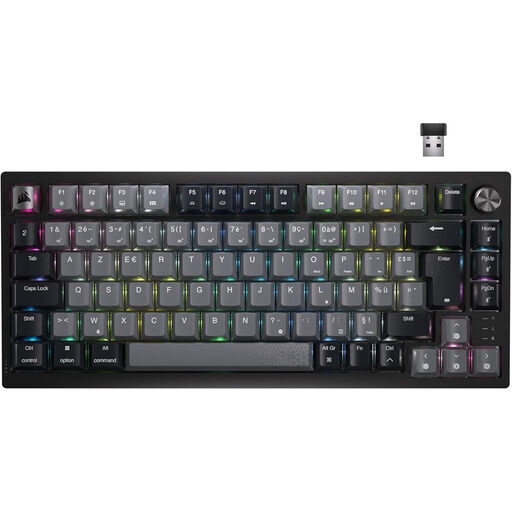
FOR THE DEMANDING GAMER
Corsair K65 Plus Gaming Keyboard Mechanical (MLX Red) Wireless Backlit RGB 75% - AZERTY - Black

Corsair K65 Plus Gaming Keyboard Mechanical (MLX Red) Wireless Backlit RGB 75% - AZERTY - Black

Why it's a fit for this profile: This keyboard is built for performance. Its 75% format frees up space for the mouse, its 2.4 GHz wireless connectivity is optimised for low-latency gaming, and its pre-lubed linear switches offer immediate responsiveness. All in a native AZERTY layout.

How it avoids the trap

It doesn't just settle for Bluetooth and offers a high-performance 2.4 GHz wireless connection, essential for avoiding in-game latency.

Key feature & highlights

Combines a compact AZERTY layout, Corsair MLX Red linear switches, and a dedicated volume knob for quick control.
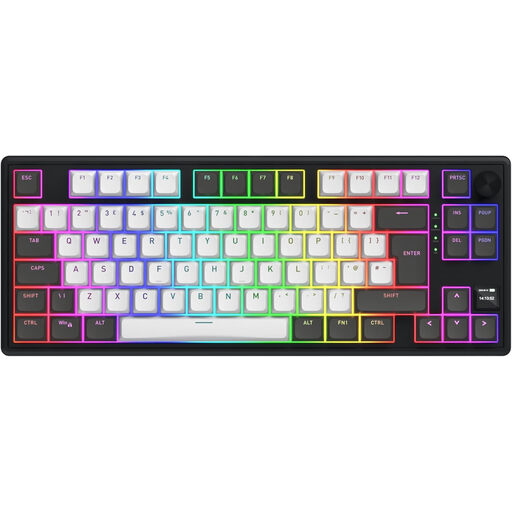
FOR THE VERSATILE CREATOR
Hator Magnetic Wireless Gaming Keyboard Skyfall 80 Pro TKL RGB - UE/ISO Layout - Black

Hator Magnetic Wireless Gaming Keyboard Skyfall 80 Pro TKL RGB

Why it's a fit for this profile: Ideal for those who juggle work and play across multiple devices. Its tri-mode connectivity, massive battery life (8000 mAh), and silent switches make it a great ally for shared offices and mobile work sessions. The included AZERTY keycap set is a real bonus.

How it avoids the trap

It offers true versatility with its three connection modes and record-breaking battery life that ends charging anxiety, the Achilles' heel of many wireless models.

Key feature & highlights

8000 mAh battery, silent linear switches, and an extra keycap set to switch to AZERTY, making it ready for the French market.
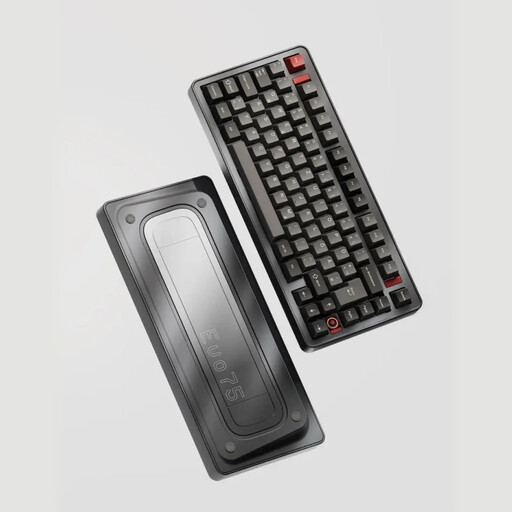
FOR THE CUSTOM KEYBOARD ENTHUSIAST
Ticktype EVO75 Custom Tri-Mode Wireless Mechanical Keyboard

Ticktype EVO75 Custom Tri-Mode Wireless Mechanical Keyboard

Why it's a fit for this profile: This model is an excellent starting point for building a top-notch **custom mechanical keyboard**. Its full aluminium chassis, leaf spring mount, and 5-pin hot-swappable sockets offer maximum customisation freedom to fine-tune the sound and typing feel.

How it avoids the trap

It includes 5-pin hot-swappable sockets, ensuring compatibility with almost all switches on the market, unlike models limited to 3-pins.

Key feature & highlights

Premium structure (aluminium chassis, leaf spring mount), VIA software compatibility for advanced key remapping, and an 8000 mAh battery.

Want to explore other options?

We have put together a complete selection of keyboards that meet our criteria for quality, performance, and reliability.

Frequently Asked Questions

What's the difference between a 2.4 GHz and a Bluetooth connection for a wireless keyboard?

A 2.4 GHz connection uses a USB dongle for a direct, very low-latency link, which is essential for responsive gaming. A Bluetooth connection is more versatile, doesn't require a dongle (if your device is compatible), and can connect to multiple devices, but its latency is generally higher, making it less suitable for competitive gaming.

Is a hot-swappable keyboard compatible with all switches?

No, not necessarily. The crucial point is the number of pins. Most MX-style switches (the market standard) come in 3-pin or 5-pin versions. A 5-pin hot-swappable socket is compatible with both types, offering maximum flexibility. A 3-pin socket can only accommodate 3-pin switches, or 5-pin switches if you clip off the two plastic stabilising pins—a tedious operation that can damage the switches.

How do you get the famous "thocky" sound on a mechanical keyboard?

The "thocky" sound (a deep, low-pitched typing sound) is the Holy Grail for many enthusiasts. It results from a combination of several factors:

  • Mounting Style: A gasket mount helps isolate plate vibrations.
  • Materials: A polycarbonate (PC) or POM plate promotes a deeper sound than an aluminium or brass plate.
  • Insulation Foams: Layers of foam (Poron, EVA) placed between the plate and the PCB, as well as at the bottom of the case, absorb high frequencies and unwanted resonance.
  • Switches and Keycaps: Lubed linear switches and thick PBT keycaps (like Cherry or SA profiles) also contribute to achieving a deeper sound.