
Livraison le jour même ou le lendemain

Qualité garantie

Débloquez vos offres de bienvenue: Livraison GRATUITE | Jusqu'à -80 % | 30 jours d'essai gratuits à JoyPlus
Téléchargez l'application
Finding the perfect keyboard is like discovering the centerpiece of your setup. For tech enthusiasts, gamers, or creatives, a wireless mechanical keyboard is far more than a simple peripheral. It's a typing companion, a tool for precision that must blend performance, aesthetics, and comfort—all while freeing your desk from cable clutter.
Faced with a seemingly endless array of options, from different layouts and switches to various features, it's easy to get lost. This guide is here to help you make sense of it all. Our mission: to decode the technical jargon and present you with models that truly stand out, beyond the marketing hype.
Before diving into our selection, let's review the essential criteria for making the right choice—one that truly fits your needs.
Mechanical keyboards are no longer limited to the full-size format. Compact layouts have won over users for their perfect balance of functionality and space-saving benefits.
gasket mount and hot-swappableswitchesThe sound and feel are at the heart of the mechanical experience. The keyboard's internal design plays a crucial role in this.
gasket mount design: This technique involves placing silicone or Poron gaskets between the keyboard's plate and its case. The result is a softer typing feel, a deeper, more muted sound (the famous "thock"), and reduced vibrations. It's a highly sought-after feature in high-end models.Hot-swappable technology: A hot-swappable keyboard allows you to change the mechanical switches without any soldering. It's the gateway to a customisable mechanical keyboard, giving you the freedom to experiment with different types of switches (linear, tactile, clicky) to find the perfect typing feel for you.A good wireless keyboard must be flexible. Tri-mode models combine the best of three technologies:
Here are three models that stand out from the crowd, each with its own unique personality.
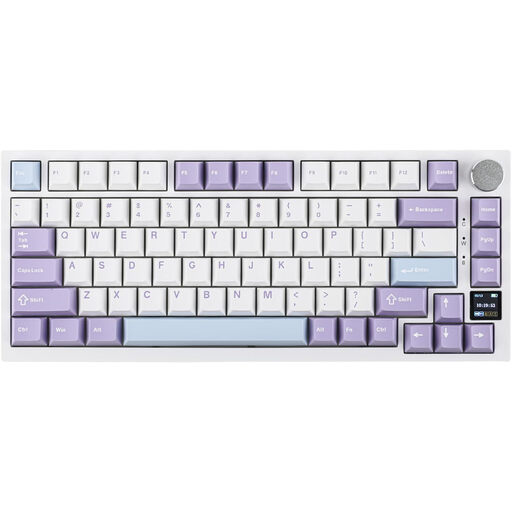
Ajazz AK820 Pro 75% Mechanical Tri-Mode Keyboard, QWERTY US
Why it stands out: The AK820 Pro features an interactive TFT color screen. At a glance, you can check the battery life, connection mode, time, or even display a custom GIF. Paired with a gasket mount structure and multiple layers of sound-dampening foam, it delivers a first-class typing experience and visual customisation.
Advantages:
Who is it for? Techies, gamers, and professionals who love having visual feedback on their keyboard and are looking for a premium, quiet typing experience.
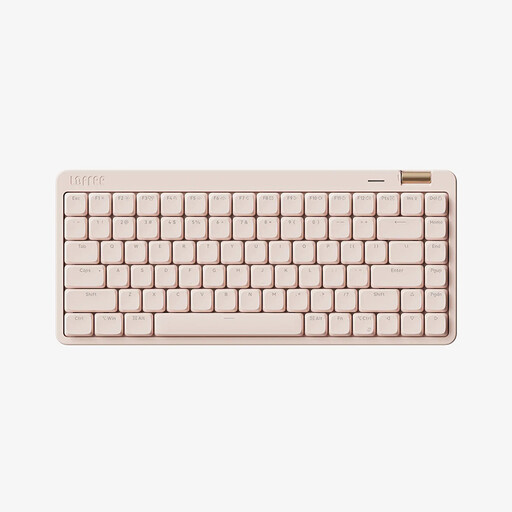
Lofree OE921 75% Office Tri-Mode Keyboard, QWERTY US
Why it stands out: The Lofree OE921 opts for a clean, minimalist approach with its design and Kailh low-profile switches. It offers a responsive yet quieter mechanical feel, with a shorter travel distance reminiscent of high-quality laptop keyboards, all in a very elegant 75% layout.
Advantages:
Who is it for? Professionals, writers, and mobile users who want a high-performance yet discreet mechanical keyboard with a polished aesthetic and a less pronounced typing feel than traditional mechanicals.

KEYSME Lunar 01 80% Tri-Mode Mechanical Keyboard, QWERTY US
Why it stands out: The Lunar 01 is more than a keyboard; it's an interactive object that personalises your desk. Its removable RGB light bar reacts to music and voice, and it even comes with magnetic rocket-shaped fidget toys. Beneath its playful exterior lies an excellent wireless TKL keyboard with a gasket mount structure, hot-swappableswitches, and a 4000mAh battery.
Advantages:
Who is it for? Creatives, streamers, and enthusiasts who want a high-performance device that stands out, offering both an excellent typing experience and unique features to spice up their setup.
Our selection is just a glimpse of what's possible, but the world of keyboards is vast. If you want to explore other layouts, designs, or price points, feel free to browse our complete collection.
? Explore Our Entire PC Keyboard Collection
The number one benefit is freedom. A cable-free desk is not only more aesthetically pleasing but also easier to organise. Furthermore, the ability to connect to multiple devices via Bluetooth simplifies life for those who juggle a desktop computer, a laptop, and a tablet. You get the exceptional typing comfort of a mechanical keyboard combined with the flexibility of wireless.
hot-swappable keyboard?A hot-swappable keyboard is one where the switches can be removed and replaced without soldering. This allows you to fully customise the feel and sound of your keyboard by trying out different types of switches, turning it into a truly unique peripheral.
Yes, absolutely. The physical key layout is nearly identical to most other Latin-based layouts (like AZERTY or QWERTZ). You just need to set your operating system (Windows or macOS) to your desired language layout, and the keys will map correctly. The printed characters on the keycaps won't match, but for those who are proficient in touch typing or for developers who often prefer the QWERTY layout for coding, this is a very common practice.