
Livraison le jour même ou le lendemain

Qualité garantie

Débloquez vos offres de bienvenue: Livraison GRATUITE | Jusqu'à -80 % | 30 jours d'essai gratuits à JoyPlus
Téléchargez l'application
A wireless mechanical keyboard can make typing more comfortable, free up desk space and connect to several devices. However, beware of specification sheets packed with appealing terms that do not necessarily guarantee an experience suited to your needs. A large battery, RGB lighting or a “gasket mount” design are not enough to determine whether a model is right for you.
Here are the key criteria to consider before buying, along with a selection designed for different types of user.
A tri-mode mechanical keyboard generally combines a wired USB-C connection, Bluetooth and a 2.4 GHz wireless connection with a USB receiver. Each mode is suited to different uses:
Before placing your order, check compatibility with Windows, macOS, iOS or Android, as well as whether a USB receiver is included if your computer does not have Bluetooth. Another point that is often overlooked is the layout. A US QWERTY keyboard does not use the French AZERTY arrangement. Accented characters and certain symbols may therefore take some time to get used to, or even require you to change your system language.
The 60%, 75%, 80%, 98% and 100% formats mainly refer to the key layout:
For someone working from home who regularly enters numbers, a 98% or 100% mechanical keyboard avoids having to rely on numerous shortcuts. For gaming, a 75% or 80% model leaves more room for your mouse. However, keep an eye on the number of keys actually available: a dial or TFT screen does not necessarily replace a dedicated key.
An RGB keyboard offers customisable backlighting, but this does not affect typing quality. Similarly, terms such as “creamy”, “thocky” or “silent” generally describe a sound profile or switch type, without guaranteeing the same result in every environment.
Noise depends on the switches, keycaps, plate, structure and sound-dampening materials. In a shared office, a linear or moderately tactile switch will often be more suitable than a clicky switch. If quiet operation is your priority, look closely at the switch type and sound-absorbing layers rather than relying on a simple marketing claim.
A hot-swappable mechanical keyboard lets you replace the switches without soldering. This makes maintenance and customisation easier: you can switch from a linear to a tactile switch, or replace a key whose operation has become inconsistent.
Check the stated compatibility, particularly between 3-pin and 5-pin switches. Actuation force, total travel and sound profile are also useful when comparing models. As for the lifespan figures provided by manufacturers, these remain theoretical specifications and do not guarantee the same operating life in every set of conditions.
A gasket mount design uses flexible elements between certain parts of the keyboard to alter the feel under your fingers and reduce certain resonances. Poron, IXPE, PET and silicone foams can also affect the sound and flexibility of the overall build.
These features do not replace good ergonomics. Also check the key height, adjustable feet, case weight and stability on your desk. An aluminium case generally provides greater rigidity and weight, while an ABS case is often lighter.
Capacity in mAh provides an initial indication, but battery life varies depending on the backlighting, connection mode and frequency of use. A 4 000 or 8 000 mAh battery may mean fewer recharges, but it is not enough to calculate an exact operating time.
To help preserve your keyboard:
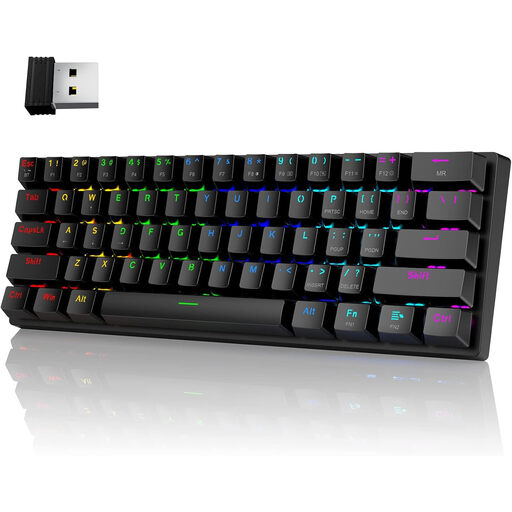
Why this choice suits this profile : Its 60% format with 61 keys is ideal for small desks, travelling and users who want to discover mechanical keyboards without a number pad.
The product listing specifies three connection modes and clearly states the US QWERTY layout. You can therefore check both points before buying.
Bluetooth, 2.4 GHz and USB-C, RGB backlighting with 16 modes, and a rechargeable 1 600 mAh battery.

Why this choice suits this profile : Its aluminium case, 75% format and VIA compatibility are aimed at enthusiasts who want to customise their keyboard’s layout and appearance.
The hot-swap function and quick disassembly mean you are not locked into a fixed configuration, making future upgrades easier.
Tri-mode connectivity, an 8 000 mAh battery, Leaf Spring mounting and Creamy Rye switches.
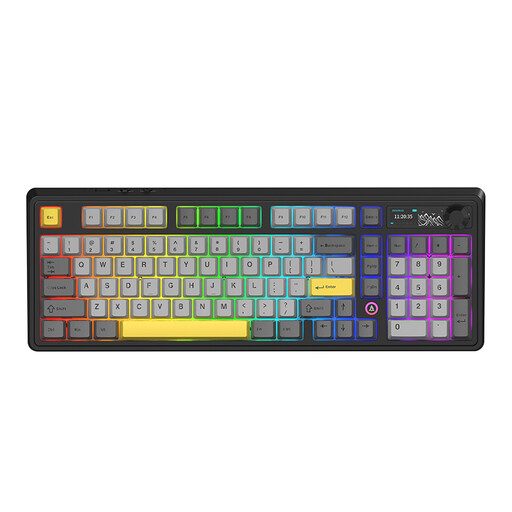
Why this choice suits this profile : Its 98% format retains a compact number pad, while the dial and TFT screen add practical controls for both work and gaming.
The product listing distinguishes between wired, Bluetooth and 2.4 GHz connections, and mentions a gasket structure alongside a hot-swap PCB.
97 keys, metal dial, TFT screen, RGB lighting and a stated 8 000 mAh battery with screen.
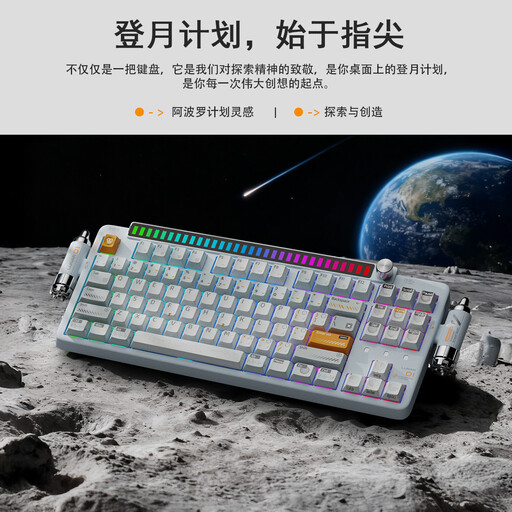
Why this choice suits this profile : Its 80% format retains the functions you need every day, while offering programmable controls and connectivity for multiple devices.
The product listing details 5-pin hot-swap functionality, three connection modes and compatibility with Windows, macOS, iOS and Android.
Programmable dial, PBT keycaps, removable light bar, 4 000 mAh battery and customisation software.
We have put together a complete, real-time-updated list of products that meet these demanding selection criteria and European safety regulations.
A 2.4 GHz connection with a USB receiver is generally the most suitable option for a desktop computer and gaming. Bluetooth is more convenient when switching quickly between devices. If you want the lowest possible latency while charging the keyboard, wired USB-C mode remains the simplest solution.
It depends on the switches, battery, typing frequency and maintenance. A hot-swappable model is easier to keep in good working order, as worn switches can be replaced without soldering. Battery life also varies depending on your use of RGB backlighting and the wireless connection mode.
Yes, provided you are happy to use a layout that differs from French AZERTY. The operating system can be configured for US QWERTY, but you will need to memorise the position of punctuation keys and accented characters. Check this before buying to avoid a difficult adjustment in everyday use.