
Livraison le jour même ou le lendemain

Qualité garantie

Débloquez vos offres de bienvenue: Livraison GRATUITE | Jusqu'à -80 % | 30 jours d'essai gratuits à JoyPlus
Téléchargez l'application
Say goodbye to cable clutter! A clean desk is often the foundation of a great work or gaming setup. Yet, for enthusiasts of precise and responsive mechanical typing, going wireless has long meant making compromises. Latency, poor battery life, and non-existent customisation... these drawbacks are now a thing of the past.
Whether you're a gamer chasing the perfect millisecond, a developer churning out lines of code, or simply an enthusiast of beautiful tech, the modern wireless mechanical keyboard offers a no-compromise experience. Our guide is here to break down the key features and present a selection of models that have won us over, all without the unnecessary marketing jargon.
Before we dive into our top picks, let's review the essential criteria for finding the perfect keyboard for your needs.
The size of the keyboard, or form factor, directly impacts your comfort and the amount of desk space you have for your mouse. The most common layouts are:
A good wireless keyboard shouldn't lock you into a single use case. The best models offer triple-mode connectivity to adapt to any situation:
One of the great joys of a mechanical keyboard is the ability to make it your own. There are two key terms to know:
We've selected three models that stand out from the crowd for their design, features, and excellent value for money.
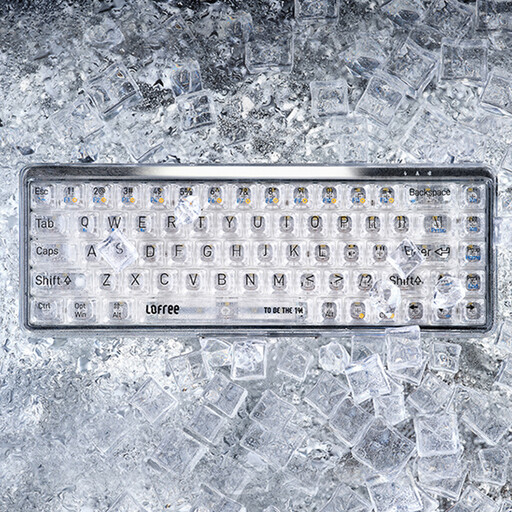
Why it stands out: It's impossible to miss: the Lofree OE907 stands out at first glance with its fully transparent design. With its polycarbonate keycaps and electroplated ABS shell, it brings a futuristic and bold touch to any desk. Its compact 68-key (65%) layout is perfect for optimising space.
Equipped with linear MX Jellyfish switches, it offers a smooth and quiet typing experience that's as pleasant for writing as it is for casual gaming. Its dual-mode Bluetooth 5.1 and wired USB-C connectivity ensures broad compatibility with Mac, Windows, and Android devices.
Pros:
Who is it for? For aesthetes and fans of minimalist desks. It's an excellent choice for a modern work environment, especially for Apple ecosystem users looking for a keyboard for Mac with a bold style.
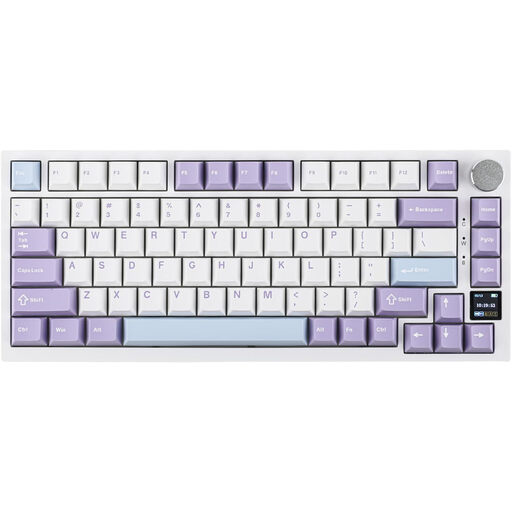
Why it stands out: The Ajazz AK820 Pro is the Swiss Army knife for keyboard enthusiasts. Its main draw is its customisable colour TFT keyboard with a screen. A gimmick for some, essential for others, this screen displays crucial information in real-time (battery life, connection status, time) and can even show your favourite GIFs.
But this keyboard is far from being just a gimmick. It incorporates high-end features: a Gasket Mount structure for superior typing comfort, a hot-swappable PCB for full switch customisation, and triple-mode connectivity (Bluetooth, 2.4GHz, USB-C). Its 75% layout is the ideal compromise between compactness and functionality.
Pros:
Who is it for? For tech enthusiasts, demanding gamers, and custom mechanical keyboard fans looking for advanced features, deep customisation, and a first-class typing experience.

Why it stands out: With the AJAZZ AK980 V2, you no longer have to choose between a compact form factor and a number pad. Its 98% layout (97 keys) retains the numpad in a condensed arrangement, offering nearly all the functionality of a full-size keyboard in a chassis with a smaller footprint.
It also packs highly sought-after features: a Gasket Mount structure, hot-swappable PCB, and triple-mode connectivity. Its added bonus? A metal control knob, which is very handy for adjusting volume or scrolling, and a very high-capacity battery (up to 10000mAh on some versions) for marathon battery life.
Pros:
Who is it for? For professionals, developers, and anyone who frequently uses a number pad but wants a less cluttered desk. It's the ultimate all-rounder, a high-performance and durable keyboard built for intensive use.
This selection is just a taste of the world of wireless mechanical keyboards. From layouts and switches to designs, the choice is vast.
? Discover our complete collection of Bluetooth keyboards
1. What's the difference between a mechanical keyboard and a membrane keyboard? On a membrane keyboard, each key press pushes down on a rubber dome, resulting in a typing feel that is often described as mushy and imprecise. A mechanical keyboard, on the other hand, has a dedicated mechanical switch under each key. The result is crisp tactile feedback, superior responsiveness, and much greater durability.
2. Is a wireless mechanical keyboard suitable for gaming? Absolutely. Modern keyboards equipped with a 2.4 GHz wireless connection offer latency so low that it's indistinguishable from a wired connection for the vast majority of gamers. This technology makes them a perfectly viable option, even for e-sports.