
Livraison le jour même ou le lendemain

Qualité garantie

Débloquez vos offres de bienvenue: Livraison GRATUITE | Jusqu'à -80 % | 30 jours d'essai gratuits à JoyPlus
Téléchargez l'application
The world of wireless mechanical keyboards is booming, to the point where it's become a real jungle. With all the different layouts, switches, and connectivity options, it's easy to get lost. Whether you're looking for the perfect typing feel for gaming, a reliable work tool for a clean desk setup, or simply a beautiful object, it's hard to know where to start.
This guide is here to break down the essential features and present our selection of models that truly stand out. Our mission? To give you all the keys to making the right choice—one that genuinely meets your expectations.
Before we dive into our top picks, let's review the technical criteria you need to know to narrow down your search.
Versatility is a key factor. A good modern wireless mechanical keyboard should offer three connection modes:
The great joy of a mechanical keyboard is the ability to tailor it to your liking.
For purists, the internal structure of the keyboard is as crucial as the switches. Gasket Mount technology is all the rage. The principle? The plate supporting the switches isn't screwed to the chassis but "floats" between silicone or Poron gaskets. The result is a softer, more flexible typing experience and a much deeper, more pleasant sound that dampens vibrations and unwanted noise.
Here are the models that, in our opinion, check all the boxes for performance, versatility, and customisation in 2026.

Why it stands out?: The AK980 V2 is an all-in-one solution that combines a 98% layout (nearly full-size, but more compact) with cutting-edge features. Its TFT screen and metal control knob make it as practical as it is stylish, while its 10,000?mAh battery promises record-breaking autonomy.
Highlights?:
Who is it for?? For professionals who want a numpad without the bulk of a classic 100% keyboard, as well as for gamers who love a feature-rich command centre.
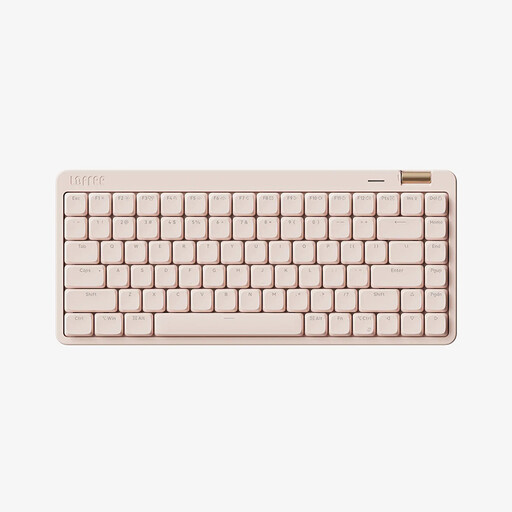
Why it stands out?: The Lofree OE921 focuses on a clean design and silent typing. With its compact 75% layout and low-profile switches, it offers an experience close to that of a laptop, but with the precision and sturdiness of a true mechanical keyboard.
Highlights?:
Who is it for?? Ideal for the office, creative professionals, and anyone who prioritises a polished aesthetic and discreet typing without compromising on mechanical quality.
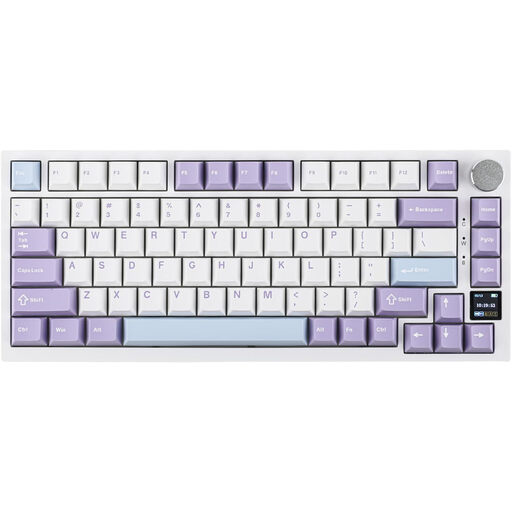
Why it stands out?: The AK820 Pro makes technologies usually reserved for high-end custom keyboards accessible to everyone. Its Gasket Mount structure, combined with a flexible polycarbonate (PC) plate and multiple layers of sound-dampening foam, makes it a champion of acoustic and tactile comfort.
Highlights?:
Who is it for?? For tech enthusiasts, demanding gamers, and anyone who wants to get a taste of the custom mechanical keyboard experience without getting their hands dirty.
Our selection highlights models with distinct profiles, but the market is full of alternatives. To explore other layouts, designs, or price points, feel free to browse our full catalogue.
? Discover Our Full Range of Wireless Bluetooth Keyboards
Membrane keyboards, found on most laptops and standard office keyboards, rely on a rubber dome under each key. The result is an often mushy typing feel and a lack of precision. In contrast, a mechanical keyboard uses an individual switch for each key. This provides far better responsiveness, rock-solid durability, and a unique typing sensation (tactile, linear, or clicky).
Yes, without a shadow of a doubt. Thanks to 2.4?GHz wireless technology, modern keyboards boast response times of less than 1?ms, a latency that is imperceptible to humans and therefore equivalent to wired performance. The proof? Professional gamers widely use wireless peripherals in competitions, a testament to their reliability and performance.
A keyboard is called hot-swappable when its mechanical switches can be removed and replaced without any soldering. This allows you to fix a faulty switch in an instant or, more interestingly, to customise your typing feel by testing different types of switches (linear, tactile, etc.) on the same keyboard.