
Livraison le jour même ou le lendemain

Qualité garantie

Débloquez vos offres de bienvenue: Livraison GRATUITE | Jusqu'à -80 % | 30 jours d'essai gratuits à JoyPlus
Téléchargez l'application
Ditching your old membrane keyboard for a wireless mechanical keyboard? It's a night-and-day difference. A revolution for your typing comfort and gaming performance. Say goodbye to mushy, unresponsive typing. The result: more precision in your games, unparalleled comfort for writing or coding, and a desk finally free from cable clutter.
The catch is that the market is a jungle: form factors, switch types, connectivity... it's hard to find your way. As a product manager at Joybuy, I'm here to cut through the noise. This guide breaks down the essential criteria and presents our selection of the best models for 2026, whatever your needs may be.
Before we dive into our top picks, let's review the 3 key points that will make all the difference.
The size of your keyboard, or its "form factor," dictates your desk layout and your comfort.
The switches, hidden under each keycap, are the soul of your keyboard. They define the typing feel. There are three main families:
One last point: the hot-swappable mechanical keyboard option. This allows you to change switches on the fly, without any soldering. It's a major advantage for extreme customisation and easy repairs.
A good wireless mechanical keyboard must be versatile. It usually offers three connection modes to juggle between your devices (PC/Mac):
Let's get down to business. Here are the models that caught our eye, each with its own strengths.
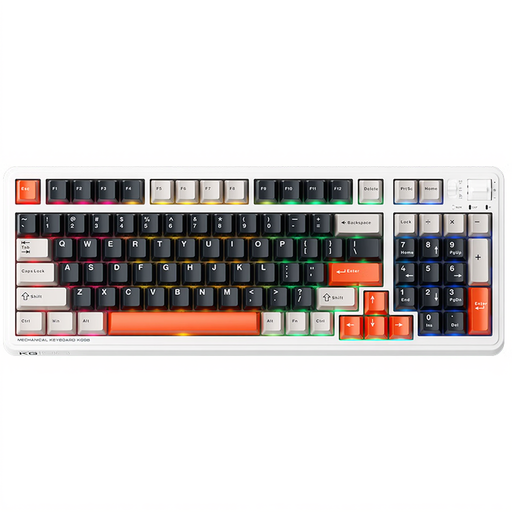
The ultimate Swiss Army knife: The Machenike KG98 is the king of balance. Its 96% form factor achieves the feat of retaining almost all the keys of a full-size keyboard, including the number pad, in a frame that's barely wider than a TKL. Its triple connectivity (2.4 GHz, Bluetooth, wired) makes it ultra-versatile. The icing on the cake is its pre-lubricated linear switches, which offer a smooth and quiet typing experience right out of the box.
Highlights:
Ideal for: Those who want a single keyboard for everything (gaming, working) and who demand a clean desk setup without sacrificing the number pad.
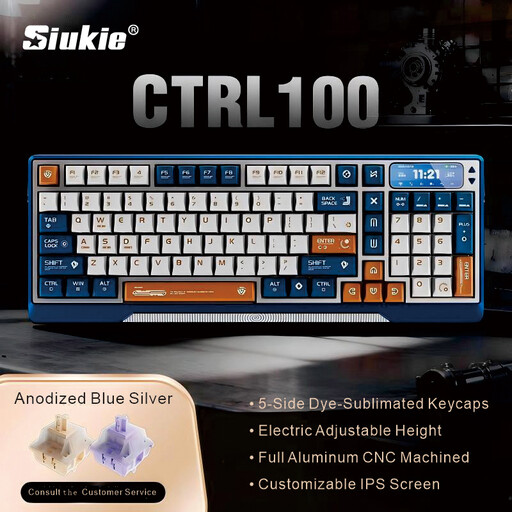
The technology showcase: More than just a keyboard, the Siukie CTRL100 is a true object of desire. Its CNC-machined aluminum chassis exudes quality and ensures rock-solid stability. But its craziest feature is its motorized elevator and customizable IPS screen for displaying stats, GIFs, or notifications. Its Gasket Mount structure completes the package by dampening keystrokes for a muted sound and premium comfort.
Highlights:
Ideal for: Tech enthusiasts, developers, and creatives looking for the centerpiece of their setup—a keyboard that makes a statement with its design, innovations, and typing comfort.
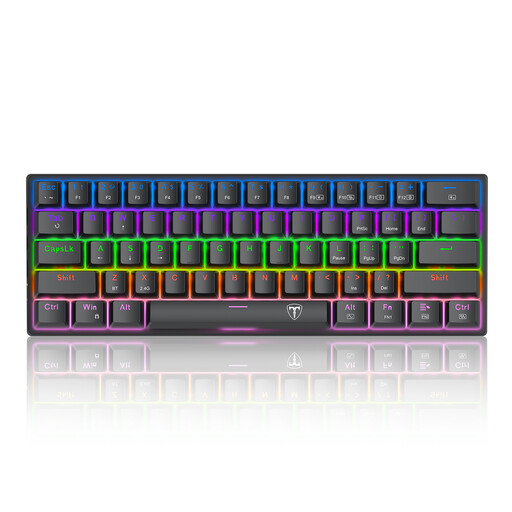
The FPS specialist: Admittedly, it's wired, but this model is a must-have for those obsessed with compactness. Its 60% form factor frees up maximum space for wide mouse movements, a decisive advantage for FPS players. Its wired connection is a guarantee of zero latency and absolute reliability. As for its blue switches, their tactile feedback and crisp "click" will delight fans of strong feedback.
Highlights:
Ideal for: FPS gamers, digital nomads, and anyone with a tiny desk for whom responsiveness takes priority over the freedom of wireless.
Our selection is just a gateway. The world of mechanical keyboards is endless, especially when it comes to customisation. To create a truly unique keyboard, start by changing its look: explore our selection of gaming keycaps and find the set that's right for you.
The QWERTY keyboard is the international layout, almost universal in gaming and development. The keyboards in our selection are QWERTY. AZERTY is the standard specific to France and Belgium. Switching to QWERTY requires a short adjustment period, but many now swear by it for gaming or coding. Rest assured, it's very simple to configure Windows or macOS so that a physical QWERTY keyboard types in AZERTY.
For the most part, yes. An RGB keyboard is primarily a customisation tool to match your keyboard with the rest of your setup. However, it does have a practical benefit: it makes the keys perfectly legible in the dark. Some games and software can even use it to display visual information, like a low health alert or a notification.
A hot-swappable mechanical keyboard allows you to change the switches one by one, without taking out a soldering iron. This offers a huge twofold advantage: