
Livraison le jour même ou le lendemain

Qualité garantie

Débloquez vos offres de bienvenue: Livraison GRATUITE | Jusqu'à -80 % | 30 jours d'essai gratuits à JoyPlus
Téléchargez l'application
By the Joybuy product experts, 2026-07-05
The appeal of a clean, minimalist desk, free from the inevitable tangle of cables, is undeniable. Yet, for typing enthusiasts, developers, and gamers, going wireless comes with its own set of questions: Will latency be an issue? Will the battery life hold up? And most importantly, how do you navigate the jungle of available options?
This guide is here to demystify the world of the wireless mechanical keyboard. We'll break down the essential criteria to consider before you buy and present a selection of models that stand out for their features, design, and versatility. The goal: to help you find the perfect match that fits your needs exactly.
The world of mechanical keyboards can quickly become overwhelming. To help you see clearly, here are three key points to check before you make a purchase.
The form factor determines the keyboard's size and, therefore, which keys are present. There's no right or wrong choice here; it all depends on your desk space and typing habits.
What makes a mechanical keyboard special is, above all, its potential for customisation.
Versatility is king: a good wireless mechanical keyboard must juggle multiple connection modes to adapt to all your devices and use cases.
Let's get down to business with a few models that perfectly embody the richness and innovation of the current market.

Highlights: The AK980 V2 is a true Swiss Army knife. Its 98% layout condenses a full keyboard experience into a more compact chassis. The inclusion of a metal control knob and a customisable TFT screen makes it ideal for demanding users who like to keep control and essential information at a glance.
Pros:
Who is it for?: For developers, content creators, and power users who want an ultra-functional keyboard that combines productivity and customisation, without sacrificing the number pad.
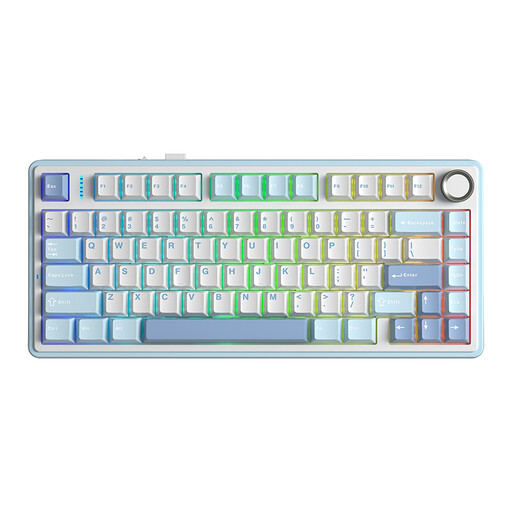
Highlights: The AULA F75 is often considered the ideal entry point into the world of the custom mechanical keyboard. Its 75% form factor works wonders, offering a perfect balance between compactness and ergonomics. Its greatest strength is an amazing out-of-the-box typing experience, thanks to pre-lubricated switches and a meticulously engineered internal design.
Pros:
Who is it for?: For gamers and typing enthusiasts looking for a compact, high-performance keyboard with an excellent feel right out of the box, without having to get their hands dirty.
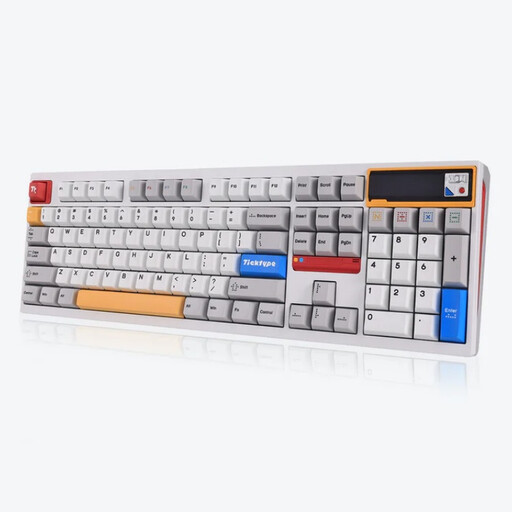
Highlights: The Ticktype DP104 plays in the big leagues with its fully machined aluminium chassis. Its weight and rigidity give it rock-solid stability on the desk. It stands out with its Leaf Spring mount, an alternative to the gasket mount that offers a unique rebound, and its customisable pixel art screen for a fun touch.
Avantages:
Who is it for?: For discerning enthusiasts seeking an uncompromising typing experience and build quality, who love to fine-tune their keyboard's aesthetics and sound down to the smallest detail.
Our selection is, of course, just a taste of what's out there. Every user is unique, with their own preferences for form factor, typing feel, or design.
To explore other models, discover new form factors, or find the perfect mouse to complete your setup, feel free to browse our full catalogue.
? Discover our complete collection of wireless keyboards and mice
Absolutely, provided you use the 2.4 GHz connection via the USB dongle. This technology offers latency so low it's imperceptible and rivals wired keyboards for most gamers. Bluetooth, on the other hand, should be avoided for competitive gaming due to its more noticeable latency.
This is the magic of mechanical keyboards!
Maintenance is quite simple. A regular blast of compressed air is enough to handle dust. For a deep clean, use a keycap puller to remove them. The advantage of a hot-swappable model is that you can also remove the switches with the provided tool to clean the plate or even lubricate them yourself. This is a common practice in the custom mechanical keyboard community to refine the sound and smoothness of the typing experience.