
Livraison le jour même ou le lendemain

Qualité garantie

Débloquez vos offres de bienvenue: Livraison GRATUITE | Jusqu'à -80 % | 30 jours d'essai gratuits à JoyPlus
Téléchargez l'application
The world of wireless mechanical gaming keyboards can be dizzying. Between latency, switch types, form factors, and connectivity, it's easy to get lost. Don't panic?: this guide is here to cut through the noise and help you make the right choice, far from the marketing jargon.
As the Head of Product Selections at Joybuy, my mission is to sift through the options to bring you only the most relevant and high-performing models. Let's review the criteria that truly matter before diving into a selection of keyboards suited for every need and budget.
Before jumping into product pages, let's break down the three criteria that will make a real difference, whether for gaming or daily typing.
The size of your keyboard, or its "form factor," directly impacts the ergonomics of your gaming and workspace.
A modern wireless mechanical gaming keyboard typically includes several connection modes.
Customisation is at the heart of the mechanical keyboard experience.
We've selected three models that stand out from the crowd, each with its own strengths.

Why It Stands Out
The AJAZZ AK980 V2 is a true Swiss Army knife for demanding users. Its 98% layout achieves the feat of retaining the number pad in a more compact chassis. Its "Gasket" mount structure and multiple sound-dampening layers ensure a soft and remarkably quiet typing experience. The icing on the cake is the TFT screen and control knob, which add a very practical modern touch for daily use.
Pros
Who Is It For?
For gamers and creators who want an ultra-complete, customisable mechanical keyboard that is packed with features and offers a premium typing experience.

Why It Stands Out
This keyboard focuses on minimalism and mobility. Its 60% form factor frees up considerable desk space, a decisive advantage for FPS players and their wide mouse movements. Despite its slim profile, it doesn't forget the essentials?: triple connectivity and full RGB lighting are included.
Pros
Who Is It For?
For competitive gamers who need every square inch for their mouse, and for nomads who want a high-performance gaming keyboard that slips into any backpack.
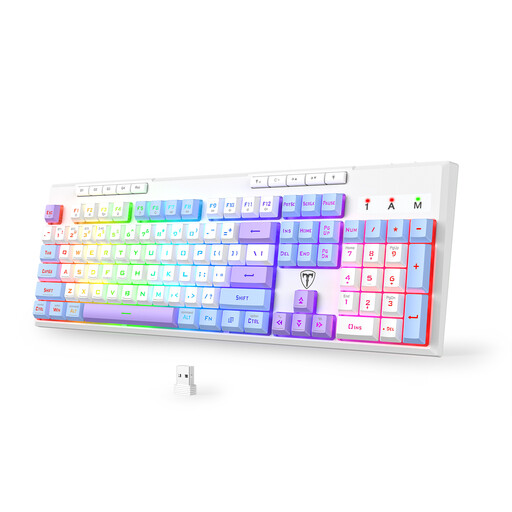
Why It Stands Out
This model is for those who want it all, with no compromises. It combines a full 104-key layout, including a number pad, with the freedom of triple-mode wireless connectivity. The addition of 6 programmable macro keys turns it into a formidable weapon, both in-game and for repetitive tasks.
Pros
Who Is It For?
For fans of MMORPGs or simulation games, and more generally, anyone who can't live without a number pad but also wants the modern features of a wireless gaming keyboard with macros and RGB.
A good keyboard is great. But for a truly complete gaming setup, a high-performance mouse is just as crucial. Take a look at our selection of RGB gaming mice to create the perfect pair with your new keyboard.
1. What's the difference between a 2.4 GHz and a Bluetooth connection for a gaming keyboard?
The 2.4 GHz connection (via a USB dongle) is built for speed?: its latency is virtually zero, which is essential for competitive gaming. It's the performance mode. Bluetooth, on the other hand, is the champion of versatility?: it connects to anything (PC, tablet, etc.) without a dongle, but with slightly higher latency. It's best reserved for office work, browsing, or less demanding games.
2. What does a hot-swappable mechanical keyboard mean?
It's a keyboard that lets you change its mechanical switches (the components under the keycaps) as easily as Lego bricks, without any soldering. The benefit? You can experiment with different types of switches (linear, tactile, clicky) to find the typing feel that's perfect for you, or simply replace a faulty switch in seconds.
3. Is a QWERTY layout a problem for users in non-QWERTY regions?
Absolutely not, in most cases. Operating systems like Windows or macOS allow you to select a software layout (like AZERTY, QWERTZ, etc.), even if the keyboard is physically QWERTY. This means you can type as you normally would. The only "catch" is visual?: the key labelled 'Q' will type an 'A', the 'W' key a 'Z', and so on. If you touch-type without looking at your fingers, you won't even notice the difference.