
Livraison le jour même ou le lendemain

Qualité garantie

Débloquez vos offres de bienvenue: Livraison GRATUITE | Jusqu'à -80 % | 30 jours d'essai gratuits à JoyPlus
Téléchargez l'application
A clutter-free desk, absolute freedom of movement, and flawless responsiveness: that's the promise of an excellent wireless mechanical gaming keyboard. However, faced with a jungle of layouts, connections, and customization options, making the right choice can quickly become a headache. Should you opt for an ultra-compact form factor? Is a 2.4 GHz connection truly essential?
This guide is here to help you see things more clearly. Our mission: to help you decode the technical jargon to find the keyboard that perfectly meets your needs, whether you're a hardcore gamer, a tech enthusiast, or a professional looking for an optimized setup.
Before diving into our top picks, let's review the essential criteria that will guide your choice.
The size of your keyboard directly impacts your ergonomics and the space available for your mouse—a crucial factor in gaming.
Wireless technology has made enormous strides, but not all connections are created equal.
A mechanical keyboard is, above all, a personal object. While RGB keyboard lighting has become an aesthetic standard, true customization lies elsewhere. A hot-swappable keyboard (with interchangeable switches) allows you to change the mechanical switches without any soldering. This lets you experiment with different typing feels (linear, tactile, clicky) and even repair a faulty switch yourself in seconds.
Here are three models that stand out for their features, design, and suitability for specific use cases.

Why it stands out: This keyboard focuses on ultra-portability and a compact design. Its 60% layout frees up maximum desk space, making it an excellent choice for gaming setups where every inch counts. Its tri-mode connectivity also makes it highly versatile for on-the-go use.
Pros:
Who is it for? For FPS gamers who demand maximum room for their mouse, nomads looking for a keyboard that's easy to slip into a backpack, and fans of minimalism seeking a clean, streamlined setup.
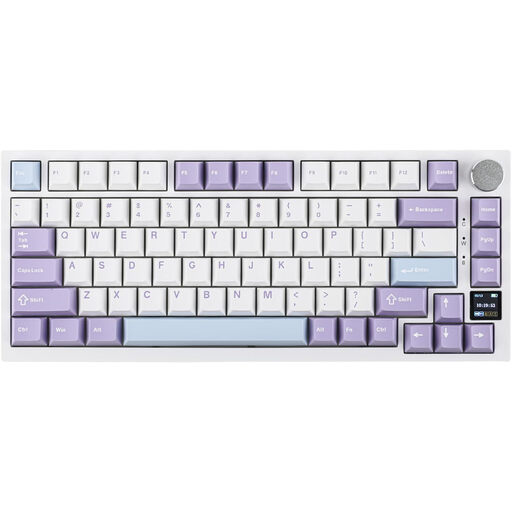
Why it stands out: The Ajazz AK820 Pro packs premium features usually reserved for much more expensive models. Its customizable color TFT screen acts as a dashboard, displaying the time, connection mode, or battery life. Its Gasket Mount structure, combined with sound-dampening foams, delivers a muted, quiet, and incredibly pleasant typing experience.
Pros:
Who is it for? For tech enthusiasts and custom keyboard hobbyists seeking a premium typing experience. It's also an excellent choice for professionals and creatives who juggle multiple operating systems and appreciate advanced features.
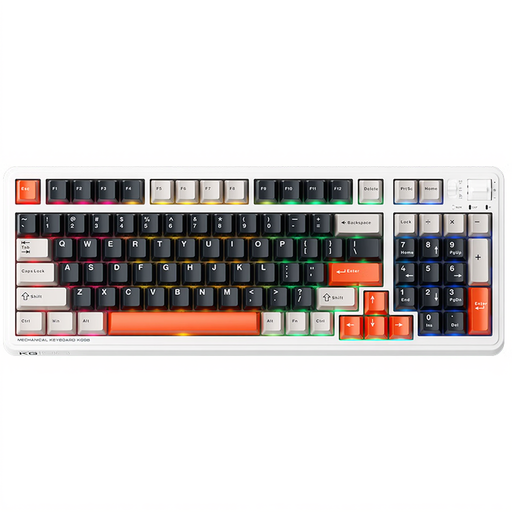
Why it stands out: The Machenike KG98 solves a common dilemma: how to keep a number pad without the bulk of a full-size keyboard. Its 96% layout (98 keys) is the answer. It packs all the keys, including the numpad, into a chassis barely wider than a TKL model.
Pros:
Who is it for? For users who can't live without the number pad for work (data entry, spreadsheets) but want a more compact wireless mechanical gaming keyboard for their gaming sessions. It's the ultimate hybrid keyboard.
To take customization even further, changing the keycaps is the easiest and most effective way to give your keyboard a unique look.
Discover our selection of mechanical keyboard keycaps to find the set that matches your style.
Absolutely, provided you use the 2.4 GHz connection. This technology now offers latency times so low (often 1 ms) that they are indistinguishable from a wired connection for the vast majority of gamers, including at a competitive level. Bluetooth, on the other hand, is perfect for productivity, casual gaming, or use with a tablet.
A hot-swappable keyboard (or one with "hot-swap sockets") means you can remove and replace the mechanical switches without needing a soldering iron. This allows you to fully customize the typing feel of your keyboard by trying out linear (smooth), tactile (with a slight bump), or clicky (with pronounced tactile and audible feedback) switches.
Although layouts like AZERTY are standard in France, many gamers and developers prefer the QWERTY keyboard for its optimized layout for shortcuts in many games and programming software. The adjustment is quick, and you just need to configure your operating system (Windows, macOS, Linux) to interpret the QWERTY keyboard as your local layout if needed. Ultimately, it's purely a matter of preference.