
Livraison le jour même ou le lendemain

Qualité garantie

Débloquez vos offres de bienvenue: Livraison GRATUITE | Jusqu'à -80 % | 30 jours d'essai gratuits à JoyPlus
Téléchargez l'application
Ditching the cables on your desk while maintaining flawless responsiveness: that's the dream for many gamers and professionals. The wireless mechanical gaming keyboard is the ideal solution, but navigating the different form factors, switch types, and connectivity options can quickly become a daunting task.
As a product expert at Joybuy, my mission is to guide you. This guide breaks down the essential technical points and presents a selection of models to help you make the right choice, based on your needs and budget.
Before diving into our selection, let's review the fundamental criteria that will guide your decision.
The size of your keyboard directly impacts the ergonomics of your gaming and workspace.
Pay attention to the layout: Many models on the international market use a US QWERTY layout. For optimal typing comfort, it's crucial to verify that the model you choose matches your regional standard (e.g., UK QWERTY, etc.).
The heart of a mechanical keyboard is its switches. There are three main families:
For customisation enthusiasts, a hot-swappable keyboard is the ultimate option. It allows you to change switches without any soldering, making it easy to adapt or repair your keyboard.
A good wireless keyboard should offer multiple connection options to suit any situation:
Battery life is also a key factor. Naturally, an RGB gaming keyboard will consume more power with the lighting enabled. Be sure to check the manufacturer's stated battery life, both with and without backlighting.
Here are a few models that stand out for their features and price point.
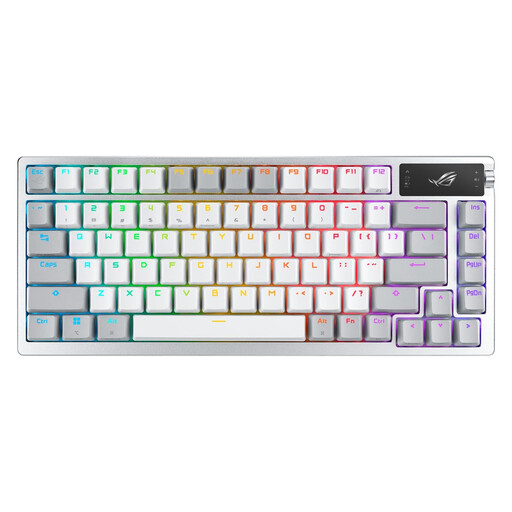
Why it stands out: The ROG Azoth is a technology powerhouse designed for enthusiasts. Its 75% form factor is an excellent compromise between compactness and functionality. It distinguishes itself with its integrated OLED screen, multi-function control knob, and especially its included full lubrication kit—a true invitation to deep customisation. Its gasket-mount design provides a soft and acoustically pleasing typing experience.
Pros:
Who is it for? Competitive gamers and customisation fans looking for a premium, out-of-the-box experience in their preferred regional layout, with all the tools needed to fine-tune their typing feel.
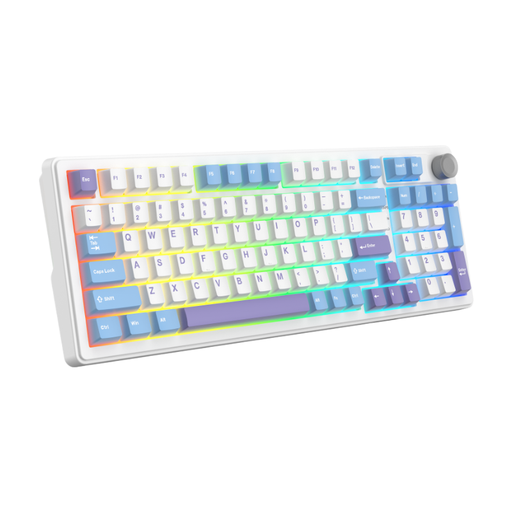
Why it stands out: This keyboard features a clever 96% layout that retains the number pad while being more compact than a standard keyboard. Its 5-layer internal structure (gasket) and pre-lubed linear switches are designed to deliver a soft, quiet, and comfortable typing experience, which is rare at this price point.
Pros:
Who is it for? Versatile users who want a high-performance keyboard for both gaming and office work without sacrificing the number pad, and who appreciate a quiet, comfortable typing feel. Note: This model typically comes in a QWERTY layout.

Why it stands out: With its 60% form factor, this keyboard is designed for portability and space optimisation. It frees up a considerable amount of surface area for mouse movements, a major advantage for FPS players. Its "clicky" blue switches provide very distinct tactile and audible feedback, which is popular among many mechanical keyboard fans.
Pros:
Who is it for? Gamers on the go, those with small desks, or fans of minimalist setups. It's aimed at users who are willing to adapt to a format without dedicated function or arrow keys and are comfortable with a QWERTY layout.
The world of mechanical keyboards is vast, and customisation is one of its most exciting aspects. Whether you want to change your switches, give your keyboard a new look with different keycaps, or simply explore other form factors, the possibilities are nearly endless.
To dive deeper, explore our dedicated category for Mechanical Keyboard Accessories.
Yes, absolutely. Modern keyboards using a 2.4 GHz wireless connection via a dedicated USB dongle offer polling rates of 1000 Hz, which translates to a latency of less than 1 millisecond. For the vast majority of gamers, including those at the highest level, their performance is now indistinguishable from that of a wired keyboard.
As QWERTY is the most common layout worldwide, many manufacturers logically prioritise it for international distribution. However, demand for models in other layouts (like AZERTY for France or QWERTZ for Germany) is growing rapidly, and more and more brands are offering versions adapted to local markets. It is therefore crucial to double-check this feature before any purchase to ensure you get the layout you need.