
Livraison le jour même ou le lendemain

Qualité garantie

Débloquez vos offres de bienvenue: Livraison GRATUITE | Jusqu'à -80 % | 30 jours d'essai gratuits à JoyPlus
Téléchargez l'application
A minimalist desk, liberated from the notorious nest of cables, promises a more serene and efficient workspace. But for gamers and professionals, saying goodbye to wires raises crucial questions: Will the responsiveness measure up? Will the battery life go the distance? Navigating the dense market of available models can be daunting.
This guide is here to break down the essentials of a great wireless mechanical gaming keyboard. We'll give you all the keys to find the model tailored to your needs, whether you're a fierce competitor, a productivity pro, or a customization enthusiast.
Before diving into our selection, let's review the technical criteria you need to master to make the right choice.
Wireless technology is the most critical aspect of your future keyboard. There are two main options:
More and more models are offering "tri-mode" connectivity (wired USB-C, 2.4 GHz, and Bluetooth), thus providing the best of all three worlds.
The size of the keyboard directly impacts your desk ergonomics and gaming comfort.
The real joy of a mechanical keyboard is being able to tailor it to your liking.
After the theory, comes the practice. Here are the models that particularly caught our attention, each catering to specific needs and profiles.
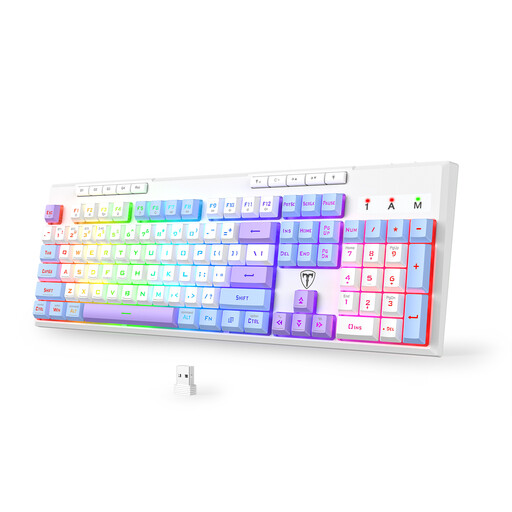
ET 100% Tri-Mode Gaming Keyboard QWERTY
Why it stands out? This is the reliable choice for those who want to go wireless without making any compromises. It features a full 104-key layout, number pad included, with all the flexibility of triple connectivity. Its XXL battery is a key selling point, promising weeks of use without a recharge.
Key features:
Who is it for? For gamers and professionals who want to experience the freedom of wireless without giving up the comfort of a number pad and dedicated function keys.
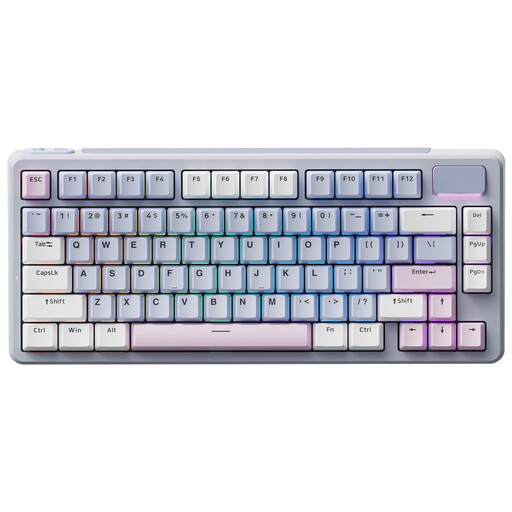
RAPOO V700DIY 75% Mechanical Tri-Mode Keyboards
Why it stands out? The V700DIY 75% is a true ode to customization. Its ultra-compact format frees up maximum desk space, while its internal Gasket Mount structure and hot-swappable feature make it the ideal blank canvas for creating a unique typing experience.
Key features:
Who is it for? For enthusiasts and tinkerers who love to test different switches and are aiming for a premium typing quality in a minimalist format.
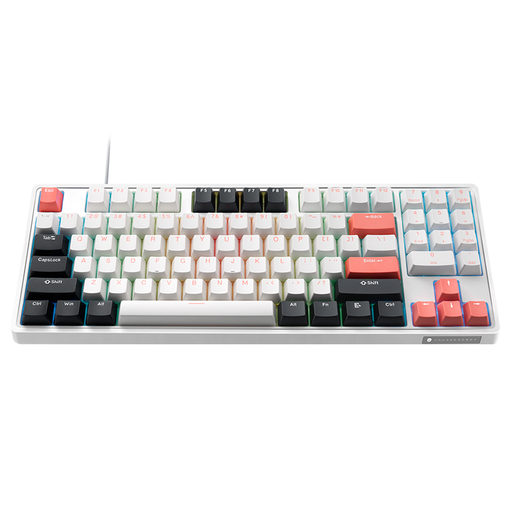
Thunderobot KG3089 80% Wired Mechanical Keyboard
Why it stands out? A wired model in a wireless selection? Yes, and it absolutely belongs here. Its unique 89-key layout achieves the feat of integrating a number pad into a TKL-sized frame. With its in-house red switches and hot-swappable capability, it's a powerhouse for those who swear by the absolute responsiveness of a wired connection.
Key features:
Who is it for? For gamers and users who want a compact keyboard without sacrificing the number pad, and for whom the stability of a wired connection remains non-negotiable.
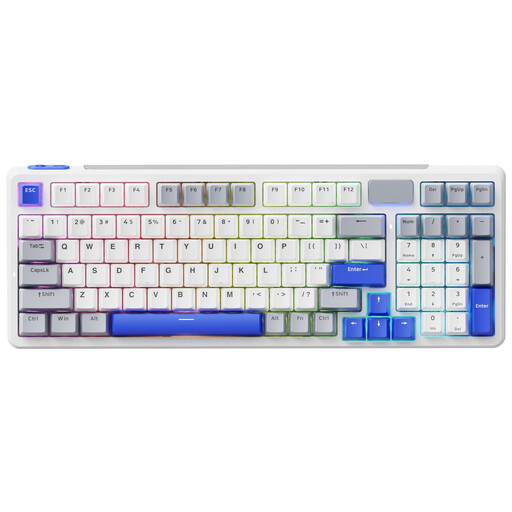
RAPOO V700DIY 96% Mechanical Tri-Mode Keyboards
Why it stands out? This is the master of smart compromises. The 96% layout manages to retain almost all the keys of a full keyboard, number pad included, but in a much more compact chassis. It adds to this the premium features of the V700DIY range, such as the Gasket Mount structure and tri-mode connectivity.
Key features:
Who is it for? For hybrid users: developers, creatives, and gamers who juggle productivity (and therefore need the number pad) with the desire for a clean desk and a custom-tailored typing experience.
Our selection highlights versatile and customizable models, but the world of keyboards is vast. If you haven't found your perfect match yet, other formats and features await you.
? Explore our entire collection of QWERTY keyboards
1. Is a 2.4 GHz or Bluetooth connection better for gaming? For gaming, especially on fast-paced and competitive titles, the 2.4 GHz connection is the clear winner. It guarantees minimal latency and rock-solid stability, very close to wired performance. Bluetooth, on the other hand, is perfect for office work, browsing, and more casual gaming, with the major advantage of being able to connect to multiple devices without needing a dongle.
2. What is a hot-swappable keyboard and why is it useful? A hot-swappable keyboard is one where you can change the switches without any soldering. It's ideal for experimenting with different types of switches (linear, tactile, clicky) to find the perfect typing feel, or simply to replace a faulty switch in the blink of an eye.
3. Is a mechanical keyboard necessarily very loud? Not at all! That's a cliché that dies hard. The noise depends entirely on the type of switch you choose. "Clicky" switches (often blue) are designed to emit a sharp, audible "click". "Tactile" switches (often brown) provide noticeable feedback under your finger but are much quieter. Finally, "Linear" switches (like red switches) offer a smooth and silent keystroke, making them the ideal choice for a shared office or for streaming.