
Livraison le jour même ou le lendemain

Qualité garantie

Débloquez vos offres de bienvenue: Livraison GRATUITE | Jusqu'à -80 % | 30 jours d'essai gratuits à JoyPlus
Téléchargez l'application
The world of the wireless mechanical gaming keyboard is brimming with promises: lightning-fast responsiveness, unparalleled typing comfort, endless customisation... Yet, behind the marketing hype lie pitfalls that can turn a sound investment into a costly disappointment. Before taking the plunge, you need to know how to spot the common misconceptions and overrated features.
Here are the two most common mistakes when buying a wireless mechanical keyboard:
To make an informed choice, you have to read between the lines of the spec sheet. Here are three essential parameters that separate an ordinary keyboard from a high-end peripheral.
A tri-mode keyboard is often marketed as the ultimate solution. But you need to understand what each mode does to match it to your needs:
The comfort and sound of a mechanical keyboard largely depend on its design. Two terms frequently appear in high-end jargon:
Desk space is a premium, and compact form factors are more popular than ever:
One point of caution, however, is the key layout. Many custom mechanical keyboard models are offered in QWERTY (US layout) by default. If you are accustomed to a specific regional layout (like AZERTY or QWERTZ), be sure to check if that version is available or if the model includes the necessary replacement keycaps.
The goal isn't to find the one perfect model, but the one that best fits your use case.
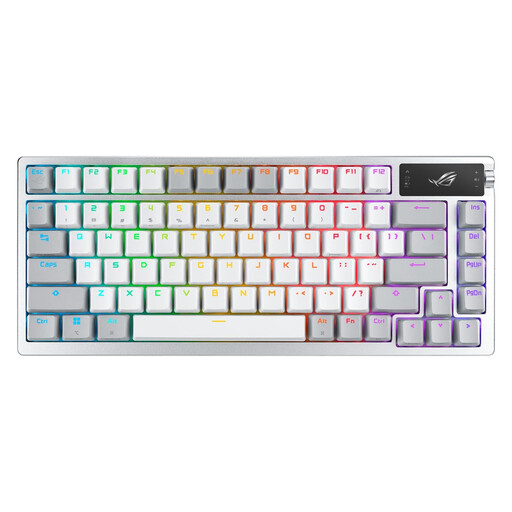
Why it's a good choice: Engineered for pure performance, this keyboard was designed for competitive gamers who tolerate no compromise on responsiveness and reliability. Its native AZERTY layout makes it ready to use out of the box for French users.
It incorporates 2.4 GHz ROG SpeedNova wireless technology for minimal latency, avoiding the Bluetooth-for-gaming trap. Its internal structure with a gasket mount and pre-lubed switches ensures a premium out-of-the-box experience.
Tri-mode connectivity, hot-swappable sockets for deep customisation, and a complete lubrication kit included for enthusiasts who like to get their hands dirty.
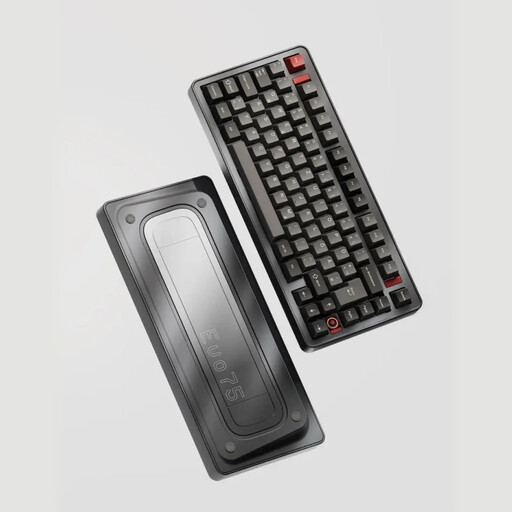
Why it's a good choice: For those who see their keyboard as the centrepiece of their setup. This model goes all-in on premium materials, build quality, and deep customisation potential, typical of the **custom mechanical keyboard** scene.
It isn't just "mechanical." It features a full aluminium chassis and a Leaf Spring mount—a sophisticated alternative to gasket mount—for top-tier acoustics and typing comfort.
100% aluminium chassis, compatibility with VIA programming software, hot-swappable sockets, and a massive 8000 mAh battery. Note: This is a US (QWERTY) layout, a common and popular choice in the custom community.
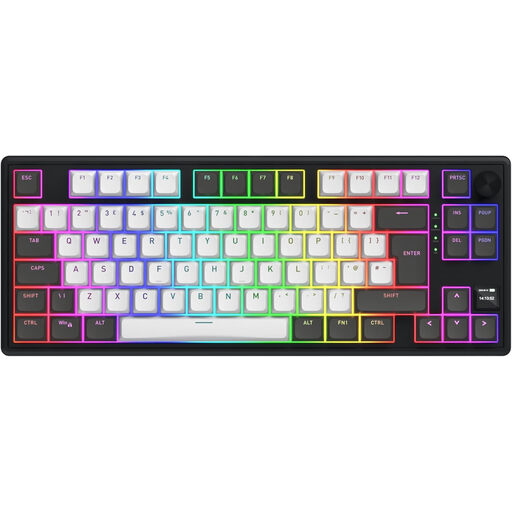
Why it's a good choice: Ideal for those who juggle work by day and gaming by night. It offers premium features in a discreet and efficient **wireless TKL** format, equally at home in an open office or during a gaming session.
It solves the tricky layout issue by including extra keycaps to easily switch to an AZERTY layout. Its silent linear HATOR Aurum Vanilla switches will be unobtrusive in an open office while remaining perfectly responsive for gaming.
Tri-mode connectivity (2.4 GHz, Bluetooth 5.3, USB-C), gasket mount structure with multiple layers of acoustic dampening, and an 8000 mAh battery for long-lasting battery life.
We have selected other models that meet our demanding selection criteria.
No, the process is designed to be very simple. You just use the included tool to remove the keycap, then use another specific, also-included puller to extract the switch. All that's left is to insert a new compatible switch (usually 3-pin or 5-pin) by gently pushing it in. No technical skills or soldering are required.
Battery life varies dramatically depending on two factors: the use of RGB backlighting and the connection mode. In 2.4 GHz mode with the lighting on, it's measured in tens of hours (e.g., between 30 and 60 hours). However, by turning off the RGB and switching to Bluetooth, some models can achieve several hundred or even over 1000 hours of use, as ASUS promises for its ROG Azoth under specific conditions.
For basic functions (typing, gaming), no software is required. However, to customise per-key RGB backlighting, create complex macros, reassign keys, or control an integrated screen, installing the manufacturer's software (like Armoury Crate for ASUS or SyncHUB for Hator) becomes essential. VIA/QMK compatible keyboards offer a powerful open-source alternative for advanced programming, without being tied to proprietary software.