
Livraison le jour même ou le lendemain

Qualité garantie

Débloquez vos offres de bienvenue: Livraison GRATUITE | Jusqu'à -80 % | 30 jours d'essai gratuits à JoyPlus
Téléchargez l'application
A clean, cable-free desk is often the first step toward greater focus and efficiency. But for demanding gamers and professionals, there's no reason to sacrifice performance or typing comfort for the sake of going wireless. Latency, battery life, customisation... the selection criteria are numerous, and it's easy to get lost.
This guide is here to break down the key features to consider and present a selection of keyboards that excel in their field, whether you're a pro gamer, a content creator, or simply an enthusiast of fine hardware.
Before diving into our selection, it's essential to understand the key points that distinguish a simple keyboard from a model built for performance and customisation.
The size of your keyboard directly impacts your ergonomics and the space available for your mouse.
One of the great joys of modern mechanical keyboards is their potential for customisation. Two terms are on everyone's lips:
Versatility is king. Most recent models offer "tri-mode" connectivity:
Some models take it a step further by integrating a gaming keyboard with a screen, displaying system information, notifications, or even custom animations. Mac and PC keyboard compatibility has also become the standard, with dedicated shortcuts to switch between the two operating systems.
Here are a few options that stand out for their specs and design.
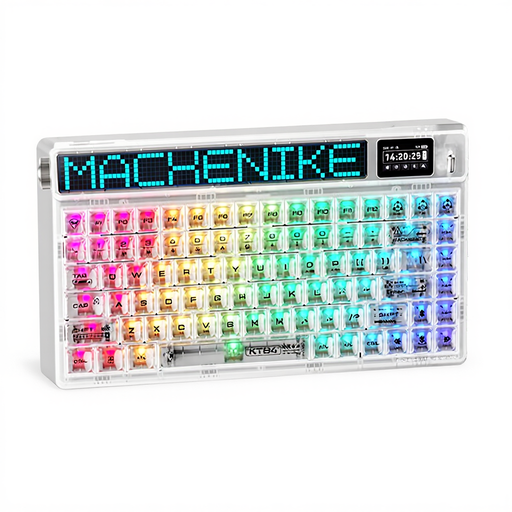
Why it stands out: The Machenike KT84 is a showstopper with its transparent design and customisable side LED matrix, for a look that is sure to turn heads. Its compact 75% layout frees up maximum desk space while integrating a small HD TFT screen to keep an eye on essential info.
Pros:
Who is it for? For aesthetes and tech enthusiasts who want a keyboard that is as beautiful as it is powerful, without compromising on cutting-edge features like gasket mounting.
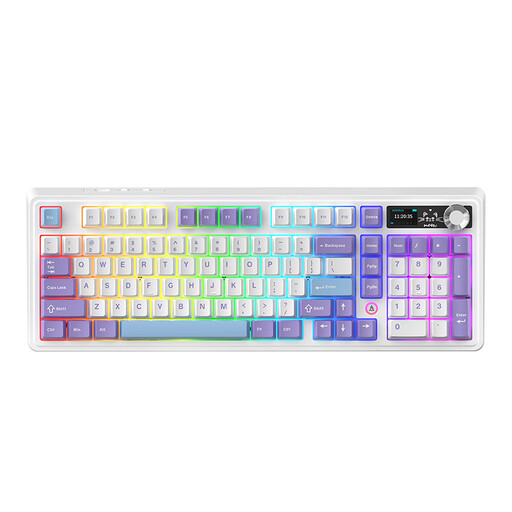
Why it stands out: The AJAZZ AK980 V2 is aimed at those who can't live without a number pad. Its 98% layout (97 keys) is barely wider than a TKL but retains almost all the keys of a full-size keyboard. It includes a metal control knob and a very high-capacity battery.
Pros:
Who is it for? For the professional or gamer who needs a number pad but wants to optimise their space. Its refined acoustics and massive battery life make it a powerful ally for daily use, both at work and in-game.
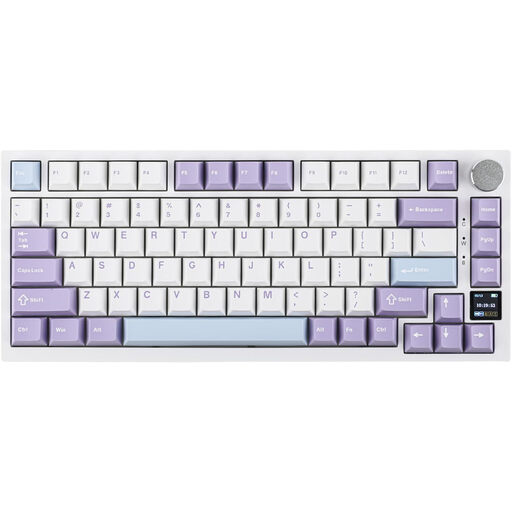
Why it stands out: The AK820 Pro focuses on the typing experience and interaction. Its TFT colour screen is not just for information; it allows you to switch connection modes or operating systems (Mac/Windows) on the fly. The combination of a gasket mount structure and "flex-cut" plates (PCB and plate) offers exceptional softness and cushioning with every keystroke.
Pros:
Who is it for? For the custom keyboard enthusiast and the technophile for whom typing comfort is king. This is the model that combines a top-tier tactile and acoustic experience with thoughtful high-tech features.
Our selection highlights some iconic models, but the choice is vast. If you have different needs or simply want to explore more options, take a look at our full catalogue.
? Discover Our Entire Monitors and Keyboards Collection
The gasket mount is a construction technique where the plate holding the switches is not screwed directly into the chassis. It is sandwiched between silicone or Poron gaskets. This isolates the plate from impacts and vibrations. The result: a softer, more flexible typing feel and a more muted sound, without the metallic ping sometimes heard on other mounting types.
Absolutely, especially if you love to experiment. A hot-swappable mechanical keyboard gives you the freedom to change the switches without a soldering iron. This allows you to test different types of switches (linear for gaming, tactile for writing, etc.) to find the perfect feel for you, or to easily replace a faulty switch.
Yes, most recent models are. Keyboards like the Ajazz AK820 Pro are designed to work on both Mac and PC. They often have a physical switch or a keyboard shortcut (sometimes even an option on the screen) to instantly switch the key layout (like swapping the CMD and ALT keys), ensuring a smooth, hassle-free experience on both systems.