
Livraison le jour même ou le lendemain

Qualité garantie

Débloquez vos offres de bienvenue: Livraison GRATUITE | Jusqu'à -80 % | 30 jours d'essai gratuits à JoyPlus
Téléchargez l'application
The market for wireless mechanical gaming keyboards is booming. Between the different layouts, switch types, and advanced features, it's easy to get lost. Are you looking for the responsiveness of wireless for gaming, the comfort of a premium typing experience for work, and a touch of customisation without having to build a custom keyboard from scratch??
This guide is here to help you make sense of it all. Our team of experts has decoded the spec sheets to bring you the most relevant models. We'll go over the essential features to consider and offer a selection of keyboards that combine performance, versatility, and design.
Before diving into our selection, here are the key criteria to help you refine your choice and master the technical jargon.
The key arrangement, or layout, directly impacts ergonomics and the amount of space on your desk.
These two terms have become must-haves in the world of modern "custom" keyboards.
Beyond the typing feel, some keyboards stand out with options that enhance the user experience.
Here are three models that pack the most sought-after features for gamers and tech enthusiasts in 2026.
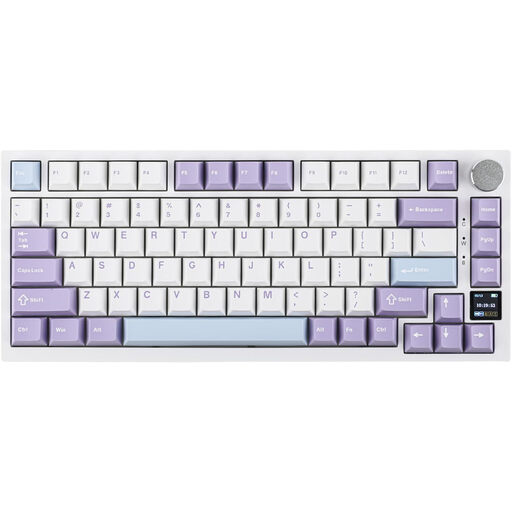
Why it stands out: The Ajazz AK820 Pro stands out with its interactive TFT color screen. At a glance, you can check the battery life, connection mode, or time, and even display your own GIF animations. It combines this technology with a Gasket Mount structure and multiple layers of sound-dampening foam for deep and satisfying typing acoustics.
Highlights:
Who is it for?? Ideal for the user seeking an out-of-the-box "custom" experience, packed with features and equipped with practical visual feedback thanks to its screen.
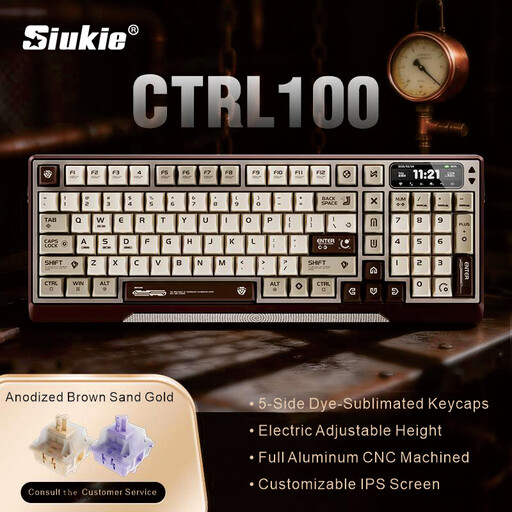
Why it stands out: The Siukie CTRL100 is a true piece of engineering. Its fully CNC-machined aluminum chassis gives it remarkable weight and rigidity. But its most unique feature is its motorised lifting mechanism, which allows for smooth and innovative tilt angle adjustment.
Highlights:
Who is it for?? For the aesthete who values premium materials, flawless construction, and a feature as innovative as it is unique. It's a true centerpiece that won't go unnoticed on a desk.
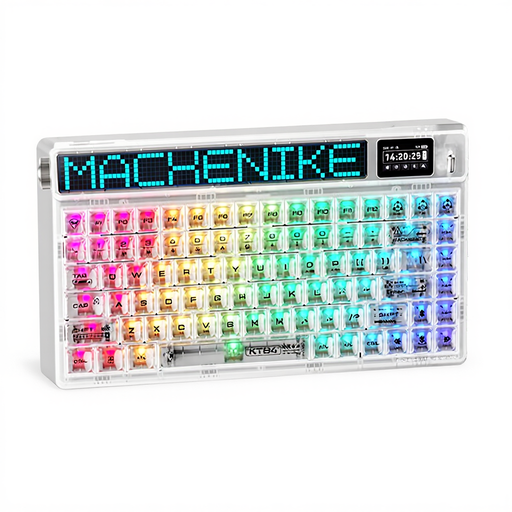
Why it stands out: The Machenike KT84-B84W banks on a bold aesthetic with its transparent design and customisable LED matrix on the side of the chassis. It combines a practical 75?% layout with an HD TFT screen and a Gasket Mount structure, offering a very complete package for fans of visual customisation.
Highlights:
Who is it for?? For the gamer or creator who places a high value on their setup's aesthetics. This is a keyboard designed to be seen and to offer a light show as impressive as its typing performance.
Our selection highlights models packing cutting-edge technology. However, the world of wireless keyboards is vast and varied. If you're looking for different layouts, other switch types, or options suited to a different budget, you'll find what you're looking for.
Discover our complete collection of wireless mechanical keyboards to find the perfect model for you.
A TKL (Tenkeyless) keyboard removes the numpad but keeps a near-standard layout for the rest of the keys, with a dedicated navigation cluster. A 75?% keyboard is even more compact: it squeezes all the keys, including the arrows and function row, into a single block for maximum space saving.
Yes, especially if you enjoy customising your gear or if you're unsure about which typing feel you prefer. The hot-swappable feature gives you the freedom to try linear (smooth), tactile (with a slight "bump"), or clicky (audible) switches without having to buy a new keyboard or break out the soldering iron.
Indirectly, yes. While a Gasket Mount structure doesn't increase response speed, it provides a much more comfortable and less rigid typing experience. By reducing impact and finger fatigue during extended gaming sessions, it can help you maintain a high level of performance over the long run. The icing on the cake is the muted acoustics, which many users find truly pleasant.