A streamlined desk, free from cable clutter, while maintaining rock-solid responsiveness for your gaming sessions: the wireless mechanical gaming keyboard has established itself as the new must-have for many gamers. But between the different form factors, switch types, and connection technologies, finding your way can quickly become a headache.
This guide is here to help you make sense of it all. We'll break down the essential criteria and present our selection of the best models currently available to help you find the keyboard that perfectly suits your needs and playstyle.
How to Choose the Right Wireless Mechanical Gaming Keyboard?
Before diving into our top picks, let's review the key points that will guide your choice.
Form Factor: TKL, 75%, or Compact?
The keyboard's form factor directly impacts your setup's ergonomics and your gaming comfort.
- Full-size (100%): The traditional keyboard with its number pad. Versatile, but it takes up considerable desk space.
- Tenkeyless (TKL): This format omits the number pad, freeing up precious space for your mouse. A wireless TKL keyboard is an excellent compromise for the majority of gamers.
- 75%: Even more compact than a TKL, it tightens up the navigation keys (arrow keys, Del, etc.) for additional space savings, while still retaining the function key row.
- 60% / 65%: These ultra-compact formats sacrifice the function and navigation keys, which remain accessible via key combinations. They are perfect for minimalist setups and mobile gamers.
Connectivity and Battery Life: 2.4 GHz or Bluetooth?
The wireless connection is the crucial element for gaming.
- 2.4 GHz Wireless: This is the gold standard for gaming. Via a USB dongle, it ensures near-zero latency, indistinguishable from a wired connection. This is the technology to prioritise for competitive gaming.
- Bluetooth: Perfect for versatility, a multi-device Bluetooth keyboard can switch seamlessly between a PC, tablet, or smartphone without a dongle. Its slightly higher latency makes it more suitable for office work or casual gaming.
- Battery Life: Nothing is worse than a gaming keyboard dying on you mid-game. Battery life varies enormously depending on the use of RGB backlighting. Some models last several hundred, or even thousands of hours with the lighting turned off.
Customisation: Switches and RGB Lighting
One of the greatest joys of a mechanical keyboard is the ability to customise it to your liking.
- Switches: This is the core component that defines the entire typing feel. The most well-known are Clicky (audible and tactile, like Blues), Tactile (quiet with a noticeable bump, like Browns), and Linear (smooth and fast, like Reds).
- Hot-swappable: A hot-swappable keyboard allows you to change switches on the fly, without breaking out the soldering iron. This is a highly sought-after feature for those who love to experiment to find the perfect keystroke.
- RGB Backlighting: More than just a gimmick, a mechanical RGB keyboard allows for per-key lighting customisation, whether for aesthetics or to highlight specific in-game commands.
Recommended Wireless Mechanical Gaming Keyboards
Here is our selection of models that stand out from the crowd and cater to different types of gamers.
ET 60% Tri-Mode Mechanical Keyboard

Why It Stands Out
This keyboard focuses on its ultra-compact 60% form factor and rock-solid connectivity. It offers a 2.4 GHz wireless connection for gaming, two Bluetooth modes to easily switch between multiple devices, and a wired USB-C option. An ultra-flexible solution for those looking to optimise their space.
Pros
- 60% Form Factor: Ultra-compact, it frees up maximum desk space and fits into any bag.
- Tri-Mode Connectivity: 2.4 GHz, Bluetooth, and wired for absolute versatility.
- Clicky Blue Switches: Provide very crisp tactile feedback and an audible click, which is particularly appreciated for typing.
- RGB Backlighting: 16 modes and 8 colours to customise your lighting atmosphere.
Who Is It For?
Perfect for mobile gamers or fans of minimalist setups who need to connect their keyboard to multiple devices (PC, tablet, etc.). Please note, this model has a QWERTY (US) layout: a crucial detail for die-hard users of other layouts.
View Product
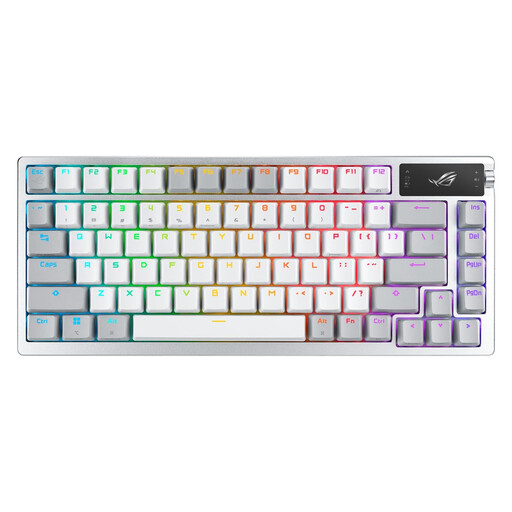
Asus ROG Azoth Wireless Gaming Mechanical Keyboard - AZERTY
Why It Stands Out
We're stepping up in quality with the Asus ROG Azoth, a real gem for enthusiasts. Its 75% hot-swappable form factor comes with unique features like an integrated OLED screen to display system info or animations, and a multi-function control knob. It even comes with a lubrication kit for the interchangeable switches, a detail that will delight customisation purists.
Pros
- 75% AZERTY Form Factor: Compact, but with all essential keys within easy reach.
- OLED Screen and Control Knob: For intuitive control and real-time info display.
- Premium Design: Silicone gasket mount for a softer and quieter typing experience.
- Fully Customisable: Hot-swappable keyboard delivered with a complete lubrication kit.
- Tri-Mode Connectivity: ROG SpeedNova 2.4 GHz wireless technology, Bluetooth, and wired.
Who Is It For?
For demanding gamers and mechanical keyboard enthusiasts who want a premium, ultra-customisable experience right out of the box.
View Product
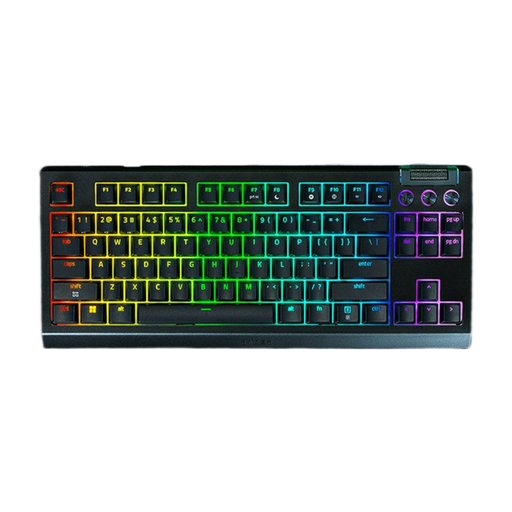
Razer BlackWidow V4 Tenkeyless HyperSpeed Wireless - AZERTY
Why It Stands Out
This wireless TKL keyboard from Razer is all about raw performance and endurance. It features Razer HyperSpeed wireless technology for a flawless connection and promises remarkable battery life. Its hot-swappable design (compatible with 3 or 5-pin switches) also makes it an excellent future-proof choice.
Pros
- TKL AZERTY Form Factor: The sweet spot, offering a perfect balance between compactness and functionality.
- Razer HyperSpeed Technology: Guarantees an ultra-fast and stable wireless connection, designed for gaming.
- Marathon Battery Life: Razer claims up to 980 hours of use in Bluetooth or HyperSpeed mode (RGB off).
- Hot-swappable Switches: The PCB is compatible with most switches on the market for limitless customisation.
- Razer Chroma RGB Ecosystem: Fully customisable per-key lighting that can be synchronised with your other Razer peripherals.
Who Is It For?
Gamers who want the assurance of a major gaming brand, a flawless wireless connection, and record-breaking battery life, while keeping the door open to customising their typing feel.
View Product
Looking for Other Options?
This selection is, of course, just a glimpse of the excellent models available on the market. Many other keyboards exist, with form factors, switches, and features to suit all tastes.
If your perfect match isn't here, feel free to browse our complete collection to unearth other gems.
Explore our collection of wireless gaming keyboards
Frequently Asked Questions (FAQ)
Is a wireless gaming keyboard really as responsive as a wired model?
Absolutely. Modern keyboards equipped with a 2.4 GHz wireless connection (via USB dongle) offer response times and polling rates so low that the difference from a wired keyboard is imperceptible to 99.9% of gamers, including at a high level. Bluetooth, on the other hand, is a bit slower and better suited for office or multi-purpose use.
What's the real difference between mechanical switch types?
It's all about the typing feel and sound:
- Linear (e.g., Reds): A smooth, fast, and quiet keystroke with no tactile feedback. Ideal for chaining actions quickly in-game.
- Tactile (e.g., Browns, Oranges): A noticeable tactile bump at the actuation point, but without the audible "click". It's the perfect compromise between gaming and writing.
- Clicky (e.g., Blues): The tactile bump is accompanied by a very distinct audible "click". Satisfying for typing, but can quickly become annoying for those around you.
How do I know if a keyboard is hot-swappable?
This is a major selling point, so manufacturers always highlight it. Look for "hot-swappable" in the product specifications. It means you can remove the switches with a small tool (often included) and replace them with other compatible models (usually 3 or 5-pin) without any soldering.
Recommended Products From Our Editors


