
Livraison le jour même ou le lendemain

Qualité garantie

Débloquez vos offres de bienvenue: Livraison GRATUITE | Jusqu'à -80 % | 30 jours d'essai gratuits à JoyPlus
Téléchargez l'application
A clean desk, free from the usual tangle of cables, is often the first step toward an immersive gaming setup and flawless concentration. But be warned: going wireless should never come at the cost of performance, especially when it comes to your primary weapon: the keyboard.
To help you navigate the options, we've broken down the essential features of a great wireless mechanical gaming keyboard and selected models that excel in their category, whether you're an esports pro or a content creator.
Before diving into our top picks, let's review the key criteria that will make all the difference in your day-to-day use.
Versatility is the name of the game for modern keyboards. A tri-mode keyboard gives you the best of all three worlds:
The soul of a mechanical keyboard is what happens under your fingertips. The experience hinges on the switches and keycaps.
The size of your keyboard has a direct impact on your desk ergonomics and freedom of movement.
Finally, one feature is non-negotiable: anti-ghosting. It ensures all your keystrokes are registered, even when you're chaining actions by pressing multiple keys at once.
Enough theory, let's get practical. Here are three models that caught our eye for their performance and smart market positioning.
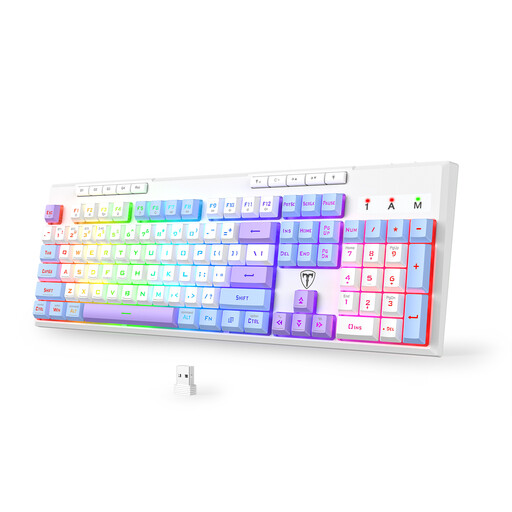
Why it stands out: This is the Swiss Army knife of our selection. It checks all the boxes: full-size layout, flawless connectivity, and marathon battery life, making it just as comfortable for work as it is for play.
Pros:
Who is it for? For gamers and remote workers who want a single keyboard for their desk, capable of effortlessly switching from an Excel spreadsheet to virtual battlefields without giving up the convenience of a numpad.
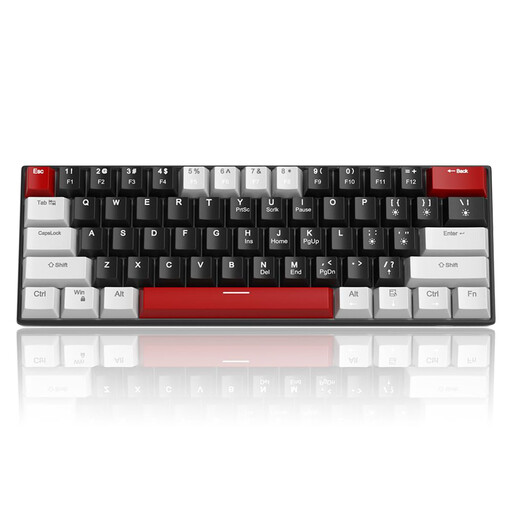
Why it stands out: Sure, it's wired, but this model earns its spot in our selection thanks to its ultra-compact form factor and aggressive price point. It's proof that you can get a high-performance keyboard without breaking the bank or cluttering your desk.
Pros:
Who is it for? For gamers on a tight budget, fans of minimalist setups, and nomads who frequent LAN parties and need a keyboard that's easy to toss in a backpack.
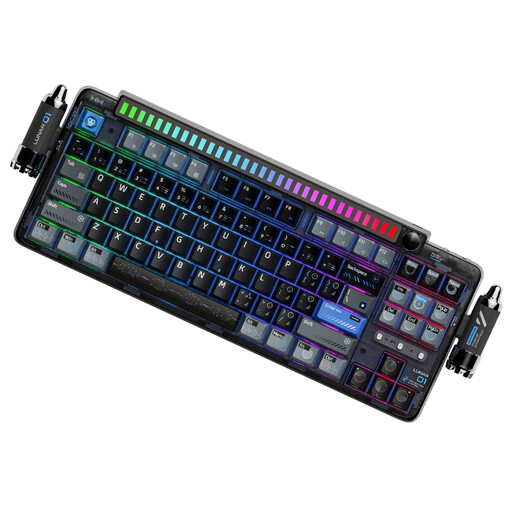
Why it stands out: This keyboard is a statement piece. It goes all-in on the typing experience and aesthetics. Its internal structure (Gasket-Mount) and unique details make it an object that's as beautiful to look at as it is satisfying to use.
Pros:
Who is it for? For enthusiasts, content creators, and streamers who want a refined typing sound, maximum customization, and a design that's sure to turn heads.
A great keyboard is the foundation. But for surgical precision in-game, you need a mouse that can keep up. A well-matched keyboard and mouse duo is the key to a responsive and cohesive setup.
? Discover our selection of USB-C mice to complete your arsenal
Q1: What exactly is anti-ghosting on a gaming keyboard? It's the technology that prevents your keyboard from getting confused when you press multiple keys at the same time. On a standard office keyboard, after a few keys are pressed, some keystrokes are no longer registered (this is the infamous "ghosting"). In a game that requires rapid combos, anti-ghosting is simply essential to ensure all your actions are recognized.
Q2: What's the difference between mechanical switches (Red, Blue, Brown)? Each color defines a unique typing feel:
Q3: Can a QWERTY keyboard really be used in a non-QWERTY country? Absolutely! While your local layout (like AZERTY in France or QWERTZ in Germany) is the standard, a huge number of gamers and developers swear by the QWERTY keyboard. Why? Because this layout is often more convenient for shortcuts in games and coding software. Furthermore, modern operating systems (Windows, macOS, Linux) allow you to instantly switch between your local layout and QWERTY with a simple shortcut (often Alt + Shift). This means you can type in your native layout on a physical QWERTY keyboard without any issues, or take advantage of the QWERTY layout for your gaming sessions.