
Livraison le jour même ou le lendemain

Qualité garantie

Débloquez vos offres de bienvenue: Livraison GRATUITE | Jusqu'à -80 % | 30 jours d'essai gratuits à JoyPlus
Téléchargez l'application
A wireless lavalier microphone can make your voice sound noticeably clearer, but product listings don’t always let you compare models on a level playing field. Between the promises of noise reduction, ranges measured in open spaces and connectors that sometimes don’t match, a hasty purchase can lead to dropouts, battery life that’s too short or a connection that simply won’t work with your phone.
This guide helps you identify the criteria that really matter before buying a wireless lapel mic, whether you’re a content creator, trainer, journalist, gamer or just an everyday user.
A range of 50 or 100 metres usually refers to ideal conditions: open space, few obstacles and limited interference. In a flat, a classroom or a busy street, the usable distance can be much shorter. For a vlog or an interview, a stable connection is worth more than an impressive figure on the spec sheet.
A microphone with noise reduction can tone down some ambient sounds. However, overly aggressive processing can alter the tone or clip the beginning of certain words. Models that offer multiple levels are easier to adapt to different situations. In a quiet room, it’s often better to dial back the processing, or even switch it off.
A Lightning receiver won’t plug in like a USB-C receiver. Also check compatibility with your phone, camera, tablet or computer. The phrase “universal” on a product page doesn’t let you off the hook when it comes to checking the port you have and the system you’re using.
For a wireless microphone for iPhone and Android, start by checking the accessories supplied and the type of receiver:
An adapter might be fine for charging but completely unable to transmit an audio signal. If possible, go straight for the version that matches your main device.
The advertised battery life needs to be weighed against how you’ll use it. For a long shoot, look at the transmitter’s run time, the receiver’s run time and the charging case’s capacity separately. Being able to charge while recording can be handy for a live stream or an online training session, as long as the cable doesn’t get in the way of your movement.
Lithium-ion batteries should be kept at a moderate temperature and away from moisture. A charging case makes transport easier, but it doesn’t let you off checking the battery level before each session.
When they’re listed, the sampling rate and audio resolution give you useful benchmarks. The hohem Wireless Lavalier Microphone, for example, claims transmission at 48 kHz/16 bits and a range of up to 100 metres in open space. These figures describe the product’s stated capabilities – they don’t guarantee the same results in every environment.
Local recording onto a TF card can act as a safety net during an interview. However, you’ll need a compatible card, which usually isn’t included. Also remember to test the sound level, the placement of the clip and any rustling noises caused by clothing.
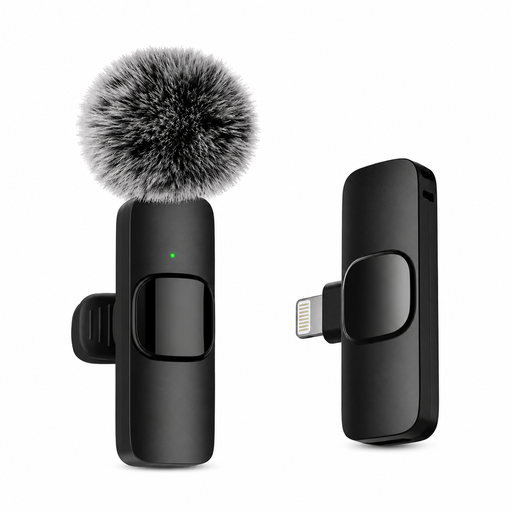
Why this pick suits this profile: its compact size makes it ideal for first attempts at video, video calls or interviews with an iOS device.
The listing mentions an iOS interface and an advertised battery life of 3 to 6 hours. Check this point before buying if you use Android or a USB-C device.
A single microphone in a mini format, with advertised noise and wind reduction.
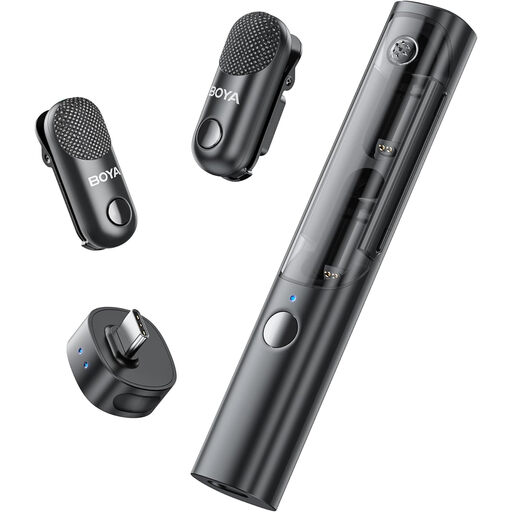
Why this pick suits this profile: with its two transmitters and USB-C receiver, this set is ideal for multi-speaker shoots on a compatible smartphone, camera or computer.
The listing advises switching off noise reduction in a very quiet studio if it alters the tone. This means you can tailor the setting to each scene.
Two transmitters, a charging case and a USB-C connection advertised for iPhone, Android and computer.
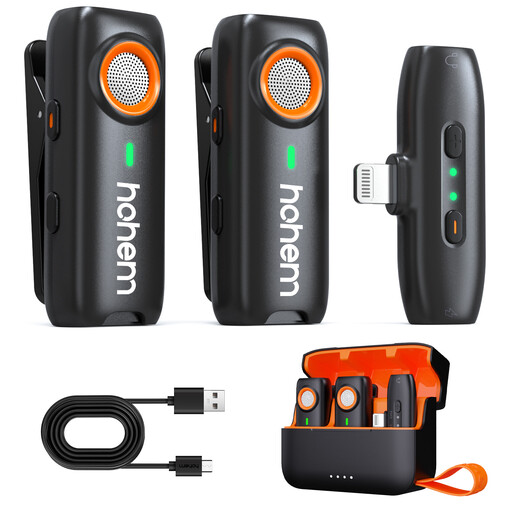
Why this pick suits this profile: local backup, remote control and the ability to charge while recording are especially useful for long shoots, interviews and reportage.
The three levels of noise reduction stop you from recording everything with maximum processing. The TF card provides a local copy, but it isn’t included.
Up to 20 hours of total battery life advertised with the case, plus local recording onto a TF card.
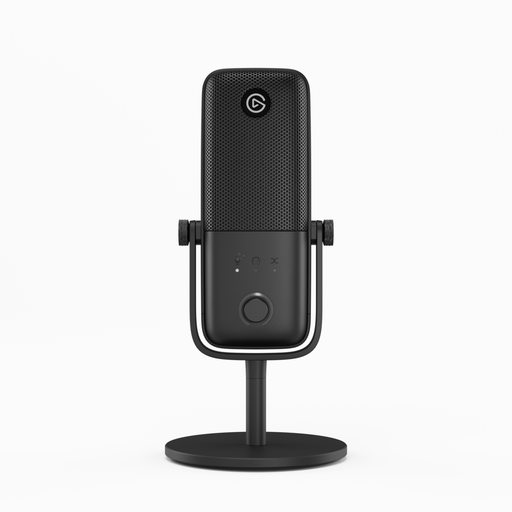
Why this pick suits this profile: this wired USB microphone is designed for a fixed streaming, podcasting, gaming or voice recording setup.
This isn’t a wireless microphone – the listing makes that clear. You avoid choosing a mobile model when, at a desk, stability is the priority.
USB connection, gain control, mute button and advertised Clipguard 2.0 and Auto Gain features.
We’ve put together a full, real-time updated selection of products that meet these demanding criteria while complying with European safety regulations.
Start by charging the transmitter and receiver, then plug the receiver into the Lightning or USB-C port before opening your recording app. Do a quick test of a few seconds before you start filming. If the phone doesn’t detect the microphone, check the port compatibility, the microphone access permission and any adapter that might be needed.
For several back-to-back sessions, go for a set that comes with a charging case and a clearly stated total battery life. An advertised 3 to 6 hours might be enough for short sessions, while a model that claims up to 20 hours with its case gives you more leeway. In any case, charge everything before you head out.
Not necessarily. Noise reduction can be valuable outdoors, on public transport or in a room with a lot of echo, but its intensity needs to be adjustable. For an interview, always test the voice with the setting you’ve chosen to make sure the words still sound natural and are perfectly clear.