
Livraison le jour même ou le lendemain

Qualité garantie

Débloquez vos offres de bienvenue: Livraison GRATUITE | Jusqu'à -80 % | 30 jours d'essai gratuits à JoyPlus
Téléchargez l'application
A wireless lavalier microphone makes recording a video, podcast or interview much simpler. Clipped to your clothing, it leaves your hands free and avoids handling noise. But product listings can sometimes blur the lines between Bluetooth, radio transmission and direct connection. And models described as universal may still require a particular adapter or receiver.
Before you place an order, content creators, streamers, trainers and video conferencing professionals need to check three things: the actual connectivity used, the stated battery life, and the intended use of the microphone. Here are the criteria to examine so you can avoid an impractical purchase.
The mention "Bluetooth 5.0" does not necessarily mean the microphone will connect directly to all smartphones and computers. Some models work with a receiver that you plug into your device's port. Other listings show "Wireless: none" while still presenting the product as a wireless microphone. In this case, it's best to check the box contents and pairing procedure carefully.
For a microphone for iPhone, make sure the interface supplied is compatible with your model. For a Type-C microphone or a USB lavalier microphone, also check whether the port is only for charging or whether it can actually transmit the audio signal.
The terms "noise reduction" and "windshield" refer to features claimed by the manufacturer. They do not guarantee perfectly clean sound in a street, café or highly reverberant room. The microphone's placement, its distance from your mouth, and the environment remain decisive factors.
An interview microphone clipped too low on clothing is likely to pick up more rustling. A foam cover or wind protection can help, but it will never replace a relatively quiet environment.
A stated battery life of 3 to 6 hours may be enough for a video conference or several short videos, but it could become tight during a long shoot. Also remember to check the number of microphones, whether a charging case is included, the cable supplied, and whether you can recharge the equipment between takes.
For regular use, compare battery life, charging time and ease of storage. Don't stop at the promise of a compact design alone.
The connectivity must match your main equipment:
If you use several devices, a microphone with two interfaces can reduce the need for adapters. However, be aware: the term "universal" does not remove the need to check compatibility with your phone, operating system and recording software.
A dual wireless microphone is ideal for two-person interviews, face-to-camera exchanges and some duo training sessions. For a single voice, a single model is generally quicker to set up and easier to carry.
For a podcast with several participants, check the number of available channels and how the audio tracks are recorded. With a camera, make sure the receiver and cable match its audio input.
The stated figures should be taken as guidelines, as they vary depending on volume, distance and usage conditions. A range measured in open space can drop significantly in a home with thick walls or in a location where many radio devices are active.
Also follow the manufacturer's recommendations: avoid excessive humidity, extreme temperatures and any contact with liquids. For rechargeable devices, use the cable and charging conditions specified in the manual. These precautions help limit premature wear and dropouts during a recording.

Why this choice suits this profile: This compact design is ideal for those looking to get started with video, interviews or video conferencing, featuring a Type-C interface and an easy-to-wear microphone.
The listing states a battery life of 3 to 6 hours and a Type-C interface. This makes it easier to check compatibility before buying, without assuming a direct Bluetooth connection.
Single microphone, stated weight of 78 g and a design described as windproof with noise reduction.
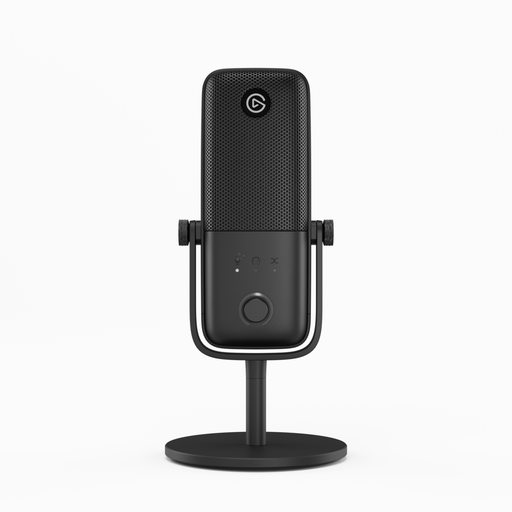
Why this choice suits this profile: This wired USB microphone is aimed at streamers and podcasters who mainly record from a computer and want easy-to-access controls.
It does not present itself as a wireless model: its USB connection is clearly stated. So there is no chance of confusion over the transmission method. It is perfectly suited to a fixed setup.
Stated Clipguard 2.0 and Auto Gain technologies, with built-in volume, gain and mute controls.

Why this choice suits this profile: With its two microphones and an interface stated as compatible with Android and Apple, this model can work well for interviews, two-person exchanges and mobile filming.
The magnetic charging case makes it easy to store and recharge both units. However, check the exact type of receiver supplied for your phone or camera.
Two microphones, magnetic charging case, stated battery life of 3 to 6 hours and a stated weight of 155 g for the set.
We have compiled a complete, real-time updated list of products that fully meet these strict selection criteria and European safety regulations.
To achieve consistent sound, attach the capsule at a constant distance from your mouth, typically at the top of your chest. Make sure the fabric does not rub against the microphone, and do a short test recording before going live. In your software, manually select the correct audio source, then check the input level.
After each use, store the equipment in a dry place. Clean it with a soft, dry cloth, without any liquid or harsh products. If the model has a built-in battery, stop charging if it overheats, gives off an unusual smell or becomes deformed.
No. Compatibility depends on the port, receiver and operating system used. A microphone for iPhone with an iOS interface will not necessarily work with an Android smartphone. With a Type-C device, check that the port accepts audio input and that the accessory supplied is suitable.
The models in this selection typically state 3 to 6 hours, while some wireless microphones designed for other equipment claim up to 8 hours. The actual duration varies depending on volume, transmission and battery condition. For a long session, a charging case or a way to recharge between takes can be very useful.
A lavalier microphone makes it easier to move around and conduct interviews. A USB desktop microphone, like the Elgato Wave:3 MK.2, is better suited to a fixed setup in front of a computer. The choice therefore depends mainly on how much mobility you need, the number of participants and the inputs available on your equipment.