
Livraison le jour même ou le lendemain

Qualité garantie

Débloquez vos offres de bienvenue: Livraison GRATUITE | Jusqu'à -80 % | 30 jours d'essai gratuits à JoyPlus
Téléchargez l'application
The dream of a minimalist desk, free from the tangled mess of cables, is an appealing one. A wireless keyboard and mouse combo is the perfect solution to achieve it. But be warned: behind this apparent simplicity lie pitfalls that too often turn a promising purchase into a daily frustration. To avoid buyer's remorse, you need to learn how to decipher marketing jargon and focus on what really matters for you.
Too many users fall into common traps and end up regretting their purchase. The cause? Three classic pitfalls:
This guide is here to arm you against these disappointments and help you choose the combo that's truly right for you.
To find the perfect match, you need to read between the lines on spec sheets. Here are the three points to scrutinise.
Not all wireless technologies are created equal. Understanding their differences is the first step.
The power source has a direct impact on your wallet and your daily convenience.
For most English-speaking users, a wireless QWERTY keyboard is non-negotiable for intuitive typing. Using other layouts, even with stickers, is a bad idea that will never replace the comfort of a native layout. Beyond the layout, the keyboard's form factor is also important:
To put theory into practice, here are a few combos that perfectly illustrate these criteria, each tailored to a specific user profile.
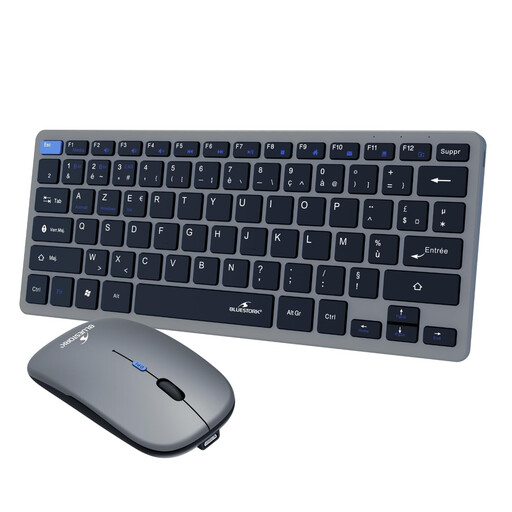
Why we love it: Perfect for juggling work between the office, home, and on the go. Its compact form factor slips into any bag, while its dual connectivity lets you switch from a laptop (via dongle) to a tablet (via Bluetooth) in a flash.
Thanks to its dual 2.4 GHz + Bluetooth connectivity, the headache of a single USB port or incompatibility with tablets is over. Being fully rechargeable, it also frees you from the chore (and cost) of batteries.
Versatility is its greatest strength: dual connection, a portable format, and, of course, a standard QWERTY layout.
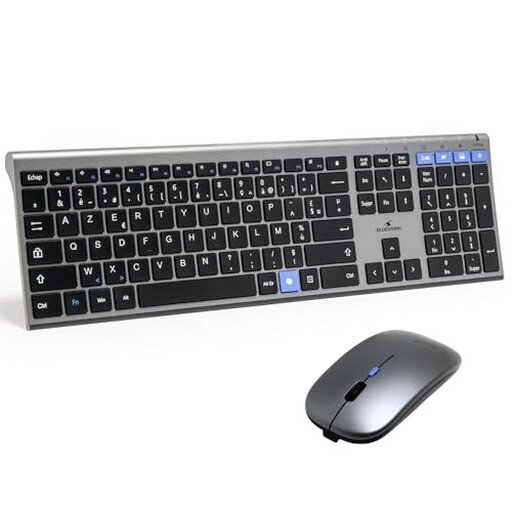
Why we love it: Built for the daily grind. Its full-size keyboard with a numeric keypad and its ergonomic mouse ensure optimal comfort, even after hours of work. The dual connectivity is the icing on the cake in a modern professional environment.
Here, ergonomics aren't sacrificed at the altar of design. Its full-size format is designed for comfort. Being rechargeable, it puts an end to battery expenses and power failures mid-meeting.
A complete, reliable, and rechargeable office package. All with a QWERTY layout, plus the flexibility of Bluetooth.
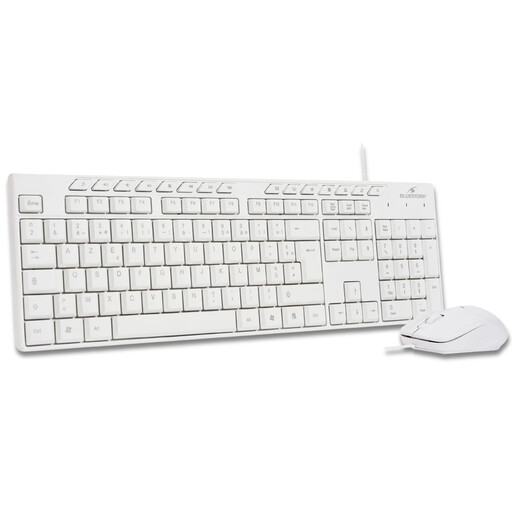
Why we love it: The simple and effective solution to go cable-free without breaking the bank. This combo gets straight to the point: a reliable 2.4 GHz connection, plug-and-play setup, and a full-size QWERTY keyboard.
It doesn't fall into the trap of unnecessary complexity. By focusing solely on 2.4 GHz, it ensures rock-solid reliability for a fixed workstation, without making you pay for features (like Bluetooth) you don't need.
Simplicity and reliability. Plug in the USB dongle, and it just works. The smart choice for a budget-friendly wireless desk setup.
We have selected a full range of products that meet our strict specifications and current standards.
Most sets are "plug-and-play." For a 2.4 GHz model, simply plug the USB dongle into a free port on your computer, and you're all set. For a Bluetooth keyboard and mouse, activate pairing mode on each device (usually via a dedicated button), then go to the Bluetooth settings on your computer or tablet to select them.
An integrated lithium-ion battery is designed to last for several years (between 300 and 500 full charge cycles on average). In practical terms, for a keyboard-mouse combo that's recharged every 2 or 3 months, the battery will remain effective for well over 5 years. The actual battery life between charges varies from a few weeks to several months, depending on your usage and the model.
Absolutely, and that's one of the biggest advantages of Bluetooth. Many recent models can be paired with multiple devices (often up to three). You can then simply press a dedicated key on the keyboard to switch on the fly between your desktop PC, laptop, and tablet. Look for "multi-device" on the product's spec sheet.