
Livraison le jour même ou le lendemain

Qualité garantie

Débloquez vos offres de bienvenue: Livraison GRATUITE | Jusqu'à -80 % | 30 jours d'essai gratuits à JoyPlus
Téléchargez l'application
Cables snaking across your desk are a recipe for clutter and frustration. Switching to a wireless keyboard and mouse combo is the perfect solution for reclaiming a clean, functional workspace. However, the market is flooded with models and sometimes misleading marketing claims. The wrong choice can quickly turn the dream of a pristine desk into a nightmare of unstable connections and constantly dying batteries.
Before you make the switch, here are the most common pitfalls to avoid:
This guide is here to help you see through the noise and choose the wireless keyboard and mouse combo that won't let you down in your daily use.
To avoid making a mistake, forget the marketing jargon for a moment and focus on a few essential technical points.
This is the crucial point. Two technologies dominate the market:
For anyone typing in French, this point is non-negotiable. You must verify that the model you're considering is a true French AZERTY wireless keyboard. Be wary of imported QWERTY keyboards, which are sometimes sold with shoddy adaptations. A native layout is the only way to guarantee that all accents and special characters are in the right place, without any complex configuration.
It's a detail that makes all the difference in daily use.
We've selected a few models that get straight to the point, each tailored to a specific need.
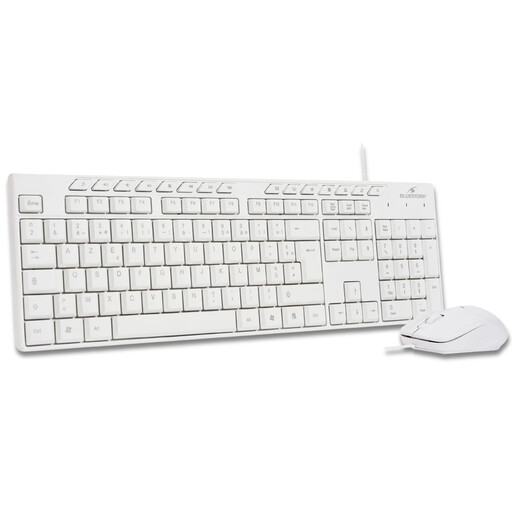
Why we chose it: It's the simple, effective solution to say goodbye to cables without the hassle. Perfect for everyday office tasks, students, or family use.
It relies on a single, shared 2.4 GHz Nano USB receiver. The result: a stable connection and an ultra-simple (*plug-and-play*) setup, which sweeps away the risks of a bad signal or finicky pairing.
Simplicity and reliability. You plug in the dongle, and it just works. The AZERTY FR layout is, of course, native, ensuring a comfortable and predictable typing experience.
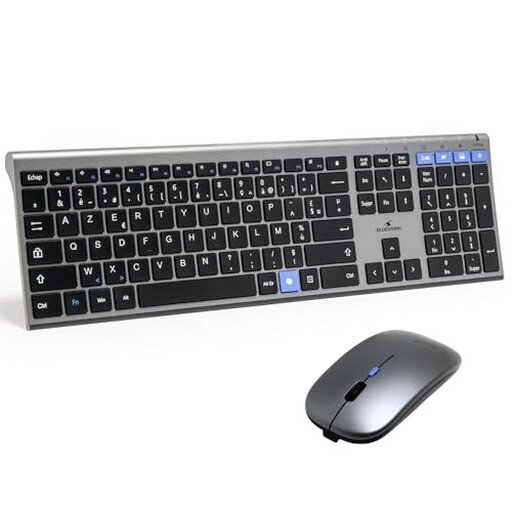
Why we chose it: The perfect ally for professionals and students who switch between a laptop, a tablet, and a desktop PC. Its dual connectivity and rechargeable battery make it a true Swiss Army knife for productivity.
With its integrated rechargeable batteries, the chore (and cost) of changing batteries is over. The dual connectivity allows you to always choose the most stable technology for any situation.
Versatility. The dual connectivity (2.4 GHz + Bluetooth) allows it to connect to almost anything, while its rechargeable feature gives you peace of mind.
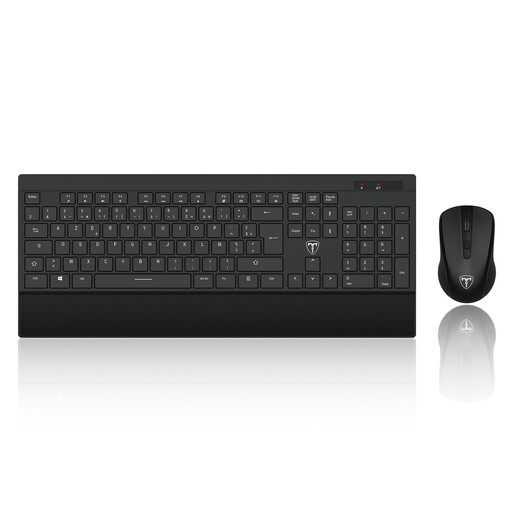
Why we chose it: Designed for those who work in *open-plan offices*, at the library, or simply don't want to disturb others. Here, the priority is silence and long-term comfort.
It tackles the problem of discomfort head-on. Its ergonomic design, complete with a wrist rest, is engineered to reduce fatigue—an aspect too often sacrificed by models that focus solely on style.
Silent typing and comfort. The keys and mouse clicks are designed to be nearly inaudible, preserving the peace and quiet of your environment (and your neighbours' ears).
We have put together a complete selection of products that meet our selection criteria and French regulations. Discover other peripherals to perfect your setup.
Battery life depends heavily on the model and your usage frequency. A classic, battery-powered wireless keyboard and mouse combo for office use can last from several months to over a year. Rechargeable models, on the other hand, offer several weeks of peace of mind before needing their charger. The best practice to maximise battery life: turn off the peripherals via their power switch (if they have one) when you're done using them.
For most 2.4 GHz combos, it's a breeze:
For a Bluetooth connection, simply activate pairing mode on the keyboard or mouse, then find it in the Bluetooth settings on your computer or tablet to complete the connection.
Yes, almost all current wireless keyboard and mouse combos use a single Nano USB receiver for both devices. In fact, that's the main appeal of these bundles: only one USB port is needed for two peripherals.