
Livraison le jour même ou le lendemain

Qualité garantie

Débloquez vos offres de bienvenue: Livraison GRATUITE | Jusqu'à -80 % | 30 jours d'essai gratuits à JoyPlus
Téléchargez l'application
A wireless keyboard clears your desk of cables, makes working from home easier and lets you control your computer from the sofa. But not all models are equal depending on how you plan to use them. Bluetooth isn't always the best choice for gaming, while a compact keyboard can quickly become frustrating if you regularly type numbers.
Before you place an order, it's worth looking beyond the design and the long list of features being promoted. Here are the criteria you need to examine to compare models and avoid common mistakes.
A Bluetooth keyboard connects directly to a compatible computer, tablet or smartphone. It's a practical solution for mobility and for devices with limited ports. On a desktop computer or console, however, a dedicated USB receiver can prove simpler to use.
2.4 GHz radio models usually work with a small USB adapter. They often offer a connection better suited to gaming, but they do occupy a port. Conversely, a wired USB keyboard requires neither pairing nor batteries, but it won't suit those who prioritise freedom of movement above all else.
To type in French comfortably, make sure you check for the French AZERTY label. A keyboard marked as "US International" or "QWERTY" may work on a PC set to French, but the position of characters and shortcuts won't match that of a French keyboard.
The same question arises for Mac users. The Command and Option keys, macOS shortcuts and iPadOS compatibility can vary from one model to another. Simply stating "Mac compatible" doesn't always give you enough information.
An RGB keyboard lets you customise the lighting and can make it easier to read the keys in a dark room. However, it doesn't make typing more accurate and it doesn't improve battery life. On a rechargeable model, the lighting effects can even significantly reduce the time you get between charges.
The term "mechanical" also deserves a closer look. Some membrane keyboards mimic the feel of a mechanical model, whereas a true mechanical keyboard uses an individual switch under each key. The noise, key travel and the ability to replace the switches can then make a world of difference.
Choose the format based on your available space and your habits:
A wrist rest, adjustable feet or low-profile keys can also improve comfort during long sessions. However, these accessories don't replace good posture or regular breaks.
A rechargeable keyboard saves you from buying batteries regularly, but you need to check the type of port used and the claimed battery life figures. A built-in battery is most often charged via USB-C. Use the supplied cable and a charger certified to the manufacturer's recommendations.
With a battery-powered model, check the required battery type and whether there is a charge indicator. The claimed battery life usually depends on backlight usage, distance from the receiver and typing frequency.
Before you finalise your basket, check compatibility with:
For a keyboard with a touchpad intended for an iPad, also check the generation and exact size of the tablet. Magnetic attachment systems are not universal.
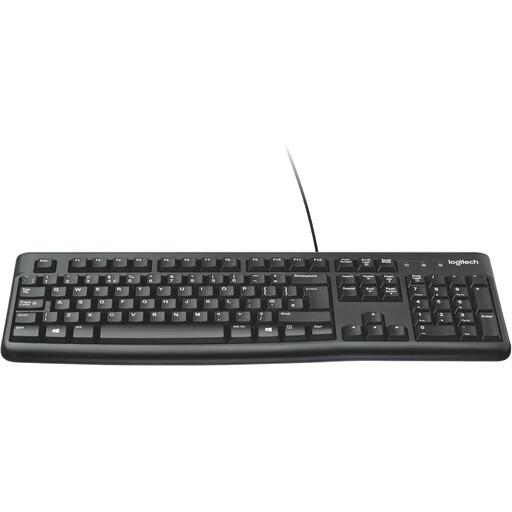
Why this choice suits this profile: This USB keyboard in a standard format is perfect for office work, studies and a first fixed setup. It requires neither pairing nor batteries.
The USB connection eliminates pairing and battery worries. Please note, however: the listing indicates a US International QWERTY layout, so check this carefully before purchasing.
Full format, numeric keypad, low-profile keys and a 1.5 m cable.
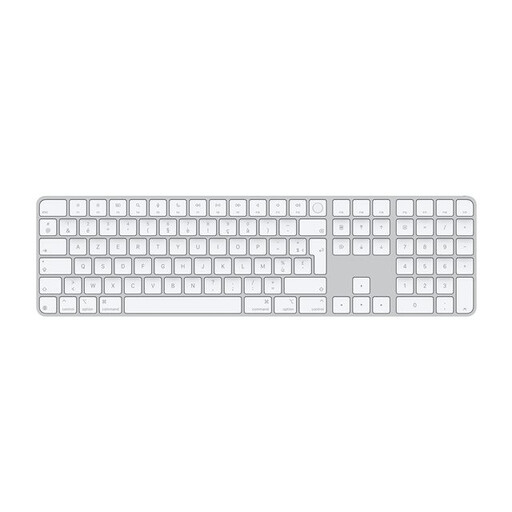
Why this choice suits this profile: Mac users who regularly type numbers and want a Bluetooth connection with USB-C charging get an extended keyboard in French AZERTY here.
The listing specifies the French layout, Bluetooth connection and a rechargeable battery. Stated compatibility covers Macs with an Apple chip running macOS 11.4 or later.
Touch ID, numeric keypad, claimed range of up to 10 m and battery life of around one month according to the listing.
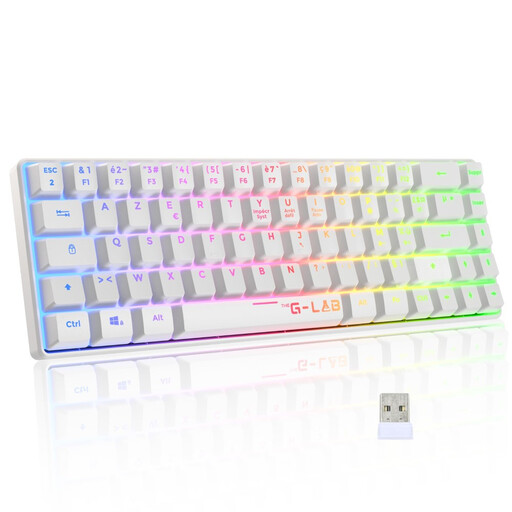
Why this choice suits this profile: Its TKL AZERTY format and 2.4 GHz wireless connection are aimed at PC or console gamers who want to free up space for their mouse.
The connection type, format and claimed range of 10 m are clearly stated. RGB backlighting is present, but is not presented as a performance indicator.
Soft and quiet membrane, detachable wrist rest, 87 keys and compatibility with Windows, Xbox One and PlayStation 4.
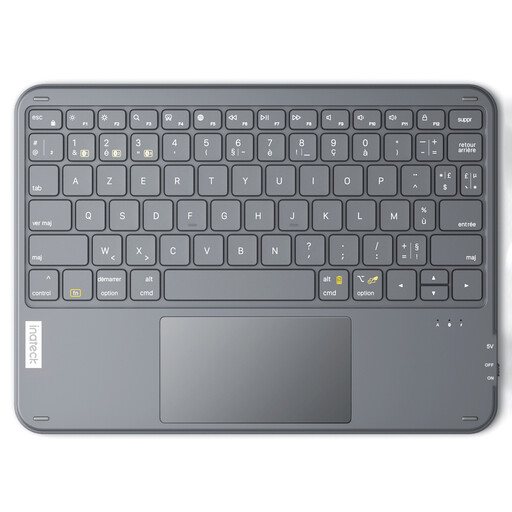
Why this choice suits this profile: Students and remote workers who switch between an iPad, a computer or a TV can pair up to three devices and carry a keyboard weighing just 228 g.
The listing mentions Bluetooth 5.3, three channels and an AZERTY layout. It remains essential to confirm compatibility with your iPad version before purchasing.
Integrated touchpad, ultra-slim format, claimed range of up to 10 m and standby battery life of up to 150 days.
We've put together a comprehensive, real-time updated selection of products that meet these demanding criteria and European safety regulations.
Turn on Bluetooth on your device, switch on the keyboard, then hold down the pairing key if necessary. Next, select the keyboard's name from the list that appears. With a model that has a USB receiver, simply plug in the dongle and follow the manufacturer's instructions.
It depends on the mechanism used, typing frequency, maintenance and the battery. Technical specifications may indicate a maximum number of keystrokes or battery life between charges. These figures remain usage estimates and do not guarantee the same duration in all conditions.
A rechargeable keyboard reduces the use of disposable batteries and is generally charged via USB-C. A battery-powered model can still be interesting for occasional use or if you prefer to be able to replace the power source quickly. In both cases, check the claimed battery life, the connection type and the accessibility of the battery compartment or charging port.