
Livraison le jour même ou le lendemain

Qualité garantie

Débloquez vos offres de bienvenue: Livraison GRATUITE | Jusqu'à -80 % | 30 jours d'essai gratuits à JoyPlus
Téléchargez l'application
A wireless keyboard clears up your desk, streamlines remote work and makes it easy to switch from a computer to a tablet. Product listings, however, often focus on lighting effects, key counts or battery life measured under highly specific conditions. To make the right choice in France, it is best to prioritise the keyboard layout, connection type and power source.
A compact keyboard is not necessarily a wireless AZERTY keyboard. Many mechanical models use a QWERTY or QWERTZ layout, with keys and symbols positioned differently. To type in French without constantly searching for special characters, look specifically for the wording “French AZERTY” in the title and specifications rather than relying solely on the software language.
A QWERTY keyboard will work perfectly well with Windows or macOS, but the characters will still be printed in different positions. The AJAZZ AK820 MAX, for example, is offered with a German QWERTZ layout. It is therefore intended for users specifically looking for this configuration, not for those who want a standard French keyboard.
Several weeks of battery life may have been measured with the backlighting switched off. Using an RGB keyboard, a high brightness level or an intensive wireless connection will generally reduce that figure. For rechargeable models, also check how long a full charge takes, which port is used and whether you can continue typing while the keyboard is charging.
For everyday use, choose a model with a clearly identified built-in battery and, where applicable, an included USB-C cable. It is also worth reviewing the safety recommendations for charging. A lithium-ion battery must not be pierced or dismantled, and should never be exposed to excessive heat.
Clicky mechanical switches, often called “blue switches”, produce clearly audible noise. This sound profile may appeal to gamers or people working alone, but it can quickly become irritating in a shared office, library or bedroom occupied by several people.
Linear switches are generally smoother and quieter, although they are not completely silent. The ET 60% listing explicitly states that its blue switches produce an audible click. This is important information to consider before placing an order.
The three main configurations do not quite serve the same purposes:
Also check how many devices can be stored in memory, which operating systems are supported and how you switch between connections. Compatibility listed as “Windows / macOS / Android” does not necessarily mean that every function key will have exactly the same role on each system.
A 75% layout generally retains the arrow keys and function row while removing the numeric keypad. It fits easily on a narrow desk and leaves more room for your mouse. A 60% keyboard takes up even less space, but you will often need to use the Function key and key combinations to access commands that have been removed.
For accounting, spreadsheets or regular numeric entry, a full-size 100% keyboard remains more comfortable. Conversely, a compact model is easier to carry between home, university and work.
A rechargeable keyboard eliminates the need to buy batteries regularly, but requires you to monitor battery health and use a suitable charger. Battery-powered models can offer long runtimes and start instantly, provided you keep spare batteries available. Remove them as well if the keyboard will be stored for an extended period.
For a mechanical keyboard, also examine:
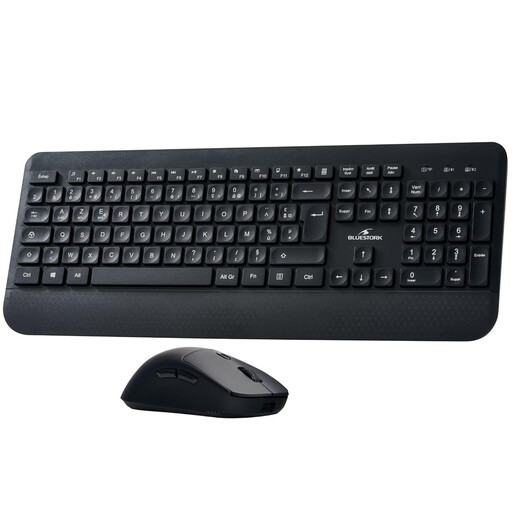
Why this choice suits this profile: this wireless keyboard and mouse set meets the needs of a student or remote worker who wants a functional desk setup without having to select and purchase each peripheral separately.
The listing specifies an AZERTY layout, a 2.4 GHz connection with a Nano USB receiver and Bluetooth. Both peripherals run on batteries rather than a rechargeable battery.
A complete set, advertised switching between multiple devices and compatibility with computers, tablets and smartphones.

Why this choice suits this profile: content creators and users who enjoy customising their keyboard will appreciate its 98% layout, metal knob and hot-swap PCB.
Bluetooth, 2.4 GHz and USB-C connectivity are clearly specified. The listing also mentions several battery capacities depending on the version: check the selected variant before ordering.
97 keys, a multi-layer dampened construction, hot-swappable keys and advertised RGB lighting.
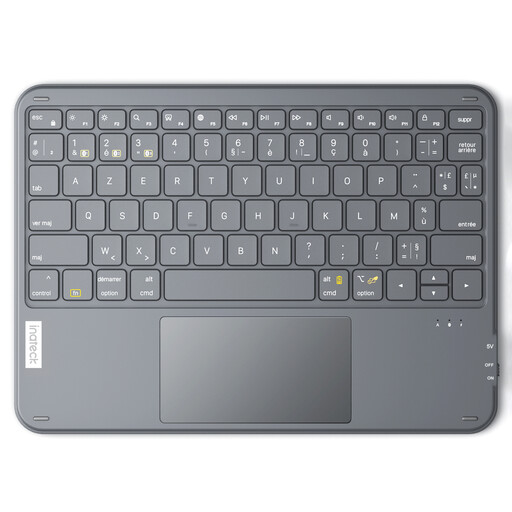
Why this choice suits this profile: its slim design and integrated touchpad make it easier to use a tablet, television or computer from a compact workspace.
The listing advertises three Bluetooth channels and an AZERTY layout. No 2.4 GHz receiver is specified, so make sure your devices support Bluetooth.
Bluetooth 5.3, an advertised weight of 228 g, a range of up to 10 m and compatibility with Windows and iPadOS.
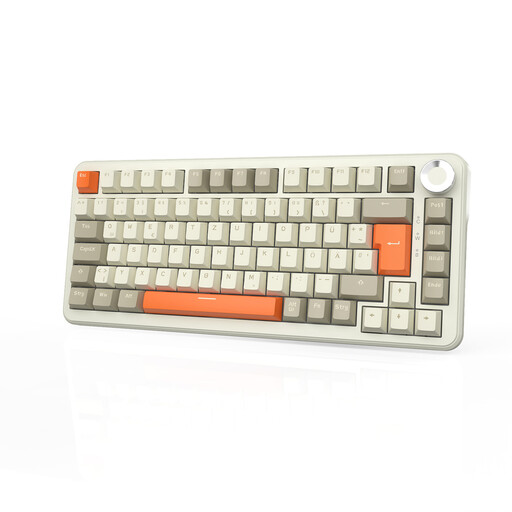
Why this choice suits this profile: its compact layout, volume knob and customisation options work well for gaming and creative activities, while leaving more room for the mouse.
The listing clearly distinguishes Bluetooth, 2.4 GHz and USB-C connections. It also specifies an 8,000 mAh battery, but the layout is German QWERTZ: check this detail before buying.
82 keys, a 75% layout, hot-swappable switches, per-key RGB backlighting and advertised onboard memory.
We have put together a regularly updated selection of wireless keyboards, mice and sets, featuring the key specifications to compare based on your usage and devices.
Yes, provided both devices support Bluetooth and use a compatible profile. You usually just need to activate pairing mode, then select the keyboard in the Bluetooth settings. If your computer does not have built-in Bluetooth, a model with a 2.4 GHz USB receiver will often be easier to set up.
It depends on the battery type, charging frequency, use of the backlighting and storage conditions. Advertised battery life should be treated as an estimate based on a specific usage scenario. To preserve the battery, avoid heat and moisture, and do not use a damaged charger or cable.
A wireless keyboard and mouse set provides a coordinated setup and helps minimise the number of USB receivers. Buying the two peripherals separately nevertheless gives you more flexibility: you can choose a mouse suited to your hand, a different layout or a more specialised mechanical keyboard. In every case, check the connection type, whether the device runs on batteries or a rechargeable battery, compatibility and the return terms before confirming your order.