
Livraison le jour même ou le lendemain

Qualité garantie

Débloquez vos offres de bienvenue: Livraison GRATUITE | Jusqu'à -80 % | 30 jours d'essai gratuits à JoyPlus
Téléchargez l'application
Buying a wireless headphone isn’t simply a choice between Bluetooth and wired. With promises of immersive sound, record-breaking battery life and noise cancellation, some features deserve a closer look. A headphone that feels comfortable in the shop can become a pain to wear after two hours, while a model marketed as versatile might turn out to be incompatible with your console or computer.
Here are the key criteria to check before you buy, along with a selection of models suited to different uses in the UK.
The battery life quoted by the manufacturer usually depends on listening volume, the codec used, noise cancellation and the type of connection. A long-lasting wireless headphone can therefore last more or less time depending on how you use it.
Also remember to check the charging time, whether there’s a fast-charge function, and whether you can continue using it with a cable when the battery runs out. This last option can come in very handy on the train, at the office or during a long flight.
A Bluetooth headphone works perfectly with smartphones, tablets and computers that have this connection. For gaming, however, you may need low latency, a dedicated wireless link or specific console compatibility.
With an Xbox, for example, make sure the headphone is designed for the platform you’re using. A wireless gaming headset with a dongle doesn’t necessarily work like a standard audio headphone. Conversely, a wired headphone for PC, with USB-A or a 3.5 mm jack, can be simpler to set up on a desktop computer.
A headphone with active noise cancellation uses microphones and electronic processing to reduce certain ambient sounds. Its effectiveness depends on the type of noise, the fit of the ear cushions and the volume level you choose.
Passive isolation relies mainly on the shape of the earcups and how well they seal around your ears. For cycling or moving around the city, an open-back model or bone-conduction headphone lets you stay more aware of your surroundings. Just keep the volume at a sensible level.
Before placing an order, start by listing the devices you use every day:
A versatile headphone can combine several connection types. The Belkin SoundForm Surround, for example, combines Bluetooth 5.4, multipoint and a 3.5 mm jack, according to the specifications given for this model.
For remote working or long days on public transport, compare the advertised battery life with your actual habits. Wireless earbuds usually have a battery in each earbud and a charging case. So you need to distinguish between the battery life per charge and the total battery life provided by the case.
Also check the charging connector, most often USB-C, as well as the charging time and whether fast charging is available. For sport, a rating like IPX5 or IP67 doesn’t automatically mean the product can be used for swimming. Always check the precise limits stated by the manufacturer.
For remote working, online classes and calls, choose a headset with a microphone that’s adjustable, or earbuds with built-in microphones. Ambient noise reduction on the microphone can improve clarity, without guaranteeing the same quality in every situation.
Weight, the pressure from the headband, the material of the ear cushions and whether the headphone can fold all affect comfort. Finally, avoid prolonged listening at high volume. Take regular breaks and always start at a moderate volume level.
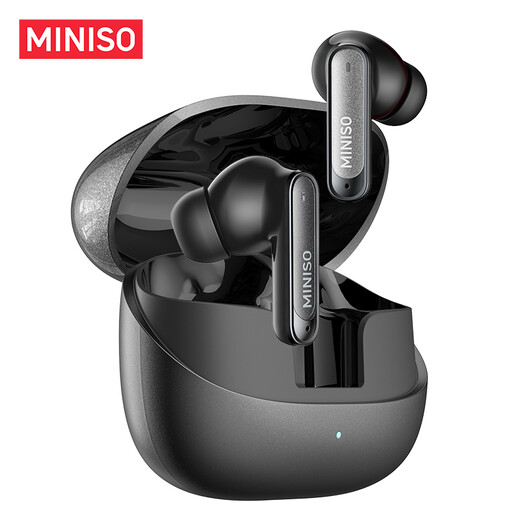
Why this choice suits this profile: These TWS earbuds are suitable for calls, studying, commuting and your first workout sessions. They are compatible with iOS and Android devices.
The product page states a Bluetooth range of 10 m, a built-in microphone and an IPX5 rating. This information lets you quickly check whether the product suits everyday use, without relying solely on marketing promises.
Bluetooth 6.0, charging case and approximately 4 hours of battery life per charge, according to the product page.
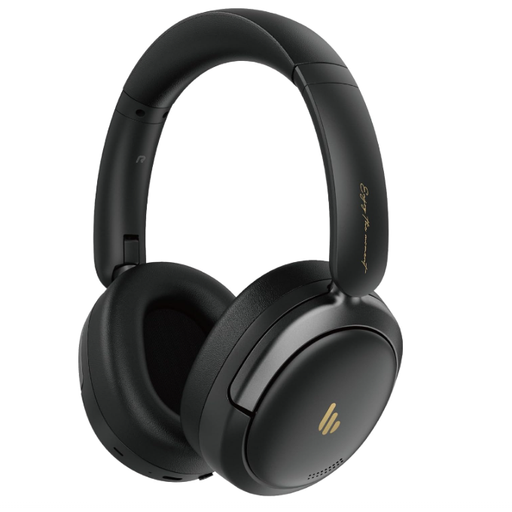
Why this choice suits this profile: This foldable headphone is aimed at those who switch between music, work and travel, and want an over-ear model with several customisation options.
The product page distinguishes between Bluetooth 5.4 connection and wired listening via USB-C, a handy backup option when the battery is low. The brand states active noise cancellation of up to -44 dB.
Advertised battery life of 45 hours, built-in microphone, dual connection and foldable design.
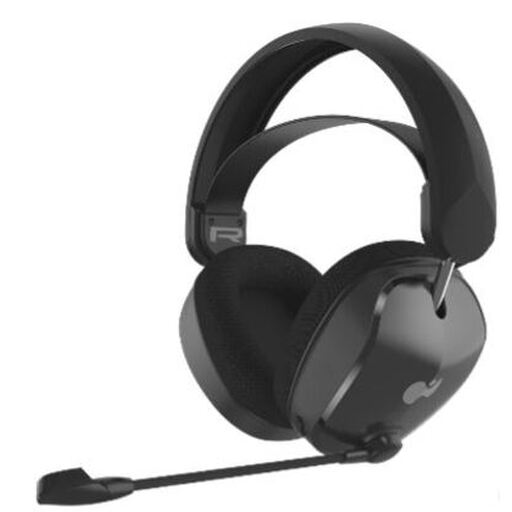
Why this choice suits this profile: This Xbox headset is aimed at gamers who switch between console and other devices and want to enjoy two connection modes.
Compatibility with Xbox Series X|S is stated, along with Bluetooth connection and the dongle. The headset also includes a bidirectional microphone with a mute function.
50 mm drivers, fabric ear cushions, suspended headband and advertised battery life of up to 40 hours.
We’ve put together a comprehensive, real-time selection of products that meet these demanding criteria as well as European safety standards.
It depends on the battery, how often you use it, the number of charge cycles and how well you look after it. The ear cushions, charging cable and hinges on a foldable model can also wear out before the electronic components. Store the headphone in a dry place and avoid exposing it to high temperatures.
Yes, as long as the computer has Bluetooth or a USB port compatible with the supplied dongle. For a more straightforward setup, a wired headphone for PC, with USB-A or a 3.5 mm jack, works without pairing. Just check which ports are available on your computer.
Some models are protected against water or sweat, but you should check their protection level in the technical specifications. Bluetooth earbuds designed for sport, particularly open-back or bone-conduction models, may also let in more outside noise. They obviously don’t replace the need to stay alert to traffic and your surroundings.