
Livraison le jour même ou le lendemain

Qualité garantie

Débloquez vos offres de bienvenue: Livraison GRATUITE | Jusqu'à -80 % | 30 jours d'essai gratuits à JoyPlus
Téléchargez l'application
A wireless gaming mouse helps you declutter your desk, gives you more freedom of movement, and makes it easy to switch from gaming to working from home. The trick is not to get overwhelmed by the numbers on the spec sheets. A sensor boasting 26,000 or 36,000 DPI doesn't automatically make for a better experience.
Before you reach for your wallet, focus on the connection, battery life, weight, shape and included software. Here are the main pitfalls to avoid, along with a selection of models suited to different needs.
DPI indicates the sensitivity of the sensor – in other words, how far the cursor moves on screen for a given mouse movement. A high-precision gaming mouse typically offers several adjustable levels, so you can tailor the sensitivity to the game or application you're using. In reality, few gamers actually use the maximum value.
In a shooter game, moderate sensitivity makes for smooth, precise movements. Conversely, a higher setting can be handy for office work or on a high-resolution screen. The real deciding factor is the ability to adjust DPI quickly, combined with a reliable sensor that suits your needs.
A Bluetooth gaming mouse connects directly to a laptop, tablet or several compatible devices without taking up a USB port. It's a particularly convenient solution for mobility and everyday work.
With its USB receiver, a 2.4 GHz gaming mouse is generally the better choice for gaming. This connection is designed to offer fast response and low latency. However, it does require a free USB port, and the receiver's position can affect stability in a crowded wireless environment.
Mice with dual connectivity let you switch from competitive gaming to on-the-go use in seconds. Still, keep an eye on which mode you're using: the advertised battery life can differ significantly between Bluetooth and 2.4 GHz.
A rechargeable wireless mouse might promise tens or even hundreds of hours of use. But this figure depends on the connection mode, RGB lighting and intensity of use. A RGB mouse will naturally consume more power if the lighting effects are always on.
To avoid running out of battery at the worst possible moment, go for a model that can be used while charging and has a low-battery alert. Some mice even come with a charging dock. For an office model that runs on batteries, check the battery type and whether there's an on/off switch.
Weight directly affects how controlled the mouse feels. A lightweight gaming mouse under 60 g is ideal for fast movements and sweeping motions. A heavier model can give a sense of stability that's welcome for office work or games that don't require much movement.
Shape matters just as much as weight. An ergonomic mouse designed for right-handed users won't necessarily suit left-handed ones. Also check whether it matches your grip style: palm, claw or fingertip. Dimensions are especially important if you have larger hands.
The number of physical buttons doesn't always reflect the number of available functions. On some Turtle Beach models, for example, Easy-Shift[+] technology lets you assign a secondary function to several controls. A programmable mouse can therefore be very handy in role-playing games, creative software or for multiplying office shortcuts.
Before ordering, check:
DPI, IPS and acceleration values are useful for comparing sensors, but shouldn't be considered in isolation. PTFE feet, the mouse mat surface and the polling rate all contribute to the feel of the glide and responsiveness.
For competitive gaming, go for a 2.4 GHz connection, an adjustable sensor and a shape that stays comfortable in your hand. For versatile use, Bluetooth, USB-C charging and ergonomics can prove far more useful than a DPI record.
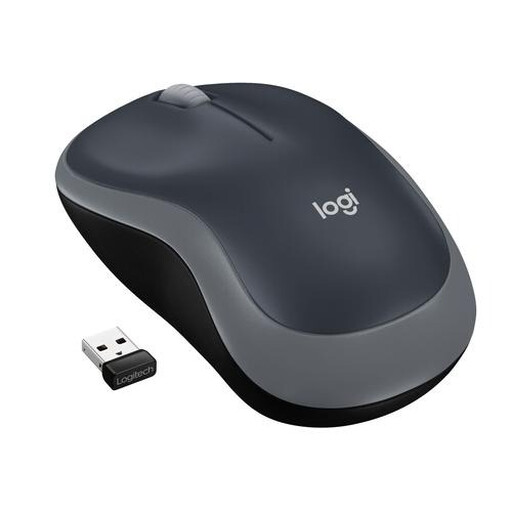
Why this choice suits this profile: This Logitech wireless mouse focuses on simplicity, making it ideal for use with a laptop, office work and the occasional gaming session.
It doesn't promise the world for gaming: its 1,000 DPI optical sensor and three buttons are perfectly suited to basic use.
2.4 GHz radio connection with Nano receiver, claimed range of up to 10 m and battery life of up to 12 months on a single AA battery.
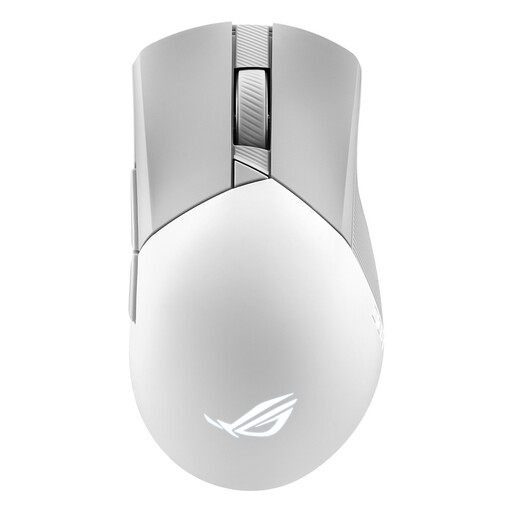
Why this choice suits this profile: This ASUS ROG model is aimed at gamers who want fine control over sensitivity, buttons and lighting, and who appreciate being able to replace certain components.
Its three connection modes let you switch between 2.4 GHz, Bluetooth or wired depending on the device and situation.
Sensor rated at 36,000 DPI, six programmable buttons, weight of 79 g and battery life of up to 119 hours in 2.4 GHz radio mode.
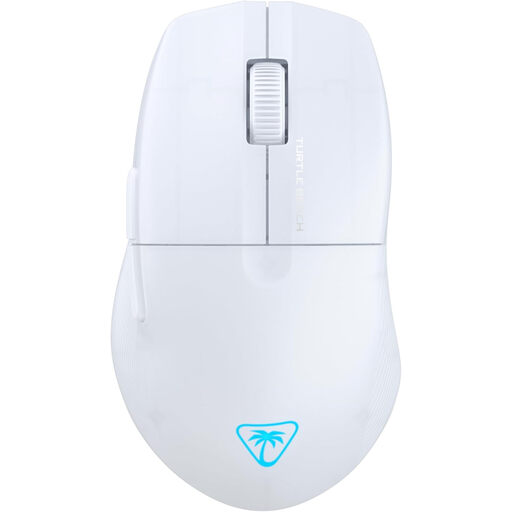
Why this choice suits this profile: With its claimed 54 g weight and dual connectivity, this mouse is aimed at gamers who want fast movements without sacrificing versatility.
It combines 2.4 GHz and Bluetooth, with fast charging claimed: 10 minutes would be enough to get up to 5 hours of use.
Sensor rated at 26,000 DPI, six buttons, customisable RGB lighting and battery life of up to 125 hours.
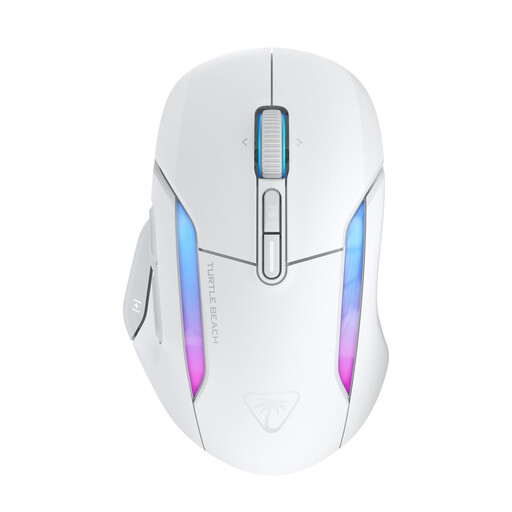
Why this choice suits this profile: Its ergonomic shape, claimed to suit medium to large hands, and its many functions are aimed at gamers who enjoy customising their shortcuts.
Its 7 buttons and 4D scroll wheel can provide access to 21 functions thanks to Easy-Shift[+], without needing extra peripherals.
Sensor rated at 26,000 DPI, battery life of up to 130 hours in 2.4 GHz and up to 350 hours in Bluetooth.
We've put together a comprehensive, real-time updated selection of products that meet these demanding criteria, as well as European safety standards.
Yes, provided you choose a 2.4 GHz connection, position the USB receiver correctly and opt for a mouse with an adjustable sensor. Bluetooth is more designed for mobility and versatility. Also look at the advertised polling rate and whether you can continue using the mouse in wired mode while it charges.
It all depends on the battery, the number of charge cycles, the use of lighting and storage conditions. An integrated battery is generally not designed to be replaced by the user. Avoid high temperatures, humidity and non-certified cables. When the mouse reaches the end of its life, dispose of it with its battery at a collection point for electrical and electronic equipment.
For a laptop or multiple devices, Bluetooth saves space and frees up a USB port. On a PC, the 2.4 GHz connection is often more suitable when low latency is a priority. A model combining both modes offers greater flexibility, though it may come at a higher price and with more involved charging management.