Latency fears, dead battery anxiety, a jungle of tech specs… Choosing a wireless gaming mouse can feel like navigating a minefield. But don't panic! This guide is here to separate fact from fiction and give you the keys to finding the perfect mouse for your playstyle, whether you're an esports pro, a mobile gamer, or a creative professional looking for versatility.
The 3 Key Criteria for Getting It Right
Before diving into our selection, let's review the essential points that will make all the difference.
1. Connectivity?: 2.4?GHz, Bluetooth, or Both??
The days when wireless was synonymous with lag are long gone. But not all technologies are created equal?:
- 2.4?GHz (via USB dongle)?: This is the go-to standard for gaming. Latency is virtually non-existent, on par with a wired mouse. It guarantees flawless responsiveness in those clutch moments.
- Bluetooth?: Perfect for office work and gaming on the go. A Bluetooth gaming mouse is more power-efficient, which saves battery life, and connects to any compatible device (laptop, tablet) without the hassle of a dongle.
- Triple connection?: The best of both worlds. These ultra-versatile models juggle 2.4?GHz, Bluetooth, and a wired connection (usually USB-C). Ideal for switching from an intense gaming session on your desktop to a work session on your laptop in an instant.
2. Weight and Ergonomics?: Speed or Comfort??
The shape of the mouse directly impacts your precision and endurance during long gaming sessions.
- Lightweight gaming mouse?: Coming in under 80 grams, these mice are the kings of FPS games. They facilitate wide, swift movements (those famous flicks) with minimal inertia.
- Ergonomic mouse?: With a sculpted shape designed to fit the palm (often for right-handers) and a thumb rest, they provide optimal support. A must-have for MMO marathoners or pros who are practically glued to their mouse.
3. Sensor and DPI?: The Pursuit of Absolute Precision
The sensor is the engine of your mouse. Here are two acronyms to know?:
- DPI (Dots Per Inch)?: This is the mouse's sensitivity. Beware the marketing trap! A high-DPI mouse isn't necessarily better. Most pros play between 400 and 1600?DPI. The key is being able to fine-tune this value to your preference.
- IPS (Inches Per Second)?: This is the maximum speed the sensor can handle without spinning out. A high IPS (above 300) ensures the mouse will track even your most frantic movements perfectly.
Recommended Wireless Gaming Mouse Options
Enough theory, let's get practical. Here are three models that particularly caught our eye, each catering to a specific need.
Razer Basilisk Mobile Wireless Gaming Mouse
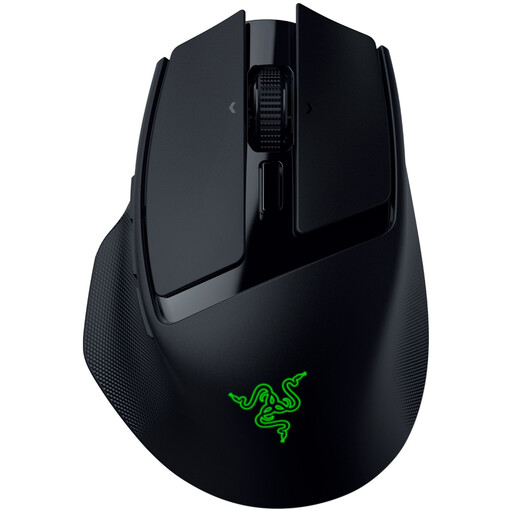
Key feature?: The Basilisk Mobile is a true technological Swiss Army knife in a portable format. Its triple connection and polished ergonomics make it a formidable weapon, both for gaming on the go and for working efficiently.
Pros?:
- Total connectivity?: Switch in the blink of an eye from the ultra-responsive Razer HyperSpeed (2.4?GHz) mode to Bluetooth to save battery, or plug it in via USB-C.
- Top-tier performance?: Its 18,000?DPI optical sensor and Razer Gen-3 optical switches guarantee flawless precision and responsiveness.
- Marathon battery life?: Get up to 105 hours in HyperSpeed mode and 180 hours in Bluetooth. This rechargeable gaming mouse won't let you down.
- Advanced customisation?: With its 10 programmable buttons and Razer HyperScroll tilt wheel, it adapts to all your needs, both in-game and at the office.
Who is it for?? For mobile gamers and professionals who want a compact (76g), powerful mouse capable of juggling multiple devices and uses without any compromise.
Rexsun Tri-Mode Gaming Mouse X7
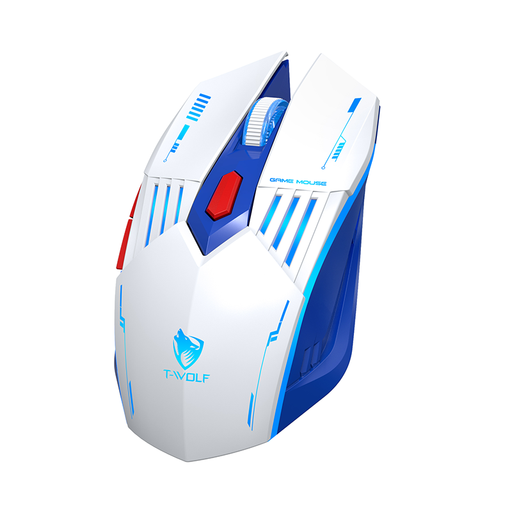
Key feature?: The Rexsun X7 is the ideal, budget-friendly entry point into the world of wireless gaming. It checks all the essential boxes with full connectivity and a solid spec sheet for versatile use.
Pros?:
- Convenient triple connection?: Compatible with 2.4G, Bluetooth, and wired modes, it adapts effortlessly to your PC, laptop, or tablet.
- Adjustable DPI?: Adjust sensitivity on the fly across four levels (up to 3,600?DPI) to switch between gaming and office work.
- Modern charging?: Its 300?mAh battery recharges via a USB Type-C port, the current standard.
- Comfortable grip?: Its ergonomic shape and 6 buttons are designed for comfortable daily use.
Who is it for?? For casual gamers and those looking for their first versatile and affordable wireless gaming mouse that is equally at home in-game and at work.
Turtle Beach Burst II Air Gaming Mouse
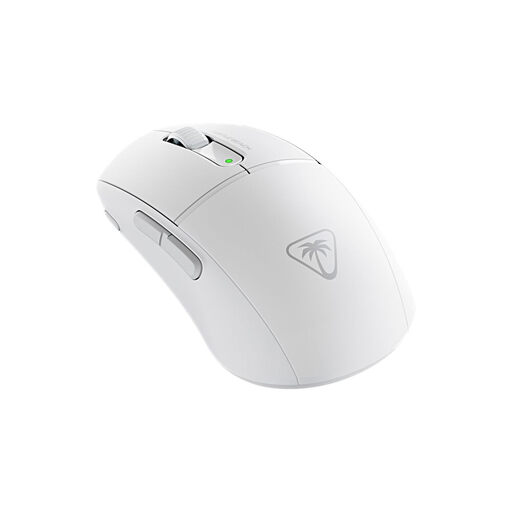
Key feature?: Weighing in at a featherlight 47 grams, the Burst II Air is a war machine built for pure speed. This ultra-lightweight gaming mouse has one goal: to minimise inertia for explosive movements.
Pros?:
- Record-breaking weight?: At 47g, it's one of the lightest wireless mice in the world. The perfect tool for fast-paced games that demand maximum agility.
- Elite sensor?: The Owl-Eye optical sensor climbs to 26,000?DPI with 650?IPS tracking. Translation: surgical precision, no matter what.
- Absolute responsiveness?: Its Titan Optical Switches promise instant actuation and an incredible 100-million-click lifespan.
- Comfortable battery life?: Up to 120 hours of battery life to power through gaming sessions without worrying about the cable.
Who is it for?? For hardcore competitors, especially in FPS games, who want a minimalist, incredibly light, and responsive mouse to optimise their aiming speed and movement.
Does Wired Still Have Its Fans??
The freedom of wireless is a real plus, but for some, nothing beats the reliability of a good old-fashioned cable, especially when you need a host of side buttons for MMOs and MOBAs.
If you're on that team, take a look at our selection of wired gaming mice with side buttons to find the perfect model for your playstyle.
Frequently Asked Questions (FAQ)
What's the difference between a 2.4?GHz gaming mouse and a Bluetooth mouse??
It's a matter of performance. The 2.4?GHz connection (via dongle) is designed for minimal latency, which is essential for competitive gaming. Bluetooth, being more universal and dongle-free, is perfect for office work and casual gaming, but its responsiveness is a step below.
Is the battery life of a rechargeable gaming mouse a problem??
Not at all. Current models easily last anywhere from 40 to over 150 hours. And if you ever run low, most can be used in wired mode while they charge. You'll never be left high and dry mid-game.
Do you really need a mouse with lots of buttons??
It all depends on your games of choice. For an FPS, 2 to 4 side buttons are more than enough. However, for an MMO, a MOBA, or professional use, a programmable mouse with 6 or more buttons becomes a major asset for assigning all your macros and shortcuts.


