
Livraison le jour même ou le lendemain

Qualité garantie

Débloquez vos offres de bienvenue: Livraison GRATUITE | Jusqu'à -80 % | 30 jours d'essai gratuits à JoyPlus
Téléchargez l'application
Choosing a wireless gaming mouse can quickly become a daunting task. Between spec sheets drowning in jargon and lofty marketing promises, it's easy to get lost or pay for features you don't need. As a product expert at Joybuy, my mission is to help you cut through the noise. Let's break down the pitfalls to avoid and the criteria that truly matter to make the right choice.
The market is saturated with claims that, in practice, don't improve your gaming experience. Here are the three most common mistakes to avoid.
To choose the mouse that's right for you, focus on the features that have a direct impact on your performance and comfort.
The ideal weight depends on your playstyle and grip.
Shape is just as crucial. An ergonomic gaming mouse should fit your grip style: palm grip, claw grip, or fingertip grip. A poorly suited mouse can cause fatigue, or even pain, after long gaming sessions.
Rather than the maximum DPI number, focus on the quality of the optical sensor (PixArt models like the PAW3395 or PAW3311 are benchmarks) and the polling rate, measured in Hertz (Hz).
A good wireless mouse should never die on you mid-game.
Let's get practical with our selection, designed for different types of gamers based on the criteria we've just discussed.
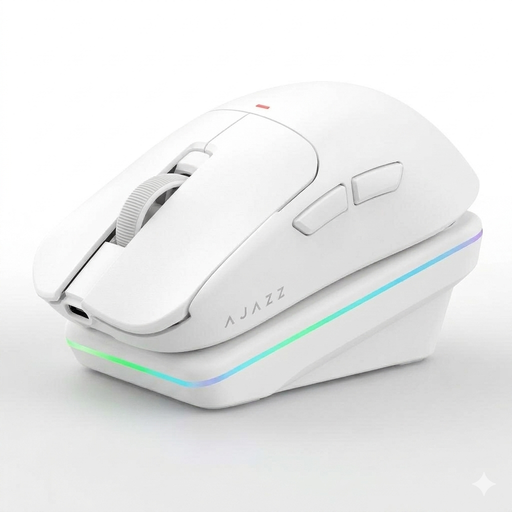
Why we recommend it: It checks all the performance boxes (lightweight, responsive sensor) without breaking the bank. The essentials, and nothing more. The included charging dock is a real bonus for daily convenience.
No unnecessary DPI race. It focuses on efficiency with a proven PAW3311 sensor and a feather-light 63g weight, without sacrificing robustness.
Its versatility: tri-mode connectivity (2.4G, Bluetooth, Wired) and a magnetic charging dock that makes life easier.
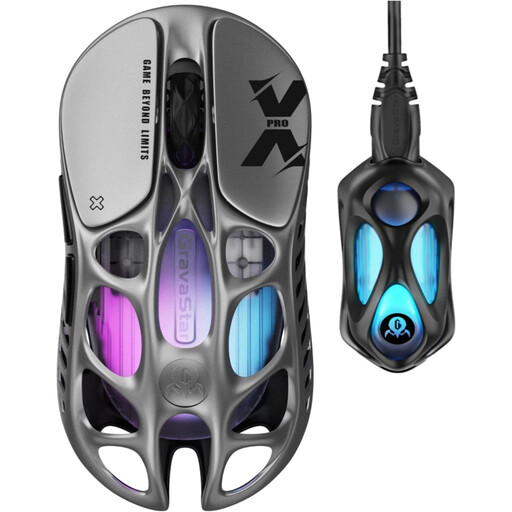
Why we recommend it: The ultimate mouse for those who aim for the top. A record-breaking 49g weight, magnesium alloy chassis, latest-gen sensor, and 8000 Hz polling rate: the spec sheet speaks for itself.
Here, the price is justified by premium materials and technologies (magnesium chassis, PAW3950 sensor, 8K dongle) that deliver a real performance gain, not just one on paper.
Its record-breaking weight of 49g and its native 8000 Hz *polling rate* for absolute responsiveness and surgical precision.
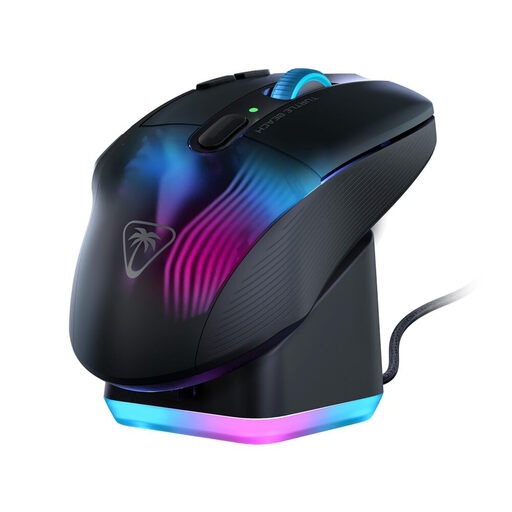
Why we recommend it: The ultimate weapon for long raid nights. Designed for comfort and versatility, its 29 programmable functions (thanks to Easy-Shift[+] technology) are a dream for managing a complex spell bar.
It doesn't play the featherweight card, but rather focuses on ergonomics and features. Its 99g weight ensures excellent stability, which is essential for accurately activating the right skill at the right time.
Its key strength: 29 programmable functions and a 4D wheel, the perfect combo for games that demand an avalanche of shortcuts.
We have compiled a complete selection of products that meet our quality charter and current safety standards.
For the majority of gamers, a 1000 Hz rate is more than sufficient and already constitutes professional-grade performance. An 8000 Hz rate can offer a perceptible smoothness gain for highly competitive players using very high-refresh-rate monitors (240 Hz and above), but be warned: it requires a powerful PC to keep up without a hitch. In short: a bonus for the elite, not a revolution for the average user.
A few simple tricks can extend battery life. The most effective is to reduce or completely disable the RGB lighting. Also, consider switching to the Bluetooth connection for office tasks, as it consumes less power than 2.4 GHz. Finally, most manufacturer software allows you to configure an automatic sleep mode after a short period of inactivity.
Optical switches register clicks via a light beam, which offers two main advantages. First, they eliminate the risk of unintentional "double-clicking," a problem that can occur as the metal contacts in mechanical switches wear out. Second, their response time is technically faster because they have no debounce delay. Ultimately, the choice comes down to your preference for click feel and your quest for absolute durability.