
Livraison le jour même ou le lendemain

Qualité garantie

Débloquez vos offres de bienvenue: Livraison GRATUITE | Jusqu'à -80 % | 30 jours d'essai gratuits à JoyPlus
Téléchargez l'application
The market for wireless gaming mice is now so vast that it can be difficult to navigate. Between complex spec sheets and marketing claims, making an informed choice can be a challenge. As a Product Recommendation Officer at Joybuy, my role is to help you find clarity by focusing on objective, practical criteria, ensuring your next purchase truly meets your gaming needs.
The goal isn't to find the "perfect" mouse, but the one that best suits your playstyle, hand size, and setup.
Before looking at specific models, it's helpful to understand the features that truly matter.
A lightweight gaming mouse is often favoured in competitive games like FPS or MOBAs. A low weight (typically under 70 grams) allows for faster movements and less fatigue during long sessions. Ergonomics are just as crucial: the mouse's shape should match your grip style (palm, claw, or fingertip) and hand size to ensure optimal comfort and sustained precision.
The fear of latency (or lag) with a wireless gaming mouse is now largely unfounded. Modern 2.4 GHz technologies offer responsiveness on par with wired models, making them perfectly suited for e-sports. Some models even offer an 8KHz polling rate for near-instantaneous fluidity.
A Bluetooth gaming mouse is a compelling option for its versatility, allowing you to connect to multiple devices without a dongle. However, it generally has slightly higher latency, making it less suitable for highly competitive gaming. Finally, a mouse with long battery life will save you from having to recharge mid-game.
DPI (Dots Per Inch) measures the sensor's sensitivity. A high-DPI mouse isn't necessarily better; what's important is the ability to adjust this sensitivity to your liking and your screen's resolution. A programmable gaming mouse with extra buttons is a major asset for assigning macros or shortcuts, giving you an edge in many games. Finally, an RGB gaming mouse allows you to customise the lighting to match the rest of your setup—an aesthetic touch appreciated by many gamers.
Here are a few models that stand out for their technical specs and market positioning.
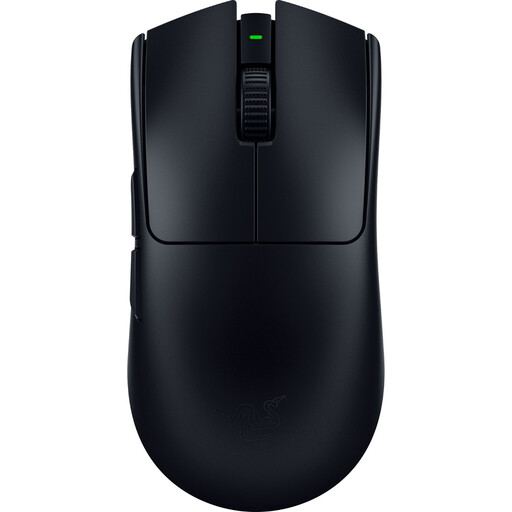
Why We Recommend It
This model is engineered for pure performance. Its feather-light 54-gram weight and ambidextrous shape make it a formidable tool for precision. The combination of the Focus Pro 35K optical sensor and HyperPolling 8KHz technology aims to deliver top-tier responsiveness and tracking accuracy—undeniable advantages for the most demanding gamers.
Pros
Who is this product for?
Competitive gamers and e-sports professionals looking for a lightweight and extremely responsive gaming mouse for fast-paced games like FPS.
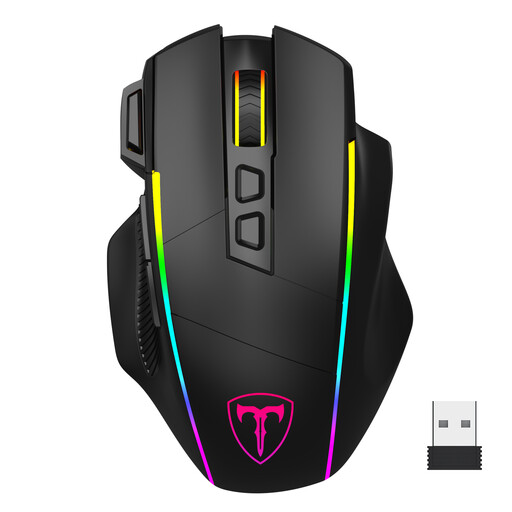
Why We Recommend It
This mouse's strength lies in its versatility. With three connection modes (2.4G, Bluetooth, wired USB-C), it adapts to multiple uses, from intense PC gaming to working on a laptop. Its ergonomic design is intended for medium to large hands, offering good support and noticeable comfort.
Pros
Who is this product for?
Versatile gamers who use multiple devices (PC, Mac, laptop) and are looking for a comfortable mouse for long sessions that can switch from gaming to work effortlessly.
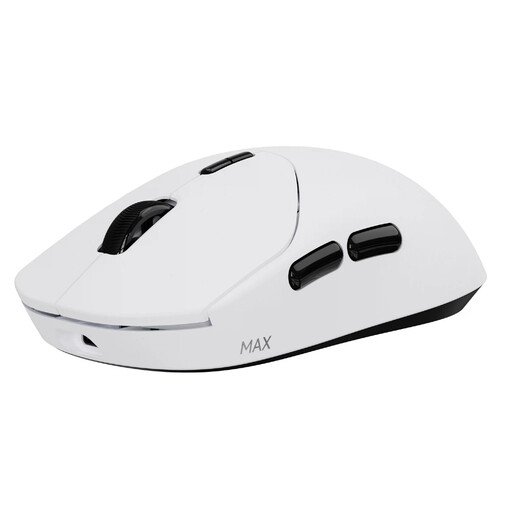
Why We Recommend It
This model stands out for two exceptional features: its mere 53-gram weight and its record-breaking battery life. The manufacturer claims up to 750 hours of use at 1000 Hz, a game-changing figure for those who often forget to charge their peripherals. It also integrates true native 8KHz wireless technology.
Pros
Who is this product for?
Gamers who hate the hassle of recharging and are looking for the ultimate lightweight gaming mouse without compromising on responsiveness or customisation features.
High-performance gaming mice are often designed to provide pronounced tactile and audible feedback on clicks. If you play or work in a shared environment, or if you're a streamer concerned about your broadcast's audio quality, click noise can become a nuisance.
In that case, it might be wise to explore other options. For those who prioritise discretion above all, a Silent Wireless Mouse can be a relevant alternative to consider.
Yes, for the vast majority of users, including high-level gamers. Modern 2.4 GHz wireless technologies have reached a level of performance where latency is imperceptible to humans. Technologies like 8KHz HyperPolling even push this responsiveness beyond what many standard wired mice offer.
A high-DPI mouse allows the cursor to travel further across the screen for the same physical hand movement. However, a very high DPI isn't always an advantage. Most professional gamers use moderate DPI settings (between 400 and 1600). The most important factor is the sensor's quality and the ability to adjust the DPI in increments to find the sensitivity that suits you.
Several simple tricks can help maximise battery life. You can disable or reduce the intensity of the RGB lighting, which is a significant power drain. It's also possible to lower the polling rate when you're not gaming (for example, switching from 1000 Hz to 500 Hz). Finally, if your mouse supports it, using Bluetooth mode for productivity tasks is an excellent way to conserve battery.