
Livraison le jour même ou le lendemain

Qualité garantie

Débloquez vos offres de bienvenue: Livraison GRATUITE | Jusqu'à -80 % | 30 jours d'essai gratuits à JoyPlus
Téléchargez l'application
Gone are the days of your mouse cord holding back your movements or snagging on the edge of your desk. Yet, faced with a jungle of models and spec sheets, choosing the right wireless gaming mouse can be a real headache. Between latency, weight, sensor precision, and ergonomics, it's easy to get lost.
This guide is here to give you the keys to tracking down the wireless gaming mouse tailored to your needs, whether you're a hardcore FPS competitor, a keen MOBA and MMO strategist, or simply a passionate gamer looking for comfort and freedom.
Before diving into our selection, let's review the key criteria that will guide your choice.
Weight is a decisive factor. A lightweight gaming mouse (usually under 80 grams) is often the weapon of choice for FPS players, as it facilitates wide, swift movements. Conversely, a heavier model can offer a greater sense of stability. Ergonomics is an equally personal matter: the shape of the mouse must match your grip style (palm, claw, or fingertip grip) and hand size to prevent fatigue during long gaming sessions. While some models are ambidextrous, others are specifically designed for right- or left-handed users.
The optical sensor is the core of a high-performance gaming mouse. Its sensitivity, measured in DPI (Dots Per Inch), defines how far the cursor travels on-screen for a given hand movement. While a high DPI is often a marketing point and a sign of quality, most gamers opt for much more moderate settings to prioritize control.
Connectivity is just as essential. Modern 2.4 GHz wireless technology via a USB dongle now ensures near-zero latency, effortlessly competing with wired models—a prerequisite for competitive gaming. A Bluetooth gaming mouse, on the other hand, offers welcome versatility for juggling multiple devices, but the 2.4 GHz connection remains the gold standard for responsiveness.
The number of buttons depends directly on your games of choice. An FPS mouse often sticks to the essentials (left/right clicks, scroll wheel, two thumb buttons), whereas an MMO mouse transforms into a true command center with sometimes more than a dozen buttons for assigning spells and macros. Customization via the manufacturer's software is the icing on the cake: it allows you to remap buttons, adjust DPI levels, and synchronize the lighting to create an RGB gaming mouse that reflects your style.
Let's get down to specifics with a few models that have caught our eye and excel in their category.
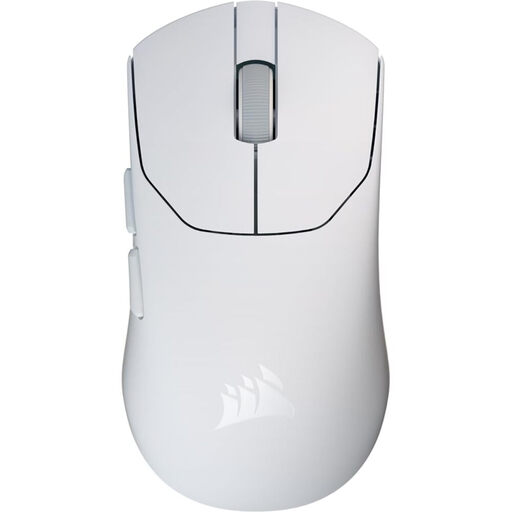
Why it stands out: With an unrivaled weight of just 36 grams, the Sabre v2 PRO is a true featherweight—one of the lightest mice on the market. It's built for pure speed and agility without sacrificing precision, thanks to its cutting-edge optical sensor.
Advantages:
Who is it for? This model is aimed squarely at competitive FPS players who are chasing every last gram to maximize their reaction speed and land flick shots without the slightest fatigue.
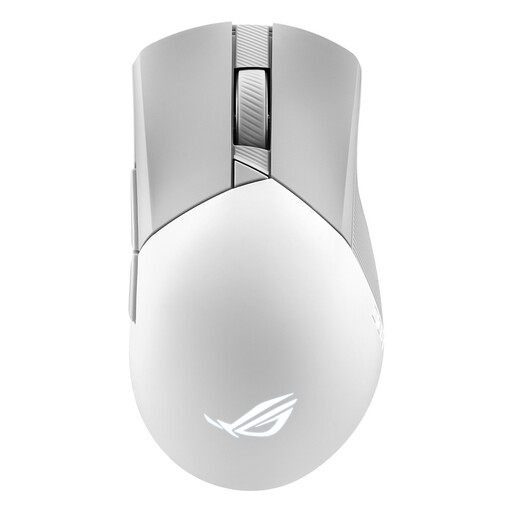
Why it stands out: This is the Swiss Army knife for the demanding gamer. The Gladius III Wireless Aimpoint combines formidable tracking accuracy, ultra-versatile connectivity, and deep customization that extends to its hot-swappable click switches.
Advantages:
Who is it for? This white gaming mouse is perfect for right-handed gamers who love having options and want a peripheral that is just as comfortable in fast-paced FPS games as it is in tactical MOBAs, thanks to its flawless sensor and unique customization features.
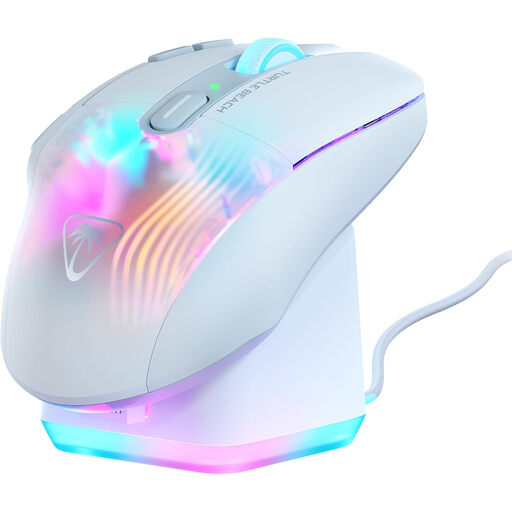
Why it stands out: The Kone XP Air is a true cockpit for your hand. With its 10 physical buttons and Easy-Shift[+] duplicator technology, it puts up to 29 programmable functions at your fingertips. It's an absolute weapon for games loaded with shortcuts.
Advantages:
Who is it for? This is the quintessential MMO mouse, built for players of World of Warcraft, Final Fantasy XIV, League of Legends, and other strategy games who need to unleash an arsenal of commands without ever letting go of their mouse.
Our selection focuses on flagship models, but the choices are vast. If you're looking for a particular style, like an all-white setup, or simply want to explore other peripherals, feel free to take a look at our dedicated category.
To discover a wider range, especially if you're a fan of pristine builds, explore our White Buttons section.
Absolutely. The era of doubt is over. Modern wireless technologies, especially the 2.4 GHz connection via a USB dongle, now offer response times and reliability identical to their wired counterparts. The proof: they have become the standard in the esports scene and are used by the majority of professional players.
This is a very personal question—it's all a matter of feel. As a general rule, lightweight mice (under 80g) are favored in FPS games to facilitate large, quick movements while reducing wrist fatigue. Conversely, a heavier model can provide a sense of greater control for micro-adjustments. There's no single right answer: the most important thing is that you feel comfortable, even after several hours of play.
DPI (Dots Per Inch) measures the sensor's sensitivity: the higher the DPI, the faster the cursor will move on-screen for the same hand movement. While spec sheets highlight astronomical figures, this is primarily an indicator of the sensor's quality. In practice, the vast majority of gamers, including pros, set their mice to much lower values—typically between 400 and 1600 DPI—and then fine-tune the sensitivity directly in the game's settings. The goal is to find the perfect balance between speed and precision.