
Livraison le jour même ou le lendemain

Qualité garantie

Débloquez vos offres de bienvenue: Livraison GRATUITE | Jusqu'à -80 % | 30 jours d'essai gratuits à JoyPlus
Téléchargez l'application
In competitive gaming, every millisecond counts. Every movement must be perfect. In this high-stakes environment, a snagging cable isn't just an annoyance—it's a handicap. This is why the most demanding players are overwhelmingly switching to the wireless gaming mouse. But with a jungle of available models, how do you separate the wheat from the chaff and cut through the marketing noise?
This guide breaks down a selection of mice engineered for pure performance. The goal: to give you all the keys to make an informed decision and find the model that perfectly matches your playstyle.
Before diving into our selection, let's review the essential criteria for unearthing the perfect mouse.
The sensor is the heart of your mouse. Its performance is measured by several key indicators:
For esports, a modern, responsive sensor is non-negotiable. It must translate your every move with flawless perfection, without ever faltering.
Latency was long the Achilles' heel of wireless mice. That's a thing of the past. Today, proprietary 2.4 GHz technologies (like ROG SpeedNova or Razer HyperSpeed) deliver a low-latency wireless mouse with 1 ms response times, easily rivaling wired models. For competition, forget Bluetooth (too slow) and always opt for the 2.4 GHz connection via the USB dongle.
Weight and shape are critical for your comfort and agility. A lightweight gaming mouse (often under 80 grams) reduces fatigue during long sessions and facilitates swift movements—a major asset in FPS games.
An ergonomic gaming mouse should contour to your hand and suit your grip style: palm, claw, or fingertip. Ambidextrous models are available, but so are mice designed specifically for right- or left-handed users.
Here are three models that stand out from the pack with their technical specs and performance-driven DNA.
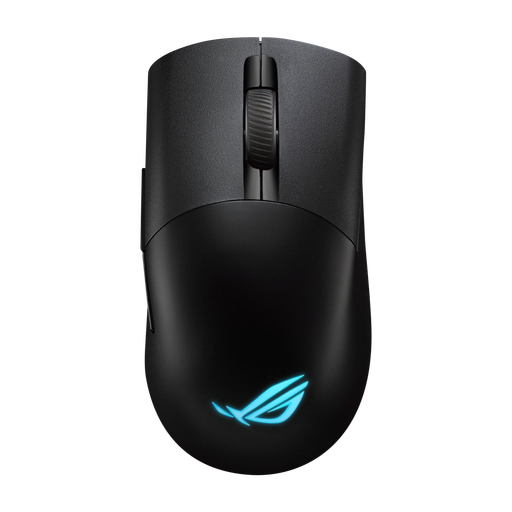
What Makes It Unique
The Asus gaming mouse, the ROG Keris Wireless Aimpoint, is the Swiss Army knife of gaming peripherals. Its ace in the hole: the Push-Fit II sockets, which let you hot-swap the micro switches without any soldering. This gives you total freedom to customize the click feel or replace a worn-out switch.
Key Features
Who Is It For? For gamers who love to tinker and fine-tune their gear down to the smallest detail. Its ergonomic shape for right-handers and light weight make it a formidable weapon on all fronts, from FPS to MOBAs.
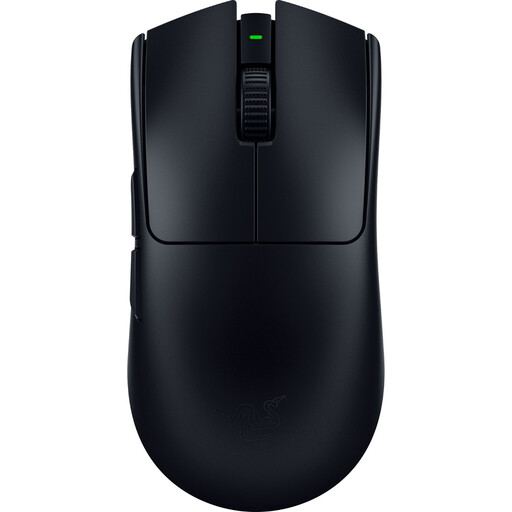
What Makes It Unique
The Razer Viper V3 Pro is the very definition of an esports mouse. Developed with professional players, it is obsessed with lightness and responsiveness. Its featherlight 54-gram weight and 8K Hz HyperPolling technology make it an absolute weapon for games where every reflex is a matter of victory or defeat.
Key Features
Who Is It For? The quintessential pro gaming mouse. It's built for FPS and Battle Royale players seeking the decisive edge that comes from minimal weight and infinitesimal latency. If pure speed and raw precision are your only priorities, look no further.
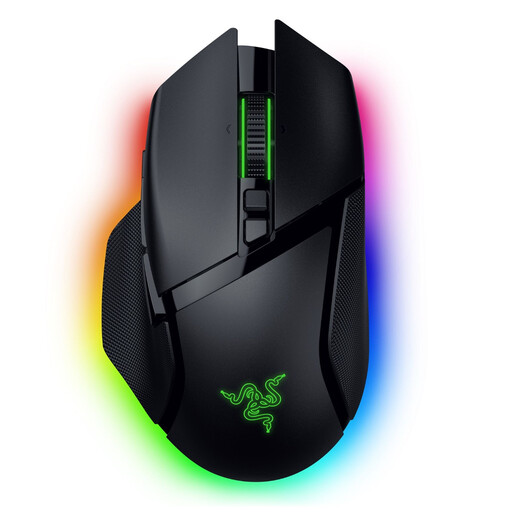
What Makes It Unique
The Razer gaming mouse, the Basilisk V3 Pro, is all about versatility and ergonomics. While heavier than its competitors, it compensates with supreme comfort for marathon gaming sessions and an avalanche of features, like its 11 programmable buttons and the HyperScroll smart wheel.
Key Features
Who Is It For? For the jack-of-all-trades gamer who doesn't stick to a single genre. Its refined ergonomics and myriad of buttons make it a prime ally for MMOs and RPGs, as well as for daily work. It's versatility without sacrificing performance.
Choosing a mouse is a highly personal decision. If none of these three models caught your eye, don't worry: the world of gaming peripherals is vast and full of hidden gems.
To perfect your setup or explore other components, take a look at our selection of accessories. You might just find the missing piece for your perfect configuration. ? Discover our range of USB Buttons and other peripherals
Q1: Is a wireless mouse really as fast as a wired model for competition? Absolutely. Modern wireless technologies (2.4 GHz connection via USB dongle) boast 1 ms response times. This latency is completely indistinguishable from a wired connection, even for the most discerning professional players.
Q2: Does the weight of a mouse really make a difference? Yes. A lightweight mouse promotes quick, snappy movements while reducing arm and wrist fatigue. This is a clear advantage in fast-paced games like FPS. Conversely, a heavier mouse can provide a feeling of greater stability and control. Ultimately, it all comes down to personal preference and feel.
Q3: DPI: should I really aim for the highest number? No, and this is a stubborn misconception. DPI measures the sensor's sensitivity: the higher it is, the faster the cursor moves on screen for the same hand movement. A very high DPI is absolutely not a guarantee of performance. Most pros set their mouse between 400 and 1600 DPI, then fine-tune the sensitivity directly in-game. A high DPI range is mainly a sign that the onboard sensor is modern and high-quality.
Article written by the Joybuy Product Recommendation Officer.