
Livraison le jour même ou le lendemain

Qualité garantie

Débloquez vos offres de bienvenue: Livraison GRATUITE | Jusqu'à -80 % | 30 jours d'essai gratuits à JoyPlus
Téléchargez l'application
Navigating the jungle of gaming peripherals can be a real headache. The wireless gaming mouse market is flooded with abstruse spec sheets and often misleading marketing promises. As a Product Specialist at Joybuy, my role is to cut through the noise and offer you clear, actionable advice.
Choosing the right mouse is crucial, especially for competitive players. The wrong choice can not only tank your performance but also turn into an unnecessary expense. Let's scrutinize the most common pitfalls and the criteria that truly matter for making the right choice.
Marketing loves to highlight flashy numbers that don't always translate into a tangible in-game advantage. Here are the claims to debunk.
The Myth of Outrageous DPI: Brands compete on extreme sensitivities (over 30,000 DPI). In reality, almost all professional players, especially in FPS games like Valorant or CS2, use settings between 400 and 1600 DPI. A sky-high DPI is no guarantee of precision. The quality and reliability of the sensor far outweigh a maximum number you will never use.
The Polling Rate Arms Race: The arrival of 8000?Hz mice introduced a new standard in responsiveness, promising minimal latency. While this benefit is tangible for top-tier competitors, it comes with two major drawbacks: skyrocketing battery consumption and a non-trivial CPU load. For the vast majority of gamers, a stable 1000 or 2000?Hz polling rate is more than enough for a perfectly smooth experience.
The Obsession with Ultra-Lightweight at the Expense of Shape: A lightweight gaming mouse can certainly reduce fatigue and facilitate quick movements. But be warned, a feather-light weight should never come at the cost of ergonomics. A mouse that is too small, too flat, or has a shape that doesn't match your grip style (palm, claw, fingertip) will inevitably lead to discomfort and a loss of control during long gaming sessions.
To find the perfect wireless gaming mouse, focus on these three pillars instead.
The ideal weight primarily depends on your playstyle. Mice under 65g are often favoured for FPS games, as they allow for quick flicks and wide sweeps. Models between 70g and 90g offer an excellent compromise between agility and stability.
Ergonomics is just as, if not more, crucial. An ergonomic gaming mouse should fit the palm of your hand and suit your grip type.
Instead of focusing on max DPI, pay attention to the sensor model. Modern optical sensors like the PAW3395, 3950, or ROG's AimPoint series are benchmarks for reliability and tracking, ensuring zero unwanted hardware acceleration.
The wireless connection must be flawless. 2.4?GHz technology offers the lowest latency, a must-have for competitive gaming. Bluetooth is a nice bonus for versatility, but it should never be your primary choice for playing.
Good battery life (over 80 hours) will prevent you from running out of power mid-game. Some models include charging docks or fast charging, which are very practical day-to-day assets. Finally, the number of programmable buttons should match your needs. While 5 to 6 buttons are enough for an FPS, MMO or MOBA fans will gravitate towards models offering a myriad of macros.
Here is a selection of models that check all the boxes, designed for different player profiles.
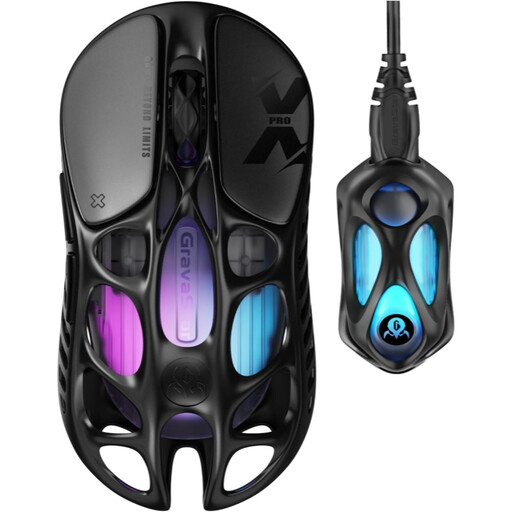
Why it's a match: Built for FPS and MOBA players who demand lightning-fast responsiveness and absolute lightness. Its feather-light 49g weight and hollowed-out shell allow for explosive movements and effortless aerial control.
It doesn't sacrifice sturdiness for the sake of weight. Its magnesium alloy frame provides far superior rigidity compared to traditional plastics, eliminating any sense of fragility. The 8000 Hz polling rate is a genuine asset for top-tier competition here, not just a marketing gimmick.
Feather-light 49g weight and 8000 Hz polling rate for near-zero latency. Latest-generation PAW 3950 sensor.
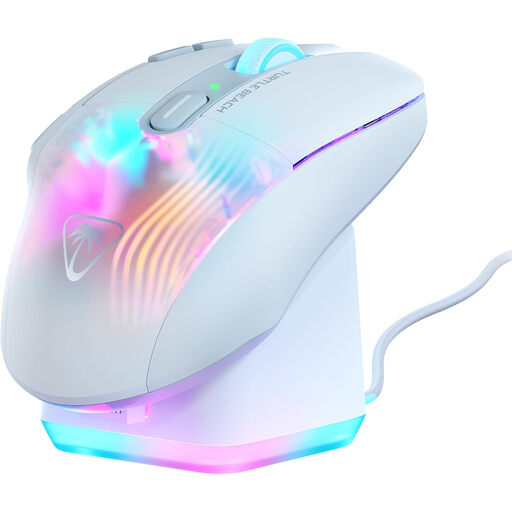
Why it's a match: Perfect for players who juggle countless skills and macros without wanting to sacrifice comfort during their marathon MMO or RPG sessions.
Rather than chasing the lowest weight, this model bets everything on proven ergonomics and formidable versatility. Its 29 programmable functions are a much more tangible advantage for MMOs than a few fewer grams on the scale.
29 programmable actions thanks to Easy-Shift[+] technology. Includes an RGB fast-charging dock for maximum convenience.
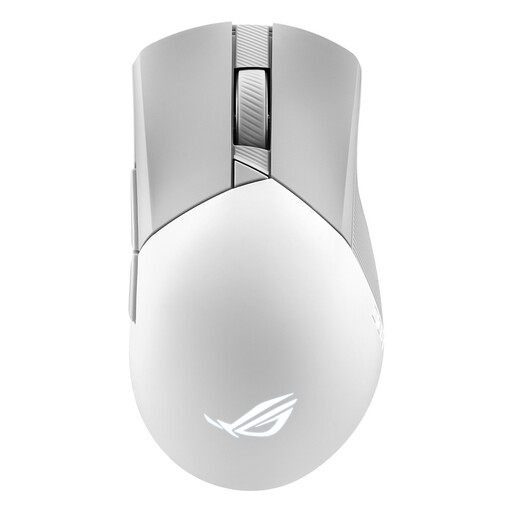
Why it's a match: The perfect ally for the passionate gamer seeking the right balance between cutting-edge performance, lasting comfort, and a classic design, without falling for overkill on sometimes superfluous specs.
It skips the numbers race to focus on the essentials: a comfortable asymmetrical shape, a controlled 79g weight, and a sensor with surgical precision. It's proof that a time-tested design is worth far more than a bloated spec sheet.
Classic, ultra-comfortable asymmetrical shape for right-handers. ROG SpeedNova wireless technology that is both reliable and energy-efficient.
We've curated a complete selection of mice that meet our strictest criteria for performance and reliability.
For the vast majority of gamers, including at a semi-professional level, a 1000?Hz polling rate is more than sufficient. The latency difference with an 8000?Hz model is a fraction of a millisecond, imperceptible to mere mortals. An 8000?Hz model can be relevant for world-class e-sports players equipped with very high refresh rate monitors (360?Hz and up) and a CPU capable of handling the extra load.
There is no "perfect" weight. It all depends on your preferences and playstyle:
A few simple tricks can help you gain precious hours of battery life: