
Livraison le jour même ou le lendemain

Qualité garantie

Débloquez vos offres de bienvenue: Livraison GRATUITE | Jusqu'à -80 % | 30 jours d'essai gratuits à JoyPlus
Téléchargez l'application
Choosing a wireless gaming mouse can quickly become a headache. Between spec sheets riddled with jargon and lofty marketing promises, it's easy to get lost and make a purchase you'll bitterly regret. To help you see things more clearly, we've broken down the pitfalls to avoid and the criteria that really matter before you check out.
The market is saturated with options, but they are not all created equal—far from it. Be especially wary of these two marketing claims, which are often more misleading than helpful.
To make an informed choice, focus on these three features that truly set a high-performance wireless mouse apart.
The ideal weight primarily depends on your playstyle. Mice under the 80-gram mark are often favored for FPS games, as they facilitate wide, rapid movements. But the most important thing is to find a model whose shape perfectly fits your hand. Good ergonomics reduce strain on the wrist and fingers—an absolutely crucial point for click marathoners, whether they're e-sports pros or just passionate gamers.
Beyond DPI, two elements are fundamental:
Nothing is more frustrating than a mouse dying on you mid-game. Double-check the battery life (in hours) advertised by the manufacturer. A good rechargeable gaming mouse should last for several dozen hours in 2.4 GHz mode. The inclusion of a charging dock or a fast-charging feature (a few minutes of charging for several hours of gameplay) is a real game-changer for daily use.
To guide you, here are a few models that check all the boxes and cater to very different player profiles.
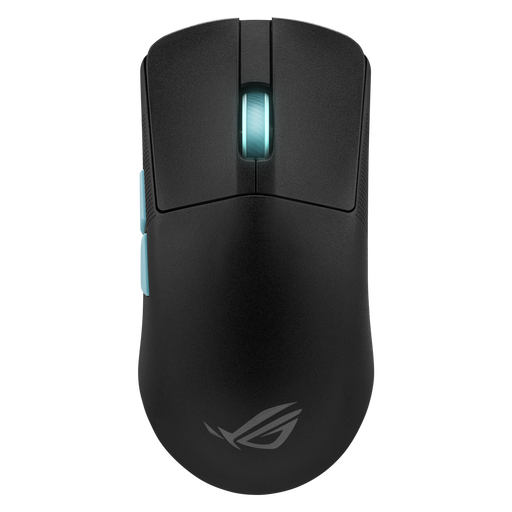
Why this one? Engineered for pure performance, this ultra-light 54-gram mouse is for FPS players who demand absolute precision and responsiveness. Its symmetrical shape and featherweight design reduce fatigue during intense sessions.
It doesn't rely on marketing-driven DPI, but on the excellence of its ROG AimPoint sensor and software that analyses your playstyle to suggest the perfect settings.
54g weight for maximum agility. Aim Lab Settings Optimizer software integration for tailored adjustments. Ultra-low latency 2.4 GHz ROG SpeedNova connectivity.
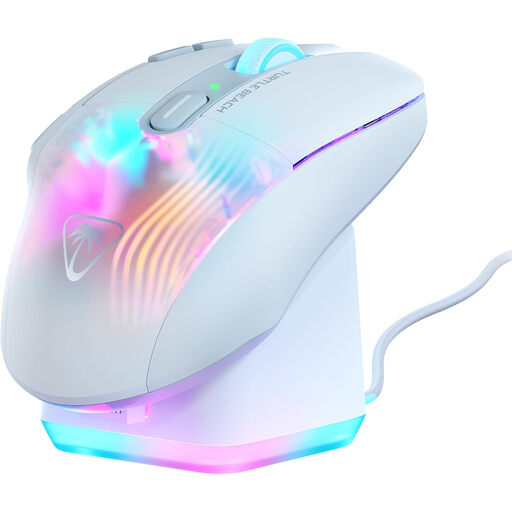
Why this one? Perfect for players of MMOs, RPGs, or any other game that's heavy on shortcuts. Its ergonomic shape and multiple programmable buttons make it a true command center for your gaming sessions.
It doesn't sacrifice features for the sake of lightness. Here, the focus is on ergonomics designed for long sessions and deep customisation—far more useful than an over-the-top DPI.
29 programmable inputs thanks to Easy-Shift[+] technology. Included RGB fast-charging dock for convenient recharging and a stylish desk. Up to 100 hours of battery life.
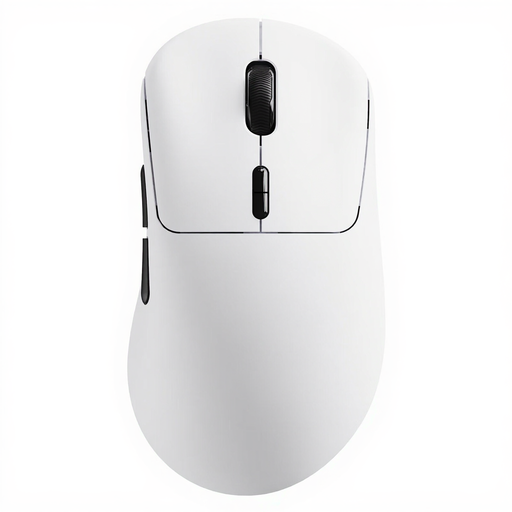
Why this one? This model is for gamers seeking lightness and endurance without compromise. At just 53 grams and with record-breaking battery life, it's perfect for those who simply want to forget they're using a wireless mouse.
It proves that a featherweight gaming mouse can also be an endurance champion. It focuses on efficient technologies (Nordic MCU) rather than superfluous gimmicks.
53g weight and record-breaking battery life of up to 750 hours. Native 8000 Hz wireless polling rate for first-class responsiveness.
We've compiled a complete selection of products that meet our strictest criteria for performance and reliability.
Several factors come into play. The switches are often the first component to show signs of wear. Most quality models are equipped with mechanical or optical switches rated for 70 to 100 million clicks. The battery is the other point of wear and tear: its capacity naturally decreases after several hundred charge cycles. On average, with regular use, a good wireless gaming mouse can last you for 3 to 5 years.
This was a legitimate concern, but it's no longer an issue with recent models. Modern 2.4 GHz wireless technologies (like ROG SpeedNova or Lightspeed) offer a latency of around 1 ms, which is completely imperceptible compared to a wired connection. Bluetooth, on the other hand, has much higher latency and is not recommended for fast-paced, competitive games.
No, that's a stubborn misconception. A high DPI simply means the cursor travels further on the screen for the same hand movement. Most pro gamers set their mouse between 400 and 1,600 DPI, then fine-tune the sensitivity directly in the game's options. A quality sensor that can track your movements with precision and without ever dropping out is infinitely more important than a marketing-driven DPI figure.