
Livraison le jour même ou le lendemain

Qualité garantie

Débloquez vos offres de bienvenue: Livraison GRATUITE | Jusqu'à -80 % | 30 jours d'essai gratuits à JoyPlus
Téléchargez l'application
Choosing a new wireless gaming mouse can be a daunting task. Between jargon-filled spec sheets and misleading marketing claims, it's easy to feel lost and end up with buyer's remorse. As a product expert at Joybuy, my role is to help you decode this information so you can make the right choice—one that's perfectly suited to your playstyle and budget.
Before we dive into our top picks, let's review the most common pitfalls that can cost you dearly, both in price and in-game performance.
The Myth of Stratospheric DPI: Brands love to advertise astronomical figures (30,000 DPI and up). In reality, most professional players, even in demanding games like FPS, use much lower sensitivities, typically ranging from 800 to 1600 DPI. A very high DPI in no way guarantees better precision; it's primarily a marketing gimmick. Focusing solely on this number means you risk overlooking far more important criteria, like sensor quality.
The Race to Featherweight at the Expense of Quality: A lightweight gaming mouse is certainly more responsive. The problem? Some models achieve this featherlight status by using low-grade plastics that creak under pressure, feel flimsy, and compromise the overall grip. A quality ultra-lightweight mouse owes its low weight to innovative materials like magnesium alloy, which combines lightness with robustness.
Latency and Wireless Technologies: Not All Are Created Equal. Bluetooth, while convenient for office work, has a latency that can quickly become a handicap in-game. For a pro gaming mouse, 2.4?GHz technology has become the gold standard, offering responsiveness nearly identical to that of a wired model. Don't trust vague claims of "low latency"; instead, verify the presence of a dedicated 2.4?GHz connection.
To avoid these pitfalls, focus on the technical specifications that truly make a difference in-game.
The ideal weight depends primarily on your playstyle and personal preference. For a wireless FPS mouse, a weight under 80 grams is often recommended to facilitate fast, sweeping movements. But be warned, weight alone isn't enough. The mouse's shape (symmetrical, ergonomic for right-handers) and materials are just as crucial. A magnesium alloy shell, for example, offers far superior rigidity and durability than standard plastic, even on a mouse with a perforated design.
The sensor is the true engine of the mouse. Names like PixArt (and its PAW sensors) are considered industry benchmarks. Forget max DPI: what defines a good sensor is its tracking precision (measured in IPS) and the complete absence of hardware acceleration.
The polling rate, measured in Hertz (Hz), indicates how often the mouse reports its position to the computer.
A good modern wireless gaming mouse typically offers triple-mode connectivity:
Customization, via dedicated software, allows you to adjust DPI steps, remap buttons, or configure the lighting of an RGB gaming mouse.
Rather than searching for a one-size-fits-all model, it's wiser to find the one that matches your specific needs. Here are a few recommendations to guide you.
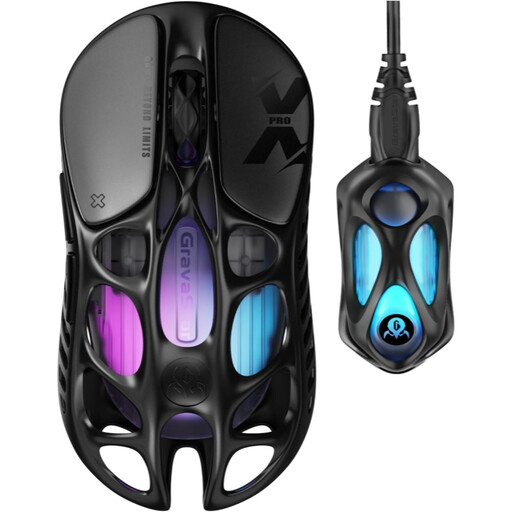
Why it's the right choice: This type of player is looking to shave off every millisecond. With its 49g weight, PAW 3950 sensor, and 8000 Hz polling rate, the Mercury X Pro is built for maximum responsiveness, ideal for the lightning-fast reflexes required in competitive games.
Its ultra-lightweight design is achieved with a magnesium alloy shell, a premium material that ensures rigidity and thus avoids the pitfall of mice that are light but flimsy.
Featherlight 49g weight and 8000 Hz polling rate for cutting-edge responsiveness. Triple-mode connectivity (2.4 GHz, Bluetooth, Wired).
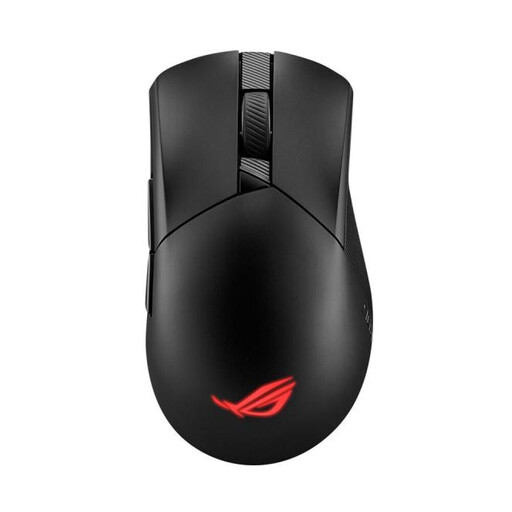
Why it's the right choice: This player prioritises comfort during long sessions and reliable performance. The Gladius's asymmetrical shape is renowned for its ergonomics. At 79g, it strikes an excellent balance between lightness and control without sacrificing grip.
It doesn't fall into the trap of being ultra-lightweight at all costs. Its 79g weight is the result of an optimised design that preserves proven ergonomics and durability.
Asymmetrical ergonomics for right-handers and hot-swappable switches (Push-Fit Socket II) to customise click feel. Reliable ROG SpeedNova wireless technology.
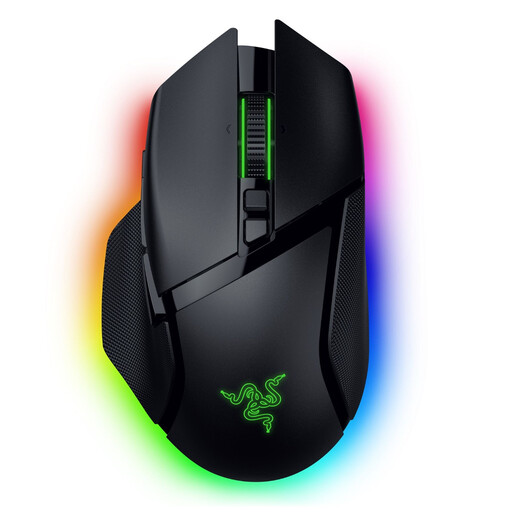
Why it's the right choice: For this player, the mouse is a true command centre. The Basilisk V3 Pro, with its 11 programmable buttons, advanced HyperScroll tilt wheel, and 13-zone RGB lighting, offers an extreme level of customisation for MMOs, RPGs, or streaming.
It proves that features and performance are not mutually exclusive. Despite its numerous options, it integrates a Focus Pro 35K optical sensor and HyperSpeed technology for minimal latency.
Razer HyperScroll Tilt Wheel with smart modes and 11 programmable buttons. Razer Chroma RGB ecosystem for complete visual immersion.
We have compiled a complete, up-to-date list of products that meet these strict selection criteria and current regulations.
Absolutely, provided you use the right technology. Modern gaming mice with a 2.4?GHz RF connection (via a USB dongle) have such low latencies (typically 1?ms) that the difference from a wired model is imperceptible to almost all players, including at a professional level. Bluetooth, on the other hand, is slower and not recommended for competitive gaming.
Battery life varies enormously from one model to another, ranging from 40 to over 150 hours. It depends on several factors: the battery capacity, the use (or not) of RGB lighting, and the selected polling rate. Most models charge quickly via a USB-C cable, which allows you to continue playing while it charges.
No, in fact, it's often counterproductive. DPI simply measures the mouse's sensitivity: a high DPI means the cursor will travel a greater distance on-screen for the same physical movement. Most FPS players, who seek surgical precision, prefer a low DPI (between 400 and 1600) for perfect control over micro-adjustments. It is far more important to have a quality sensor that provides accurate tracking without acceleration, regardless of the DPI used.