
Livraison le jour même ou le lendemain

Qualité garantie

Débloquez vos offres de bienvenue: Livraison GRATUITE | Jusqu'à -80 % | 30 jours d'essai gratuits à JoyPlus
Téléchargez l'application
Choosing a wireless gaming mouse can quickly become a daunting task. Between jargon-filled spec sheets and alluring marketing promises, it's easy to get lost or overpay for useless gimmicks. As a product expert at Joybuy, my role is to help you separate fact from fiction. Let's break down the criteria that truly matter so you can make an informed choice that fits your playstyle and budget.
Peripheral marketing is relentless. Certain selling points, hammered home on product pages, often hide a more nuanced reality. Here are the three most common traps to avoid.
It's the go-to argument for marketing departments: DPI (Dots Per Inch), which measures sensor sensitivity. We're led to believe that a higher number guarantees better performance, but this is a misleading shortcut. A high-DPI mouse (over 16,000) is actually unusable for the average person, making movements blurry and imprecise. What really matters is the intrinsic quality of the sensor: its ability to handle rapid acceleration without spinning out is far more important than the maximum DPI number.
The race to the bottom in terms of weight is the other major trend, with some models dipping below the 50-gram mark. While a featherlight weight is an undeniable asset in fast-paced FPS games for reducing fatigue and facilitating wide sweeps, it's not a one-size-fits-all solution. A heavier mouse can offer better stability and a more controlled feel, especially for players who prefer a palm grip. The ideal weight is ultimately a matter of personal preference and grip style.
Not all wireless connections are created equal. A Bluetooth gaming mouse is convenient for on-the-go use or office work thanks to its universal compatibility, but its latency can quickly become a deal-breaking handicap in competitive games. For gaming, the only real option remains a 2.4?GHz RF connection via a USB dongle. This is the industry standard, offering responsiveness that is indistinguishable from a wired model.
To make the right choice, forget the marketing hype and focus on the three pillars that define a mouse's true performance.
The sensor is the engine of your mouse. Mainstays like the PixArt PAW3395 or the ROG AimPoint are gold standards. They guarantee flawless, pixel-perfect tracking, even during the swiftest movements (measured in IPS, or Inches Per Second). Instead of focusing on a stratospheric DPI number, verify that the mouse is equipped with a modern, reputable sensor. This is your guarantee of rock-solid reliability, whether you're in a frantic FPS or a demanding strategy game.
Comfort is non-negotiable, especially during long gaming sessions. An ergonomic mouse designed for right- or left-handed users, with a shape that fits your hand, will prevent fatigue and strain.
A good wireless gaming mouse must offer a rock-solid connection and comfortable battery life.
To illustrate these criteria in action, here is a selection of models suited for different types of players.
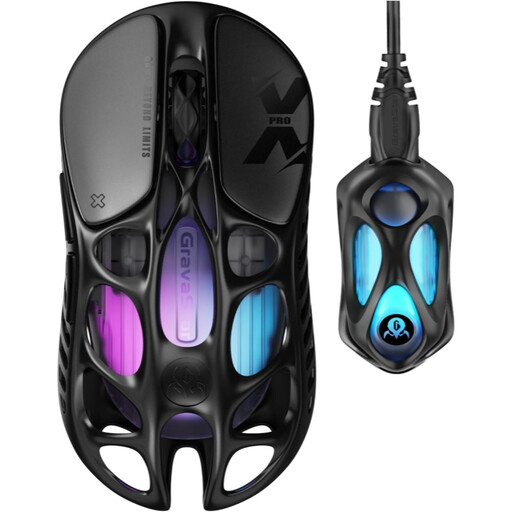
Why it stands out: Engineered for pure performance, this mouse is for gamers looking to optimise every millisecond. Its featherlight weight and extreme responsiveness make it a competitive-grade tool.
Instead of relying on marketing-driven DPI, it doubles down on an 8000 Hz polling rate—a far more relevant metric for absolute in-game responsiveness.
Ultra-lightweight at 49 g thanks to its magnesium alloy shell. PAW 3950 sensor and triple-mode connectivity (including 2.4 GHz with an 8K dongle).
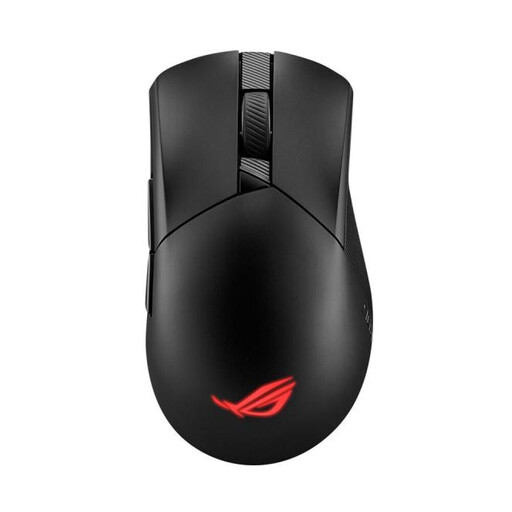
Why it stands out: This is the sensible choice for the do-it-all gamer. It offers a remarkable balance of performance, comfort, and features without going to extremes.
At 79 g, it's lightweight but doesn't sacrifice ergonomics. Its asymmetrical right-handed shape ensures lasting comfort, proving that weight isn't the only factor.
Triple-mode connectivity (2.4 GHz RF, Bluetooth, USB). Hot-swappable Push-Fit II switch sockets allow you to customise click feel and extend lifespan.
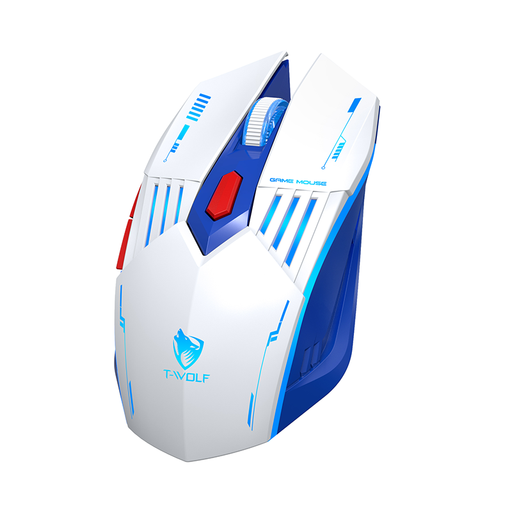
Why it stands out: Perfect for getting a reliable wireless experience without breaking the bank. It focuses on the essentials, packing the must-have features for both gaming and productivity.
It proves that a great wireless experience isn't exclusive to high-end models. The focus is on reliable connectivity rather than extreme specs.
Triple-mode connectivity (2.4G, Bluetooth, wired). Adjustable DPI up to 3600 and a USB-C rechargeable battery at a very accessible price point.
We have curated a complete range of products that meet our selection criteria and industry standards.
Battery life varies greatly depending on the model and usage. On average, a rechargeable gaming mouse offers between 40 and 80 hours of gameplay on a 2.4?GHz connection. Using RGB lighting can reduce this duration by 30-50%. Most models can be used in wired mode while charging, so you'll never be left out of the game.
For casual or less competitive games (strategy, adventure), a Bluetooth gaming mouse can get the job done. However, for fast-paced games like FPS where every millisecond counts, the higher latency of Bluetooth can be a real disadvantage. The 2.4?GHz RF connection remains the undisputed standard for a no-compromise gaming experience.
Regular maintenance will extend your mouse's lifespan. Wipe the shell with a slightly damp microfibre cloth. A blast of compressed air will help dislodge dust from the sensor and the crevices around the buttons. Regularly check the feet (often made of PTFE) for wear and replace them if necessary to maintain a perfect glide.