
Livraison le jour même ou le lendemain

Qualité garantie

Débloquez vos offres de bienvenue: Livraison GRATUITE | Jusqu'à -80 % | 30 jours d'essai gratuits à JoyPlus
Téléchargez l'application
Choosing a wireless gaming mouse can quickly become a headache. Between indecipherable spec sheets and marketing jargon, it's easy to get lost. Our mission as editors is to cut through the noise and help you make an informed choice, free from the advertising hype. To avoid buyer's remorse, here are the 3 pitfalls to watch out for.
high precision; the quality and reliability of the sensor are far more critical factors.lightweight gaming mouse can certainly improve the speed of your movements, an ultra-light design sometimes comes at the expense of durability or ergonomics. A mouse that creaks under pressure or has a shape that doesn't fit your hand will quickly become uncomfortable after a few hours of gaming.To avoid falling into these traps, focus on the features that have a direct impact on your performance and comfort.
The weight and shape of a mouse are primarily a matter of personal preference. A lightweight gaming mouse (usually under 80g) facilitates wide, fast movements, which is a clear advantage in first-person shooters (FPS). Conversely, a heavier model can provide a better sense of control and stability.
The key is to find an ergonomic mouse that suits your grip style:
As you've gathered, high DPI isn't the only performance metric. Two other features are worth watching closely:
For a wireless gaming mouse, a reliable connection is non-negotiable.
Here are our recommendations, designed for different types of gamers and based on the criteria we've just covered.
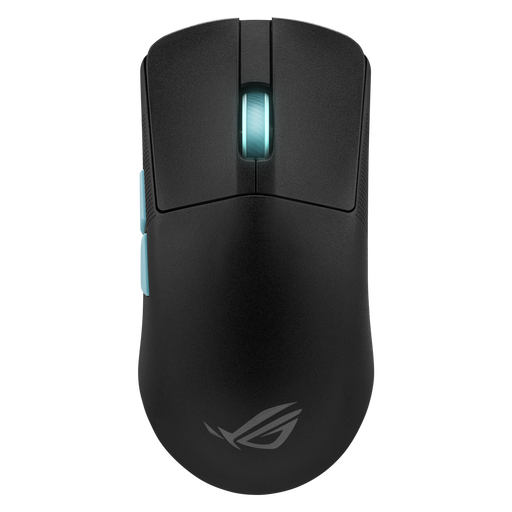
Why we recommend it: Ultra-lightweight (54g) and developed with esports pros, it's built for absolute precision and the swift movements required in competitive FPS games.
It doesn't just boast a high DPI. It integrates the Aim Lab Settings Optimizer, which analyses your playstyle to recommend the most suitable settings. This turns a simple marketing point into a genuine optimisation tool.
Featherlight 54-gram weight for minimal fatigue; ultra-low-latency ROG SpeedNova connectivity; deep software integration for custom-tuned settings.
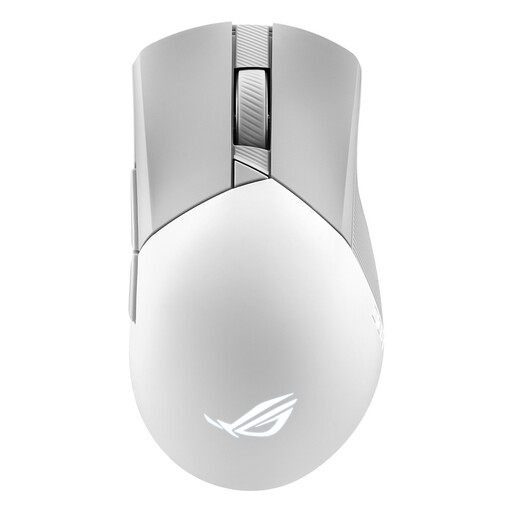
Why we recommend it: Its comfortable asymmetrical shape, balanced 79g weight, and tri-mode connectivity (2.4 GHz, Bluetooth, wired) make it the perfect ally for switching from gaming to productivity without compromise.
It combines a high-performance 2.4 GHz connection (ROG SpeedNova) for gaming with Bluetooth for versatility, without ever sacrificing responsiveness when it's crucial. The choice of mode is therefore clear and deliberate.
Reliable tri-mode connectivity; hot-swappable Push-Fit II switch sockets for enhanced customisation and durability; a proven ergonomic shape.
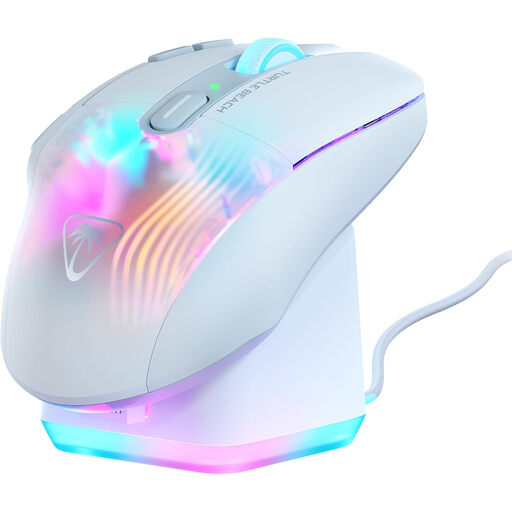
Why we recommend it: With 10 physical buttons and Easy-Shift[+] technology that unlocks 29 programmable functions, this is the ultimate weapon for MMOs and RPGs that demand a barrage of shortcuts.
Rather than chasing lightness at all costs, it embraces its 99g weight, focusing on a well-designed ergonomic shape and a functional depth that justifies it. Here, performance is measured by the power of its commands.
29 programmable functions via 10 buttons; included rapid-charge RGB dock; 4D wheel for extended control.
For MMO and MOBA fans who swear by macros, discover our complete selection of mice equipped with multiple side buttons, all tested and approved by our editors.
Its longevity primarily depends on two components: the switches (the mechanisms under the clicks) and the battery. Quality switches are typically rated for tens of millions of clicks (70, 80, or even 100 million). The battery, like any lithium-ion battery, will inevitably lose capacity over charge cycles. However, recent models are designed to last several years with normal use, and almost all allow you to play in wired mode while charging.
Absolutely not. A stratospheric DPI figure is more of a marketing gimmick than a real in-game advantage. The majority of gamers, including professionals, set their sensitivity between 800 and 1600 DPI for optimal control. The quality of the sensor, its lack of smoothing or acceleration, and its ability to track movements without ever spinning out are far more crucial factors.
For minimal latency, the golden rule is simple: always use the 2.4 GHz connection via the provided USB dongle, and forget about Bluetooth for gaming. To optimise the signal, place the dongle as close to the mouse as possible, using a USB extender if necessary to move it away from sources of interference (other USB 3.0 ports, a Wi-Fi router, etc.).