
Livraison le jour même ou le lendemain

Qualité garantie

Débloquez vos offres de bienvenue: Livraison GRATUITE | Jusqu'à -80 % | 30 jours d'essai gratuits à JoyPlus
Téléchargez l'application
Choosing a new wireless gaming mouse can quickly become overwhelming. Between spec sheets riddled with jargon and dazzling marketing promises, it's easy to get lost or make a purchase you'll instantly regret. As expert editors, our mission is to help you decipher this information to make an informed choice that's perfectly suited to your playstyle and budget.
Before diving into specifications, let's identify the three most common traps awaiting gamers in 2026:
To avoid these pitfalls, focus on a few fundamental parameters that truly define the performance of a gamer mouse.
Rather than being mesmerized by the maximum DPI number, pay attention to the sensor model. References like PixArt (PAW) sensors, such as the PAW3395, PAW3950, or PAW3398, are true hallmarks of reliability and precision. These sensors ensure tracking without unwanted hardware acceleration, meaning your hand movements are translated to the screen with perfect fidelity. A good sensor offers a wide and stable DPI range, allowing you to find the setting that suits you without touting numbers that are unusable in practice.
The polling rate measures how often the mouse sends information to your computer.
Be aware, however: a high polling rate consumes more battery and requires a powerful PC setup (Core i7/Ryzen 7 or higher recommended) to handle the data stream without bogging down your in-game performance.
A lightweight gaming mouse (typically between 60 and 80 grams) is an excellent compromise for the majority of gamers. Ultra-lightweight models (under 60 grams) are built for maximum speed, especially in FPS games.
The quality of materials is paramount here. Shells made of magnesium alloy, for example, achieve a feather-light weight while ensuring a rigid and durable structure, unlike some low-quality plastics. Perforated designs (sometimes called "honeycomb") contribute to lightness and ventilation but expose internal components to dust and liquids.
Rather than a laundry list, here are a few models that check all the boxes for specific gamer profiles, taking into account the performance criteria we've just discussed.
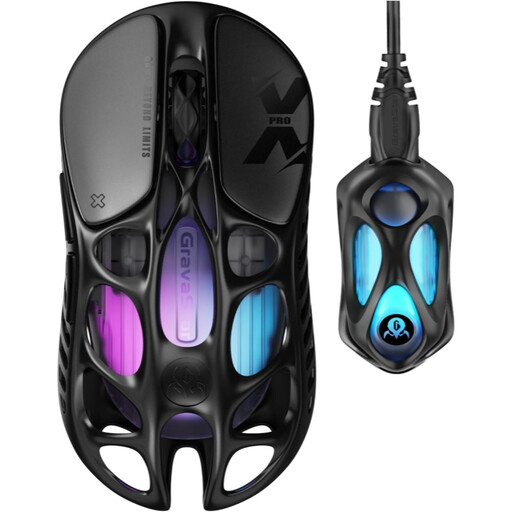
Why it's for this profile: Designed for pure performance, this mouse combines a feather-light weight of 49 grams with an 8000 Hz polling rate and a top-tier PAW3950 sensor. It's the tailor-made tool for the reflexes and surgical precision required by high-level FPS games.
It doesn't just boast a stratospheric DPI; it pairs it with an 8 kHz polling rate for near-zero latency. Its weight isn't a gimmick: it's the result of a magnesium alloy shell that combines lightness with robustness.
Feather-light 49g weight for minimal fatigue and ultra-fast flicks. 0.125 ms responsiveness thanks to the included 8K dongle.
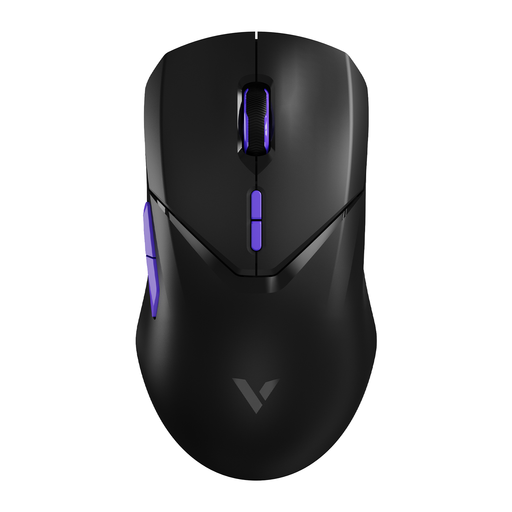
Why it's for this profile: The perfect balance of weight (68 g), performance (4 kHz), battery life (up to 180h), and customisation (10 programmable buttons). Ideal for gamers who juggle between a fast-paced FPS and a MOBA or MMO that requires more macros.
It offers a 4 kHz polling rate, a high-performance sweet spot without the CPU load of an 8 kHz model. Its 68g weight provides the ideal compromise between lightness for speed and stability for precision.
Extreme versatility thanks to its 10 programmable buttons. Proven PAW3398 sensor and record-breaking battery life.
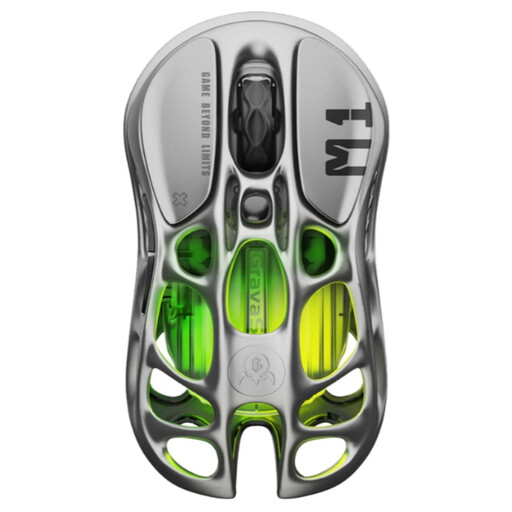
Why it's for this profile: For those who want a setup that stands out, this mouse features a unique skeletonized magnesium alloy design and fully customisable RGB lighting. Style doesn't come at the expense of performance, with a PAW3395 sensor and a 4 kHz option.
The design isn't just about aesthetics: the perforated magnesium alloy structure contributes to its lightness (88 g) and ventilation. Performance isn't sacrificed at the altar of style, thanks to a proven sensor and high-performance connectivity.
A radical design that leaves no one indifferent. Tri-mode connectivity (Wired/Bluetooth/2.4 GHz) for absolute flexibility.
Explore our full selection of products that meet these criteria for performance and reliability.
Not necessarily. An 8 kHz mouse offers the lowest latency on the market, an undeniable advantage in esports where every millisecond counts. In return, it's more demanding on your CPU and consumes more battery. For the vast majority of gamers, a 1000 Hz or 4000 Hz model already provides excellent responsiveness without bringing your PC to its knees.
Caution is key. The easiest way is to use a can of compressed air to dislodge dust from the inside, keeping it at a safe distance. For the exterior, a soft, dry microfiber cloth is sufficient. If needed, you can dampen it very slightly, but never spray liquid directly onto the mouse: its internal components are much more exposed than on a classic model.
It used to be, but recent technologies have changed the game. Thanks to ultra-power-efficient chips, many models like the RAPOO VT2 MAX can achieve several hundred hours of battery life at a 1000 Hz polling rate. Obviously, battery life decreases at higher rates (4K/8K), but it remains more than sufficient for back-to-back intense gaming sessions before needing a recharge.