
Livraison le jour même ou le lendemain

Qualité garantie

Débloquez vos offres de bienvenue: Livraison GRATUITE | Jusqu'à -80 % | 30 jours d'essai gratuits à JoyPlus
Téléchargez l'application
Navigating the jungle of wireless gaming mice can feel like an uphill battle. Between spec sheets filled with obscure acronyms and marketing promises of "unparalleled" performance, it's hard to sort the good from the bad. As the head of product selection at Joybuy, my mission is simple: to decode this jargon to help you make an informed choice and, most importantly, avoid disappointment.
Before diving into our selection, let's review the three classic mistakes to avoid when choosing your gaming mouse.
To avoid these pitfalls, focus on what truly impacts your performance and gaming comfort.
Weight is a crucial factor, especially for fast-paced first-person shooters (FPS). A mouse is generally considered lightweight if it's under 80 grams. But the ideal weight remains a very personal matter. Even more important is the shape of the mouse. An ergonomic gaming mouse must, above all, fit your grip style:
The performance of a pro gaming mouse rests on two pillars: the quality of its sensor and the reliability of its connection.
A good wireless mouse is one that makes you completely forget its cable. Check the manufacturer's stated battery life, but keep in mind that activating RGB will cause it to melt away. Models that exceed 80 hours of battery life on 2.4 GHz are a solid baseline. The inclusion of a USB-C port is an almost essential standard today. It ensures fast charging and allows you to continue playing in wired mode if the battery is dead.
Here are a few models that check all the boxes for performance and durability, suited for different types of gamers.
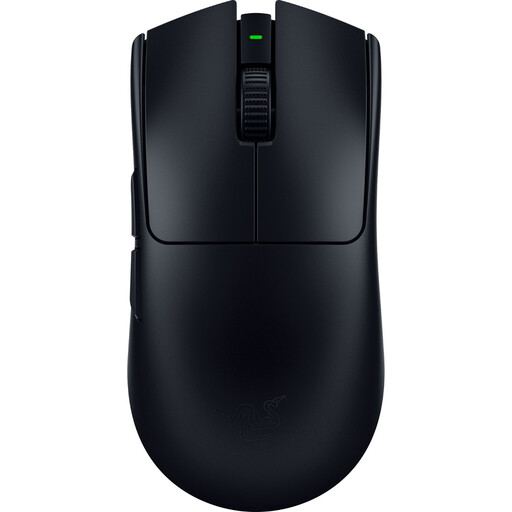
Why we recommend it: Developed with professional gamers, this is the ultimate weapon for the competitor who leaves nothing to chance. Its feather-light 54g weight allows for explosive movements with surgical precision, while its symmetrical shape suits a majority of grip styles.
It doesn't sacrifice durability on the altar of lightness. Its solid, soft-touch coated shell is built to endure, avoiding the trap of feather-light mice that creak under pressure.
Feather-light 54g weight for maximum agility. Focus Pro 35K Gen-2 optical sensor for impeccably precise tracking.
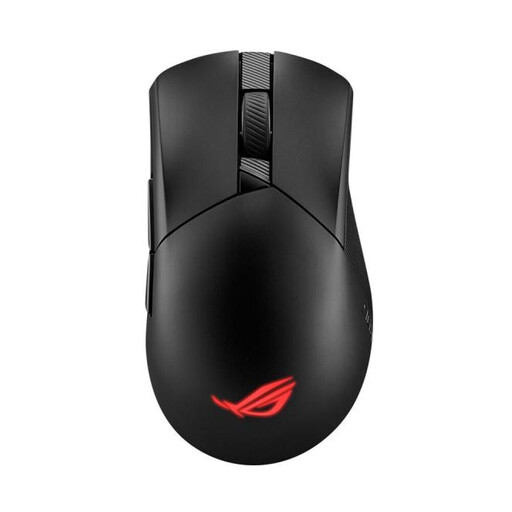
Why we recommend it: Perfect for gamers who love to tinker and seek optimal comfort. Its ergonomic right-handed shape provides excellent support, and its 79g weight strikes an ideal balance between lightness and stability.
It goes beyond an impressive spec sheet. The ROG AimPoint 36K DPI sensor is certainly excellent, but its true genius lies in the Push-Fit Socket II technology: it allows you to swap out switches on the fly, without any soldering, to customise the click feel.
Hot-swappable switches for ultimate customisation. Triple connectivity (2.4 GHz, Bluetooth, wired) for rock-solid versatility.
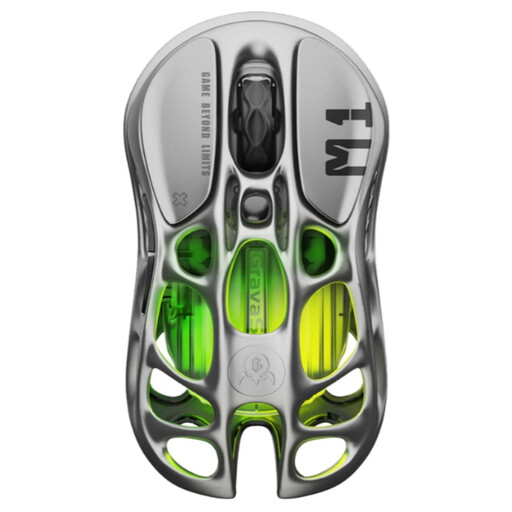
Why we recommend it: For those who want a mouse that is also a designer piece on their desk. Its perforated magnesium alloy structure isn't just an aesthetic choice: it ensures exemplary rigidity for a controlled weight of 88g.
It proves that a bold design can go hand-in-hand with performance. Its magnesium alloy chassis offers a premium feel and far greater durability than typical plastics. This avoids the trap of a flashy "gamer" look with cheap build quality.
Magnesium alloy chassis for a unique design and rock-solid durability. PAW3395 sensor and 4000 Hz polling rate compatibility (with the 4K dongle sold separately).
Explore our full selection of products that meet our demanding selection criteria and current safety standards.
Absolutely not. A stratospheric DPI is primarily a marketing gimmick. Most gamers, including pros, use sensitivities between 400 and 1600 DPI for optimal control. The real difference lies in the quality of the sensor (its ability to never spin out) and the stability of the connection.
Yes, without a shadow of a doubt. Modern wireless technologies have made spectacular progress. Proprietary 2.4 GHz connections (like HyperSpeed from Razer or SpeedNova from ROG) offer such low latency (typically 1 ms) that it's indistinguishable from a wired connection. For competitive play, always choose this mode over Bluetooth, which is much less responsive.
Battery life can vary dramatically, from 40 to over 150 hours depending on the model. The number one culprit for a draining battery? RGB lighting. Disabling it can often double the battery life. Fortunately, most current mice charge quickly via USB-C and can still be used in wired mode while charging. Zero risk of running out of power mid-game.