
Livraison le jour même ou le lendemain

Qualité garantie

Débloquez vos offres de bienvenue: Livraison GRATUITE | Jusqu'à -80 % | 30 jours d'essai gratuits à JoyPlus
Téléchargez l'application
The world of gaming peripherals is constantly evolving. Choosing the right wireless gaming mouse has become a daunting task amidst a jungle of technologies, sensors, and designs. Latency, weight, sensor accuracy, and battery life are decisive criteria that shape the in-game experience.
This guide is here to give you clear benchmarks and practical, no-nonsense advice to find the mouse that fits your playstyle and your standards.
Before diving into our selection, here are the essential criteria to keep in mind to guide your choice.
A mouse's weight directly impacts the speed of your movements and wrist fatigue. A lightweight gaming mouse, often under 80 grams, is the top choice for FPS (First-Person Shooter) players who favour wide, swift movements. Conversely, a heavier mouse can offer a better sense of stability and control, which is an asset in strategy games or MMOs. Ergonomics (shape for right-handed, left-handed, or ambidextrous users) are just as crucial to ensure perfect comfort during long sessions.
The sensor is the mouse's brain: it translates your movements into on-screen action. Its quality determines the precision and reliability of the tracking. DPI (Dots Per Inch) measures the mouse's sensitivity: a high DPI means the cursor will travel a greater distance on the screen for the same physical movement.
A high-performance wireless mouse isn't just about the race for high DPI. Most professional players use sensitivities between 400 and 1600 DPI. What's essential is the sensor's ability to track movements with surgical precision, without unwanted acceleration or spin-outs, even in the heat of battle.
Modern wireless gaming mice rely on two main connection types:
Battery life is another critical factor. Recent models offer dozens, or even hundreds, of hours of use on a single charge, ensuring you'll never run out of power mid-game.
Here are a few models that stand out from the crowd with their technical specs and design, created for different player profiles.
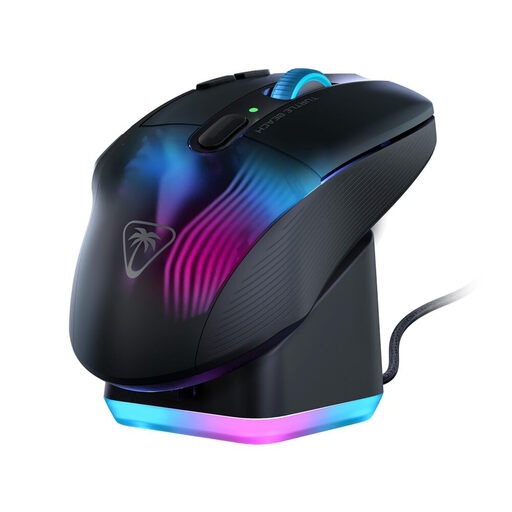
What sets it apart: The Kone XP Air stands out for its versatility and its arsenal of programmable commands. With 10 physical buttons and the Easy-Shift[+] function, it offers up to 29 possible actions, a huge advantage for games that require a flurry of shortcuts.
Highlights:
Who is it for? Fans of MMOs, RPGs, or Battle Royales who want an ergonomic mouse packed with buttons to cast their spells and execute macros in the blink of an eye.
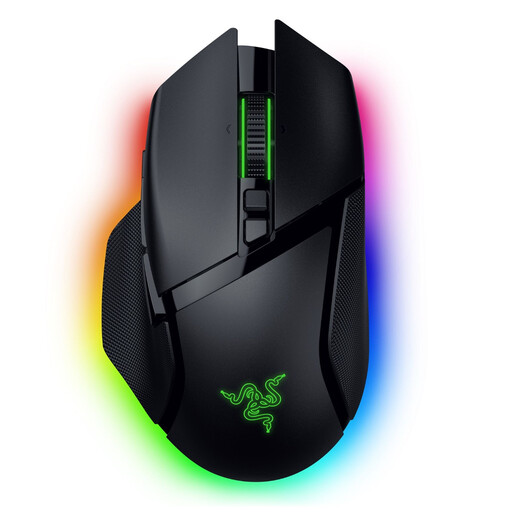
What sets it apart: The Basilisk V3 Pro is aimed at demanding gamers who love deep customisation. Its HyperScroll Tilt Wheel and cutting-edge optical sensor make it a formidable precision tool.
Highlights:
Who is it for? All-around players who juggle different genres (FPS, RPG, etc.) and want absolute control over every setting, from sensor sensitivity to the smallest lighting effects.
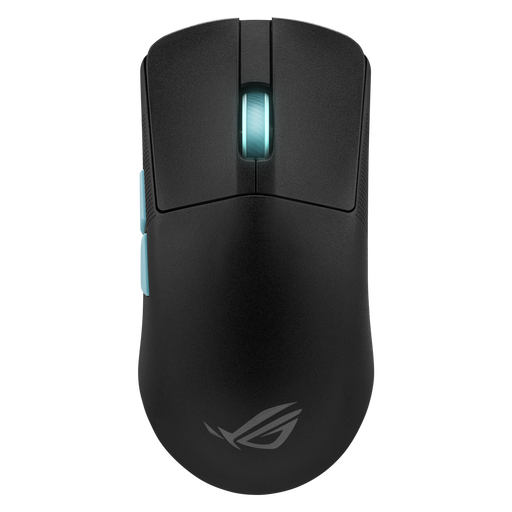
What sets it apart: Co-developed with esports pros, the ROG Harp Ace is a performance beast built for pure competition. Its feather-light weight and Aim Lab optimisation software make it a top choice for competitive gaming.
Highlights:
Who is it for? Hardcore FPS competitors who chase every last gram and millisecond to optimise their precision and aiming speed.
If the models presented don't check all your boxes or if you simply want to broaden your horizons, feel free to explore other avenues. After all, every gamer is unique, with their own needs for grip, features, and design.
? Discover our full range of wireless mice
A 2.4 GHz connection, via its USB dongle, guarantees minimal latency and rock-solid signal stability: an essential combination for online gaming and competition. Bluetooth, on the other hand, is a convenient universal standard for mobility and connecting multiple devices without extra clutter. However, its slightly higher latency makes it better suited for less-demanding games or office work.
No, a high DPI is absolutely not a guarantee of performance. This number simply measures the mouse's sensitivity. Having a wide DPI range offers flexibility, but most gamers, including pros, set their mice to moderate values (between 400 and 1600 DPI) to prioritise control and muscle memory. Ultimately, the quality of the sensor (its ability to translate your movements without any errors) is infinitely more important than the race for the biggest DPI number.
A few simple steps are all it takes to extend the life of your trusted ally. Regularly clean the sensor and the mouse feet with a soft, dry cloth to maintain a perfect glide and flawless tracking. For battery life, consider reducing the intensity of the RGB lighting (or turning it off) via the manufacturer's software. Finally, as with any electronic device, avoid drops and handle the charging cable with care to prevent damage to the connector.